InVideo AI free plan limits in November 2026 come down to three hard facts: InVideo removed the free tier from its pricing page, replaced its old weekly minute caps with an unpublished weekly reset, and locked flagship models like Seedance 2.5 and Seedance 2.0 out of Starter ($20/month list). If you shoot multi-take AI stories or series, Movoa is the better starting point because your first MiniMax H3 clip runs without an account with native sound and zero watermark, a free account lifts daily clip caps on 480p H3, and Starter ($14.90/month) unlocks unlimited 768p H3 plus every flagship video model.
Checked on
invideo.io/pricing,invideo.io/help/billing/plan-limits,invideo.io/help/billing/how-do-credits-work, andinvideo.io/help/billing/extra-creditson November 27, 2026.
- Where InVideo AI stops at $0: Manual timeline editing of your own clips stays free, while AI generation and Agent Two hit an unpublished weekly credit ceiling that pauses runs until the next weekly cycle.
- Where InVideo AI Starter ($20/mo list) stops: 400 monthly credits (~13 Seedance 2.0 Fast runs at published ~30 cr/clip rates; the pricing card advertises "up to 15"), zero rollover, and No access to flagship Seedance tiers until you pay $60/mo list ($24/mo billed annually at $288/yr) for Plus.
- Best pick for multi-take AI stories and episodes: Movoa is the clear winner for serialized workflows. Start free with no sign-up on a clean MiniMax H3 clip with native sound, and remove daily caps on 480p H3 with a free account. Upgrading to Starter ($14.90/mo) gives you unlimited 768p H3 plus every flagship engine with automatic refunds on failed runs.
InVideo AI free plan limits and paid plans compared (November 27, 2026)
Every figure below comes straight from InVideo AI's live pricing and billing help pages plus Movoa's live catalog audited on November 27, 2026. Because the billing page defaults to annual Black Friday discounts ("Up to 60% off"), both monthly list prices and upfront yearly totals appear side by side.
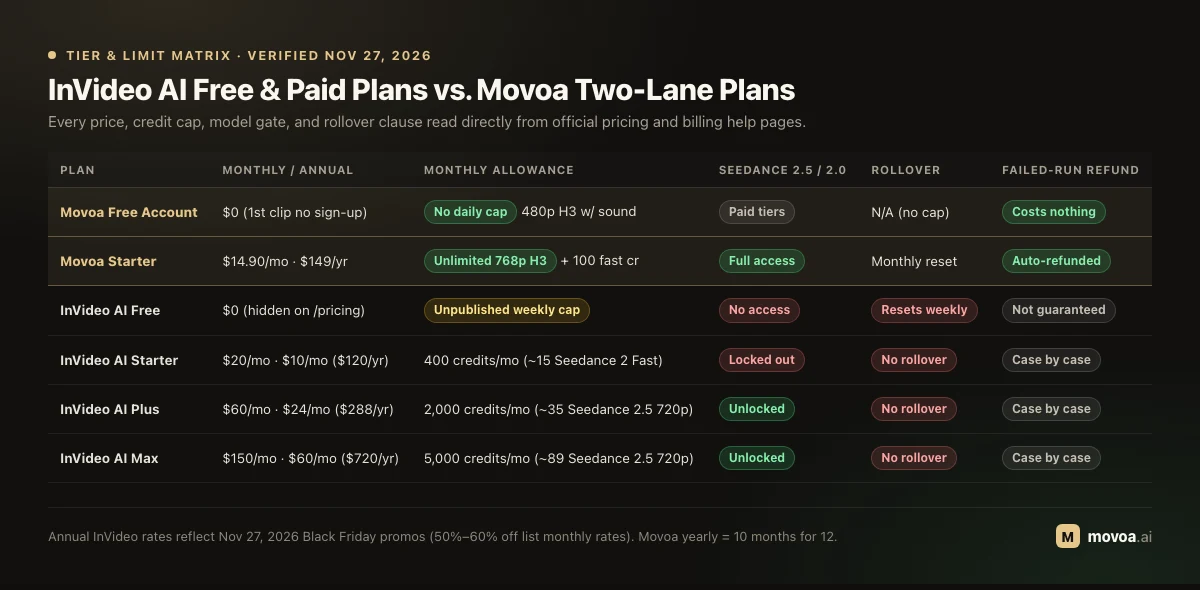
Verified billing terms from November 27, 2026. Annual figures show the upfront checkout total.
| Plan | Monthly list | Annual rate (upfront) | Monthly cap or allowance | Flagship Seedance access | Rollover & refund terms |
|---|---|---|---|---|---|
| Movoa Free (Signed-In) | $0 | $0 | Start free, no sign-up; free with an account, no daily cap on 480p MiniMax H3 (4s, sound, clean video) | Upgrade to any paid plan for fast-credit engines | No card required; personal use; failed runs cost nothing |
| Movoa Starter | $14.90/mo | $12.42/mo ($149/yr) | Unlimited 480p/768p MiniMax H3 (4-15s, sound) + 100 fast credits/mo | Full access to Seedance 2.5, Seedance 2.0, Veo 3.1 Fast, Grok 1.5 | Failed runs auto-refund; 7-day full refund on first sub (<10% fast cr used) |
| InVideo AI Free | $0 (hidden) | $0 | Unpublished weekly credit cap ("Limited" credits); resets weekly | Not listed on /pricing |
No rollover; manual own-footage exports free |
| InVideo AI Starter | $20/mo | $10/mo ($120/yr BF) | 400 credits/mo (~13 Seedance 2.0 Fast runs at ~30 cr; card cites "up to 15") · 100 stock · 200 GB | Blocked (No access) to 2.5 & 2.0; Fast/Mini only |
Unused credits expire monthly; 24-hour refund window |
| InVideo AI Plus | $60/mo | $24/mo ($288/yr BF) | 2,000 credits/mo (~35 flagship 720p 5s runs) · 200 stock · 600 GB | Unlocked (2.5 1080p, 2.0 4K, Agent Two Pro/Ultra) | Unused credits expire monthly; 24-hour refund window |
| InVideo AI Max | $150/mo | $60/mo ($720/yr BF) | 5,000 credits/mo (~89 flagship 720p 5s runs) · 500 stock · 2,000 GB | Unlocked (+20 free guest seats, 190 cr each) | Unused credits expire monthly; 24-hour refund window |
InVideo AI's billing documentation (invideo.io/help/billing/plan-limits, November 27, 2026) confirms the weekly reset applies exclusively to the hidden $0 workspace, whereas paid plans switch to monthly UTC resets with zero rollover.
What actually runs on the InVideo AI free plan in 2026
Older reviews ranking in late 2026 still repeat retired numbers from 2024 and 2025: "10 AI minutes per week and 4 watermarked exports." Reading help.invideo.io and invideo.io/help/billing/plan-limits on November 27, 2026 confirms InVideo AI retired fixed minute buckets and merged billing into one unified credit meter.
That switch split the $0 tier into two distinct behaviors:
- Manual timeline editing (
invideo Editor): According to the official FAQ (invideo.io/faq/is-invideo-editor-free-when-i-use-an-ai-editing-agent, updated October 5, 2026), cutting and exporting your own uploaded media in the manual editor remains free with zero watermark and zero credit deduction. - Generative AI scenes, voices, paid stock, and Agent Two: Every AI clip, voiceover, transcript task, paid stock item, and AI agent prompt deducts from your credit balance. InVideo AI lists Voice Cloning in its audio tool lineup (
invideo.io/pricing, requiring live consent verification perinvideo.io/privacy-policy), yetinvideo.io/help/billing/plan-limitspublishes no separate free voice-cloning allowance—all AI voice and video runs compete for the same unpublished"Limited"weekly credit pool. Reaching zero triggers"Weekly limit reached — Wait for the next weekly reset or upgrade."
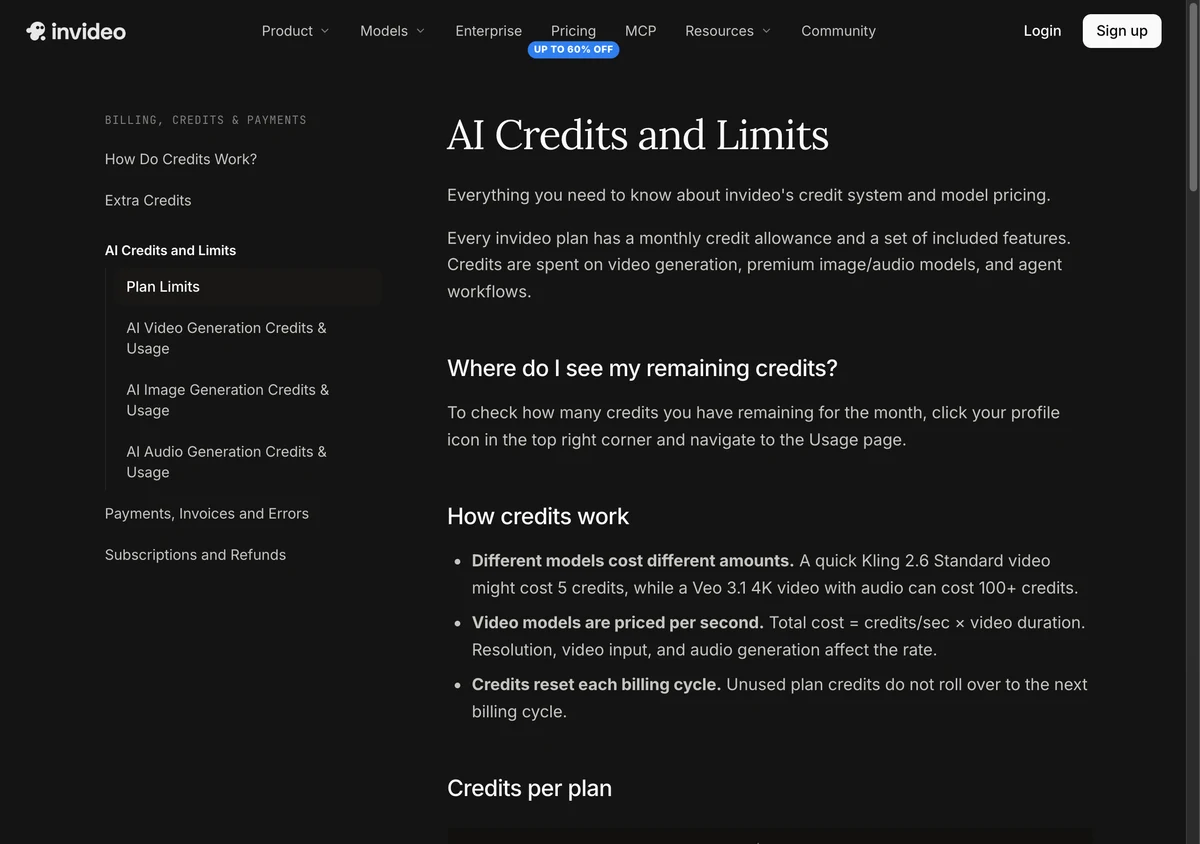
Captured from invideo.io/help/billing/how-do-credits-work on November 27, 2026. Generative charges follow credits/sec × video duration.
Because each prompt revision, voice regeneration, and scene replacement deducts from that unpublished weekly pool before download, free workspaces often exhaust credits mid-draft—matching reports on Reddit (r/AI_UGC_Marketing, November 6, 2026) and YouTube tutorials where users cannot download a finished AI clip without upgrading.
Watermark terms are equally specific. The October 5, 2026 FAQ guarantees clean exports strictly for manual timeline edits on your own clips, while current InVideo AI billing docs (invideo.io/help/billing/plan-limits and invideo.io/help/billing/subscriptions-and-refunds) publish no watermark-free guarantee for $0 generative clips. For clean generative runs before paying, Movoa's no-watermark AI video lane renders your unauthenticated first clip with native sound and nothing stamped on the frame.
Three InVideo AI credit walls that show up before you pay
Running into InVideo AI free plan limits sends most users straight to invideo.io/pricing. Three billing rules determine what a paid seat really buys.
1. Monthly vs. annual price anchoring (up to 2.5x gap)
InVideo AI defaults its pricing switch to Annual with bold promotional rates: $10/month for Starter, $24/month for Plus, and $60/month for Max. Getting those numbers requires paying $120, $288, or $720 upfront for twelve months.
Switching to month-to-month billing changes the invoice dramatically:
- Starter jumps from $10/mo to $20/mo (2x) for the exact same 400 credits.
- Plus jumps from $24/mo to $60/mo (2.5x) for 2,000 credits.
- Max jumps from $60/mo to $150/mo (2.5x) for 5,000 credits (with 8,000-credit and 10,000-credit Max 2x options reaching $250 and $300/mo list).
Even annual subscribers receive credits in monthly UTC drips rather than a flexible yearly pool.
2. Starter blocks flagship Seedance models completely
Model gating inside the tier matrix is the sharpest hidden barrier on InVideo AI. On invideo.io/pricing (checked November 27, 2026), InVideo AI Starter explicitly shows No access for both flagship engines—restricting entry subscribers to Seedance 2.0 Fast, Seedance 2.0 Mini, and Agent Two Lite.
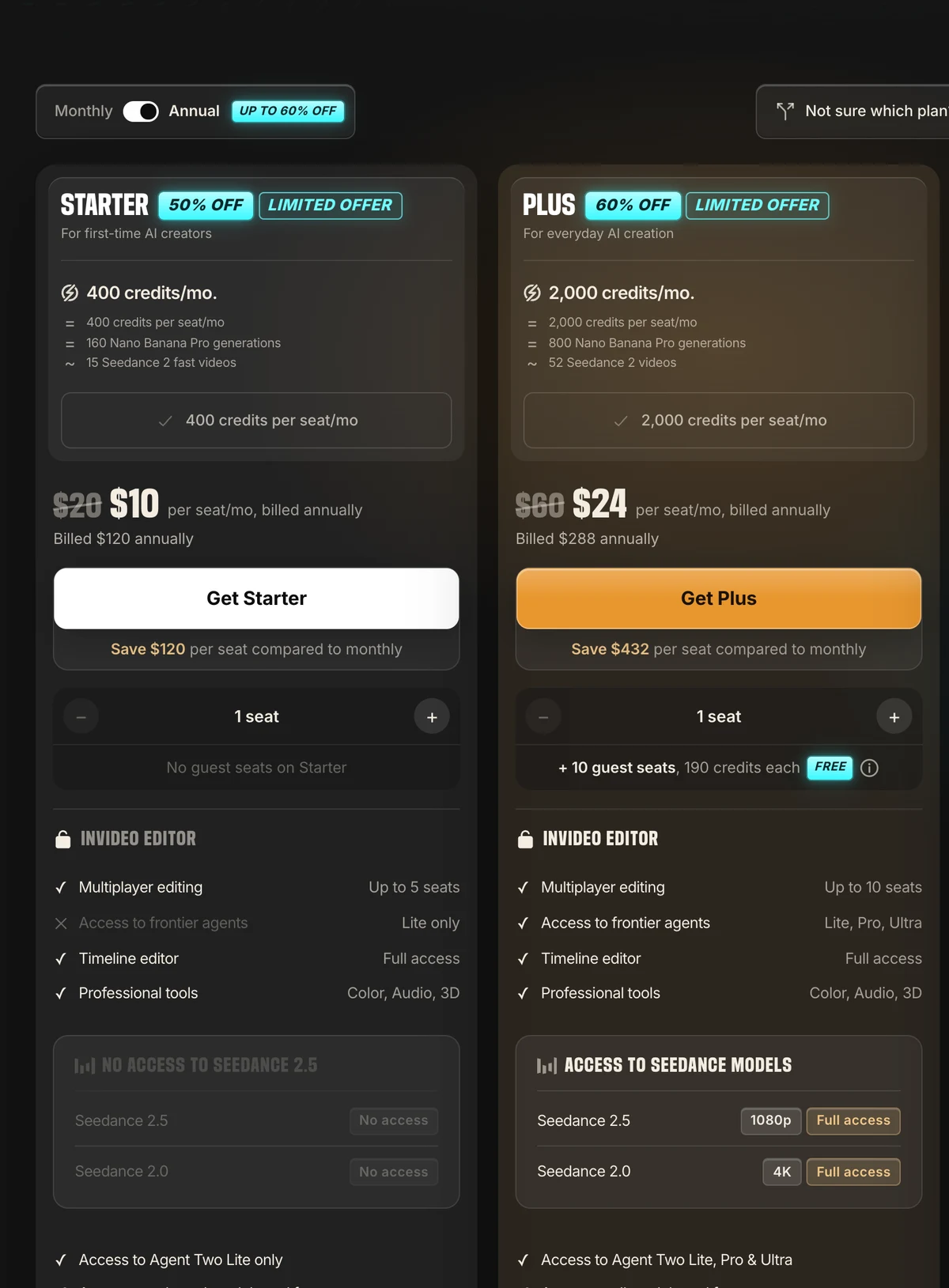
Screenshot from invideo.io/pricing on November 27, 2026. Opening Seedance 2.5 or 2.0 forces a jump from Starter ($20/mo list) to Plus ($60/mo list).
Starter also caps workspaces at 1 seat with zero guest seats and Agent Two Lite only, whereas Plus adds 10 free guest seats (190 credits each) plus Agent Two Pro and Ultra.
3. Zero rollover, variable rates, 24-hour refunds, and Extra Credits lock-in
Four clauses across InVideo AI's help center and Terms (verified November 27, 2026) tighten credit pressure further:
- Zero rollover: The pricing FAQ states plainly:
"Unused credits don't roll over to the next month."Leftover balance clears on each monthly UTC anniversary. - Variable per-second burn: Published rates on
invideo.io/help/billing/how-do-credits-workspan ~5 credits for Kling 2.6 Standard, ~30 credits for Seedance 2.0 Fast, ~56 credits for a 5-second Seedance 2.5 720p clip, ~96 credits for a 5-second 1080p clip, and 100+ credits for Veo 3.1 4K with audio. The same page reserves the right"to update credit costs at any time, without prior notice." - 24-hour refund limit:
invideo.io/terms-and-conditionsmakes paid plans non-refundable except for written requests sent within 24 hours of initial purchase or renewal. - Permanent Extra Credits switch: Under
invideo.io/help/billing/extra-credits, turning on pay-as-you-go Extra Credits"remains permanently active for that workspace"and cannot be disabled workspace-wide. Top-ups are non-refundable, freeze if you downgrade to Free, and get wiped if you start a new subscription later.
Why InVideo AI free plan limits and Starter credits break on multi-take episodes
To test how each credit ceiling behaves in real production, assume a benchmark scenario of 12 shots × 2.5 takes per shot = 30 video renders for one short episode.
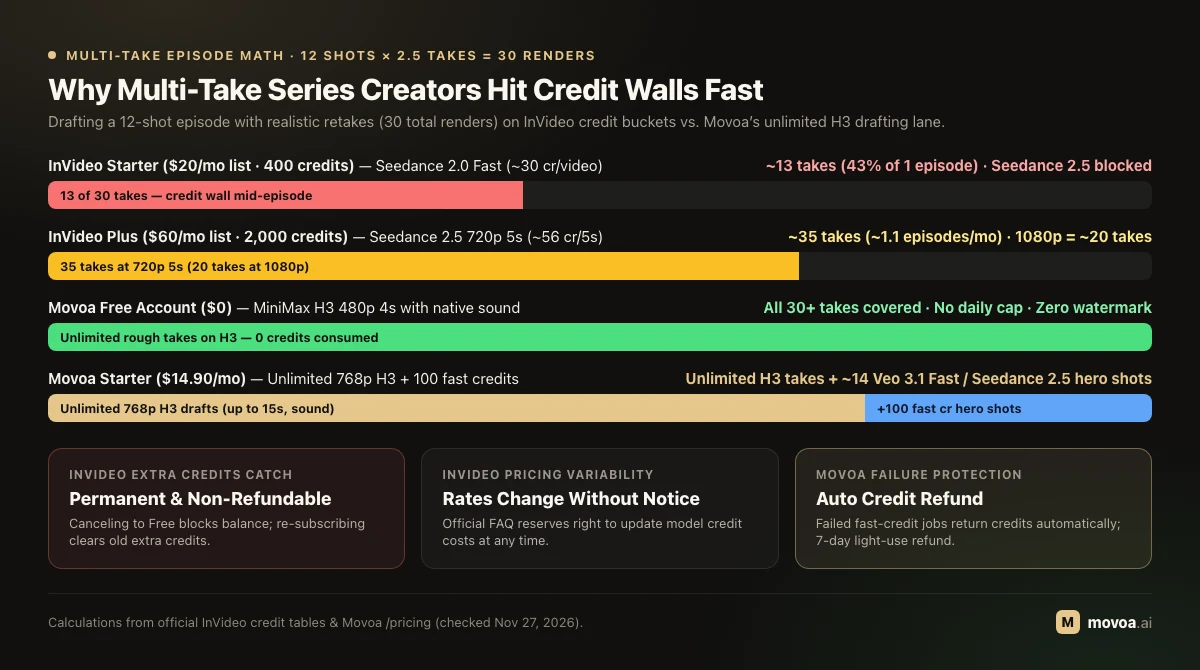
Scenario benchmark: 12 shots × 2.5 takes = 30 renders using published November 27, 2026 rates on invideo.io and movoa.ai.
What 30 takes do to an InVideo AI balance
- InVideo AI Starter ($20/mo list · 400 credits): At ~30 credits per Fast clip, 400 credits cover roughly 13 renders total—under half of one 30-render episode—while flagship Seedance models remain unavailable.
- InVideo AI Plus ($60/mo list · 2,000 credits): Thirty 5-second 720p flagship renders (~56 cr each) consume ~1,680 credits (84% of the month) on episode one. Stepping up to 1080p (~96 cr each) requires ~2,880 credits, exceeding Plus before one episode wraps.
How Movoa's two-lane studio removes retake friction
Movoa splits unlimited drafting and flagship models into two separate lanes (see our credits vs. unlimited AI video breakdown):
- Unlimited drafting lane (MiniMax H3 with native sound): Start free with no sign-up, then create a free account to lift daily clip caps on 480p 4-second H3 clips. On Movoa Starter ($14.90/mo), Creator ($29/mo), Pro ($59/mo), and Studio ($119/mo), 480p and 768p MiniMax H3 runs up to 15 seconds with no monthly cap, scaling daily full-speed volume (1×, 2×, 5×, 10×) before shifting to a slower lane rather than halting work.
- Fast-credit hero lane (zero model lockouts): Starter includes 100 fast credits/month (~14 Google Veo 3.1 Fast 8-second clips with sound) and opens every flagship engine—Grok Imagine Video 1.5, Seedance 2.5, Seedance 2.0, and Seedance Mini/Fast—without tier paywalls.
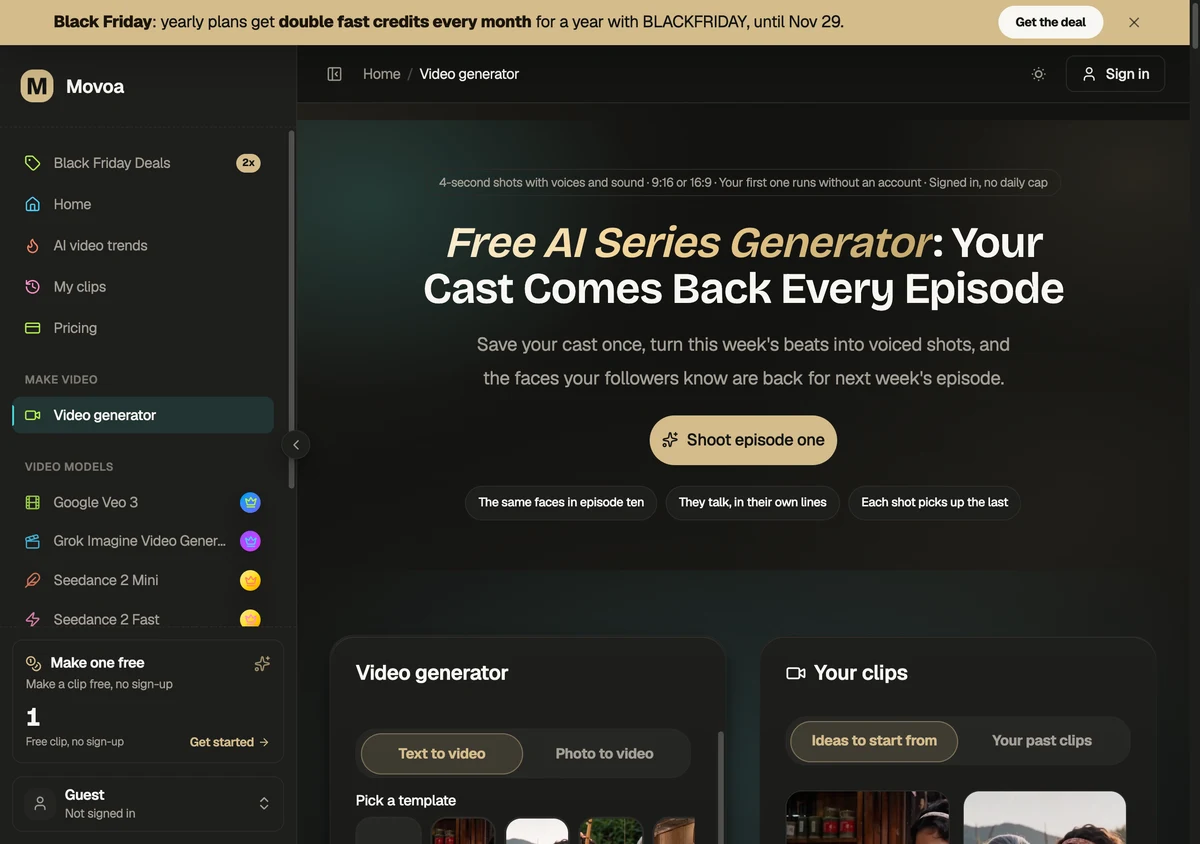
Movoa's AI Series Generator combines Saved Cast, native sound, and frame continuation inside one workspace.
Use 24 drafting takes inside unlimited MiniMax H3 to lock camera blocking and dialogue timing, then render 6 hero establishing shots on Veo 3.1 Fast (42 fast credits). One full 30-render episode finishes with 58 fast credits left on a $14.90/month seat—backed by automatic fast-credit refunds on failed runs and a 7-day full refund policy on your first subscription under 10% fast-credit use (refund policy).

Saved Cast stores a character's photo, look, and voice notes so consecutive scenes keep the same identity without rebuilding prompts.
Best free alternatives when you hit InVideo AI free plan limits
Match your format directly to a verified replacement:
| If you are making... | Start here (audited Nov 2026) | What $0 gives you | First paid tier |
|---|---|---|---|
| AI stories, episodes, and multi-take clips with sound | Movoa | Start free, no sign-up; free account has no daily cap on 480p H3, clean video | Starter $14.90/mo ($149/yr): unlimited 768p H3 + 100 fast cr + all 7 models |
| Manual timeline edits on your own clips | Microsoft Clipchamp (clipchamp.com) |
Unlimited 1080p watermark-free timeline exports with basic captions/TTS | Microsoft 365 for 4K & brand kit |
| Short-form social edits plus occasional AI shots | CapCut (capcut.com) |
Free basic editing and templates; generative AI credits live on Pro | Pro $19.99/mo ($179.99/yr · 1,200 AI cr/mo) |
| Narrated blog-to-video slides for B2B | Lumen5 (lumen5.com) |
5 videos/month up to 2 min with Lumen5 outro | Basic $19/mo billed yearly |
| Multilingual voiceover clips (80+ languages) | Fliki (fliki.ai) |
3 credits/month forever, 720p watermarked, 5-min cap, 300 voices | Standard (180 cr/mo, 1080p; regional pricing on fliki.ai/pricing) |
| Script-to-stock explainers (14-day test) | Pictory (pictory.ai) |
14-day trial (300 cr, up to 10 min, no card, watermarked) | Starter $29/mo list (BF $14.50/mo monthly / $12.50/mo annual) |
| Browser editing and auto-subtitles | VEED (veed.io) |
Free 720p browser exports with watermark | Creator $12/user/mo billed annually (6,000 cr) |
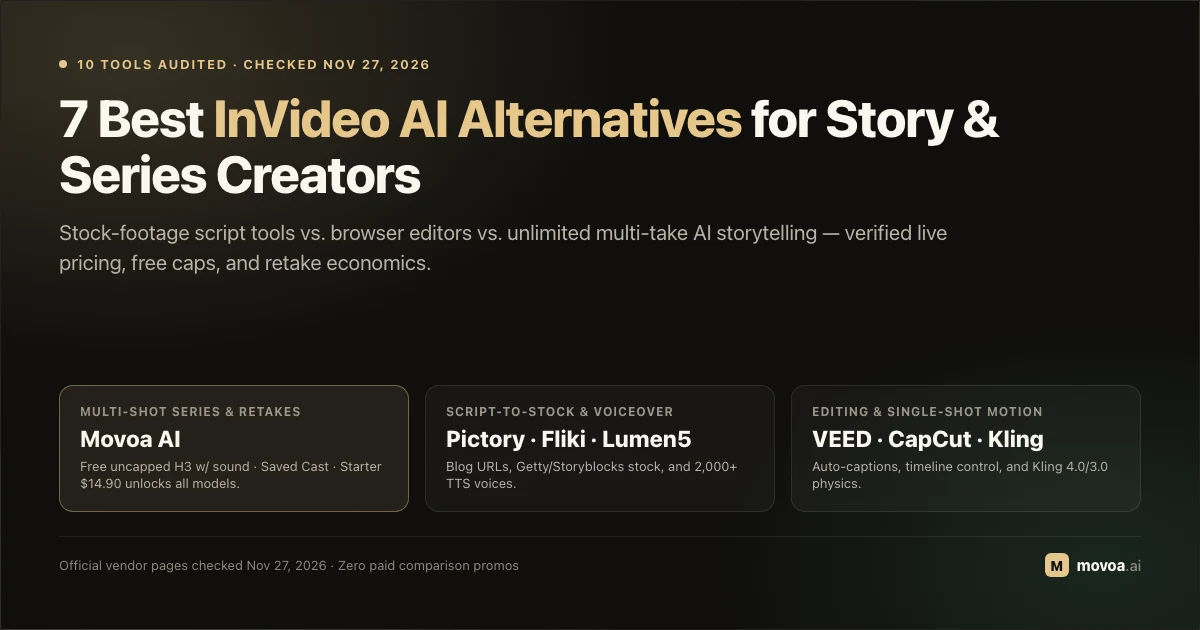
Workflow entry points on Movoa: Script to Video AI, Text to Video, Photo to Video, AI Video with Native Audio, and our comparison of no-daily-cap free AI video generators.
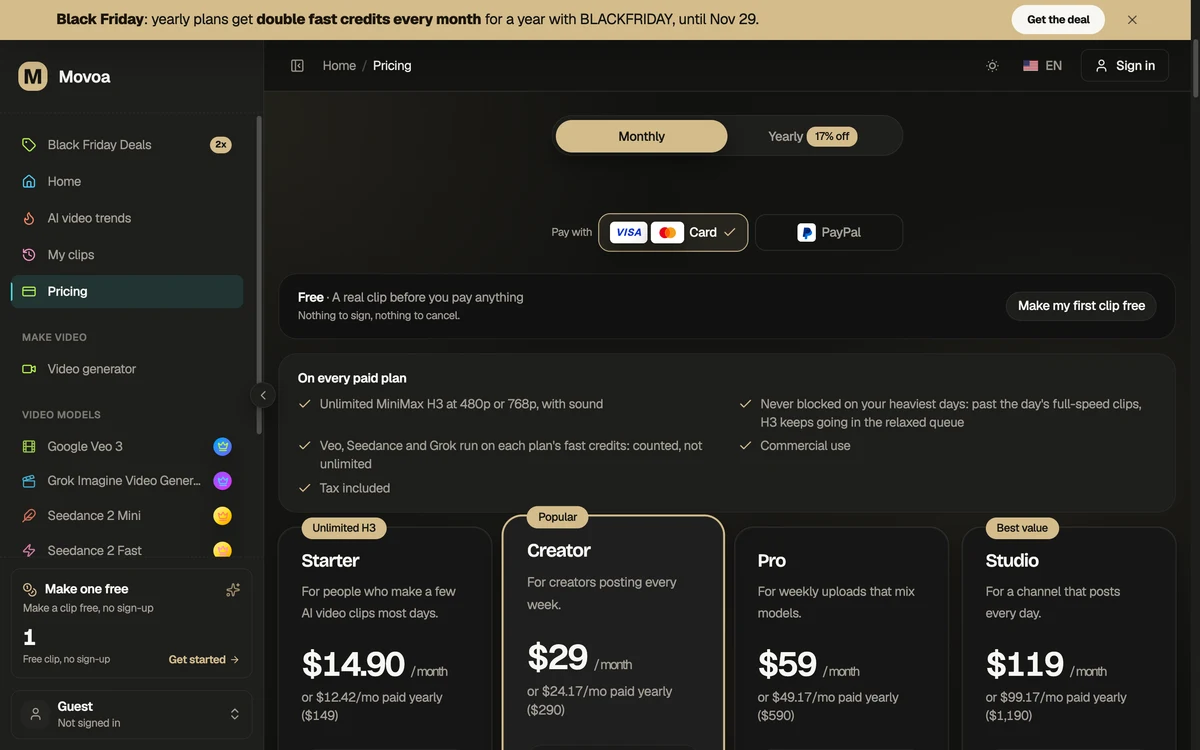
Live plans on movoa.ai/pricing checked November 27, 2026: yearly billing charges 10 months for 12 (2 months free) and doubles concurrent slots and batch capacity.
InVideo AI free plan limits FAQ
Does InVideo AI still have a free plan in November 2026?
Yes. Even though InVideo AI removed the free tier card from invideo.io/pricing, invideo.io/help/billing/plan-limits (checked November 27, 2026) confirms a $0 workspace exists with "Limited" weekly credits and an unpublished numeric cap. Once that weekly balance runs dry, AI generation pauses until the next weekly reset.
Do InVideo AI free videos have a watermark?
Manual timeline edits and exports of your own clips in invideo Editor carry no watermark at $0 per the October 5, 2026 FAQ. Current InVideo AI billing docs publish no watermark-free guarantee for $0 generative AI outputs. On Movoa, free MiniMax H3 clips export clean with zero watermark on the video.
Do unused InVideo AI credits roll over each month?
No. InVideo AI's pricing FAQ explicitly confirms "Unused credits don't roll over to the next month." Credits reset monthly in UTC even on annual subscriptions. Top-up Extra Credits remain active while subscribed, yet turning Extra Credits on is permanent for the workspace, non-refundable, and locked if you cancel to Free.
Can InVideo AI Starter run Seedance 2.5 or keep consistent characters?
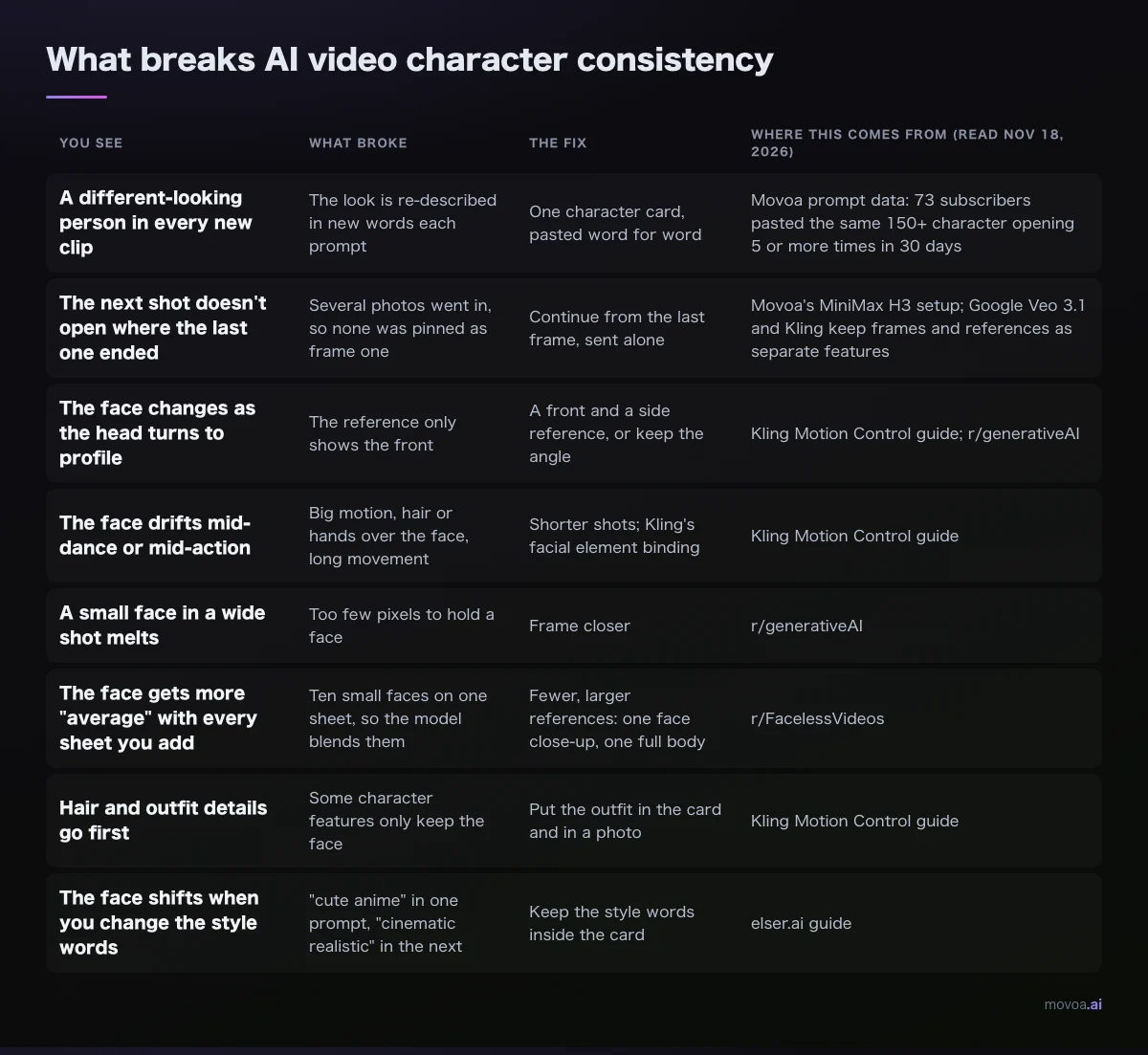
No on Seedance 2.5: Starter ($20/mo list) explicitly marks both flagship Seedance models No access on invideo.io/pricing, requiring Plus ($60/mo list). For consistent characters across episodes, Movoa's AI Series Generator provides Saved Cast (reference photo, look, and voice notes) and Continue from this clip on both free and paid accounts.
What happens on failed generations, refunds, and cancellations?
InVideo AI's Terms (invideo.io/terms-and-conditions) restrict subscription refunds to 24 hours from purchase or renewal, Extra Credits are strictly non-refundable, and no public billing rule guarantees automatic credit refunds for unusable AI renders. On Movoa, failed runs auto-refund fast credits (failed H3 runs cost nothing), subscriptions cancel anytime, and first-time subscribers receive a 7-day full refund under 10% fast-credit usage (refund policy).
Can I monetize InVideo AI free or Movoa videos on YouTube and ads, and what about InVideo music claims?
InVideo AI's Terms (invideo.io/terms-and-conditions, November 27, 2026) classify built-in stock music and footage as "Licensed Content" governed by third-party licensors, and stock allocations appear only on paid plans (100/200/500 items). Exporting stock music on a $0 workspace does not carry commercial stock clearance and can trigger YouTube Content ID claims unless you swap the track or hold a paid license. Movoa's free account covers personal use, while every paid plan from Starter ($14.90/mo) includes full commercial rights, generates original native audio inside each clip rather than third-party stock loops, and keeps your prompts and videos out of AI training (privacy policy).
Is CapCut or Movoa better than InVideo AI for a $0 start?
Choose CapCut or Clipchamp when editing real footage you already filmed. Choose Movoa when generating original AI scenes with dialogue and sound effects from prompts or photos—start free with no account and no credit card.
Sources checked on November 27, 2026
- InVideo AI pricing & feature matrix:
invideo.io/pricing(2026-11-27) - InVideo AI plan limits & weekly reset:
invideo.io/help/billing/plan-limits(2026-11-27) - InVideo AI per-second credit math & rate notice:
invideo.io/help/billing/how-do-credits-work(2026-11-27) - InVideo AI Extra Credits permanent toggle & wipeout rules:
invideo.io/help/billing/extra-credits(2026-11-27) - InVideo AI manual editor free export FAQ (updated Oct 5, 2026):
invideo.io/faq/is-invideo-editor-free-when-i-use-an-ai-editing-agent(2026-11-27) - InVideo AI 24-hour refund terms & privacy policy:
invideo.io/terms-and-conditions,invideo.io/privacy-policy(2026-11-27) - Competitor pricing audited 2026-11-27:
pictory.ai/pricing,fliki.ai/pricing,veed.io/pricing,lumen5.com/pricing,capcut.com,clipchamp.com/en/pricing - Movoa live plans, catalog, refund policy, and privacy policy: movoa.ai/pricing, movoa.ai/refund-policy, movoa.ai/privacy-policy (2026-11-27)