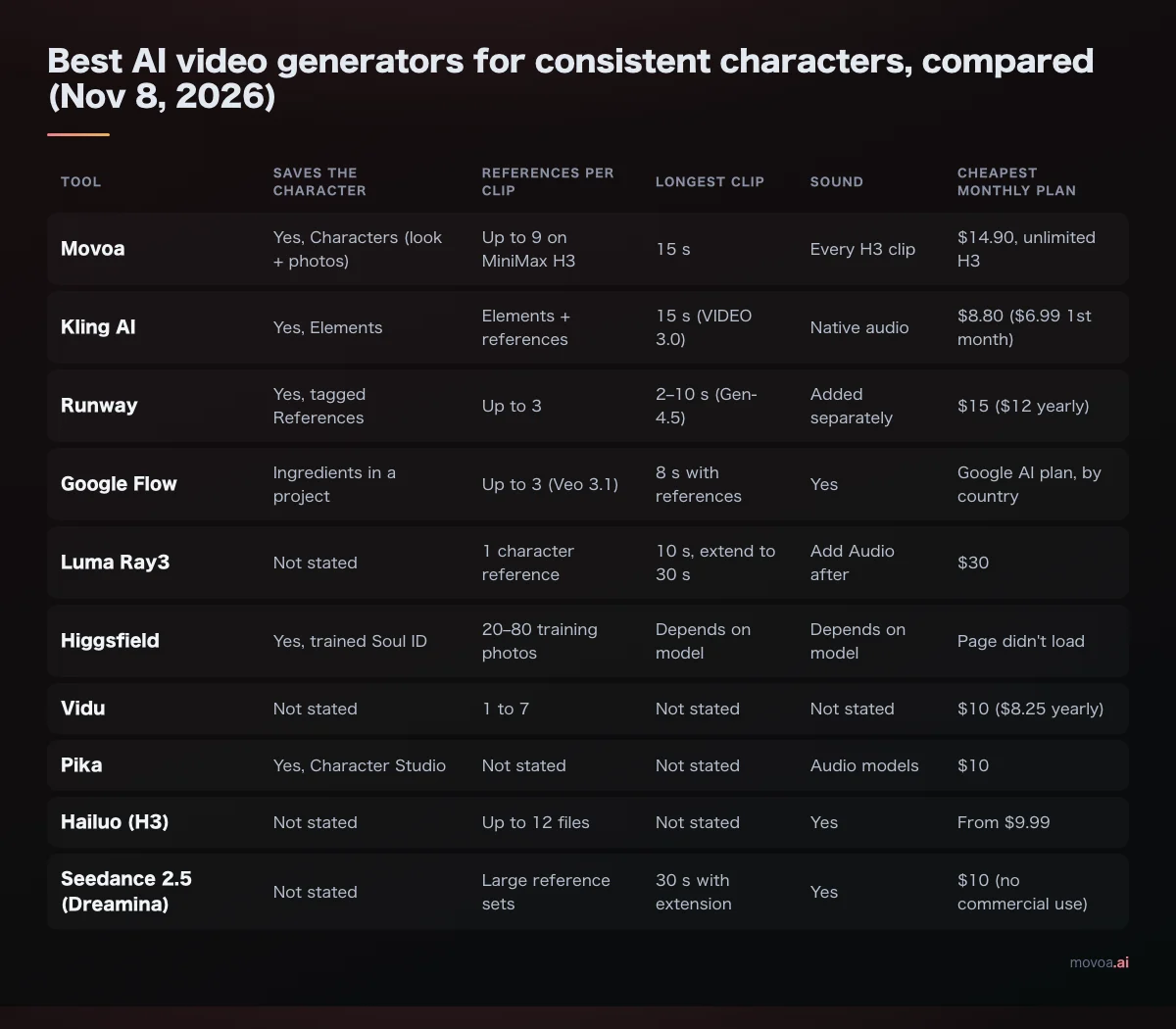
AI video character consistency breaks when something that defined the face stops reaching the model: the look gets described in new words, the next shot goes in as loose "references" instead of a first frame, or the head turns to a side no photo ever showed. That second cause is easy to miss. On Movoa, 117 of the 549 sessions that pressed "Continue from this clip" in the 7 days to November 13, 2026 got a new face for exactly that reason, and 17 of them were subscribers making a series.
- Continuing a shot? Start the next clip from the previous clip's final frame, and send that frame alone. Several photos at once turn it into "references", and the opening is no longer pinned. On Movoa, "Continue from this clip" now does exactly this for you.
- New clip, same person? Write one character card (face, hair, age, outfit, one prop, art style) and paste it word for word at the top of every prompt, or save it as a character and tap it.
- Face changes when they turn? The model never saw that side. Add a reference that shows it, or keep the camera on the angle your photo shows.
- Long takes, fast dance moves and small faces in the distance break character consistency first. Cut shots short and frame closer.
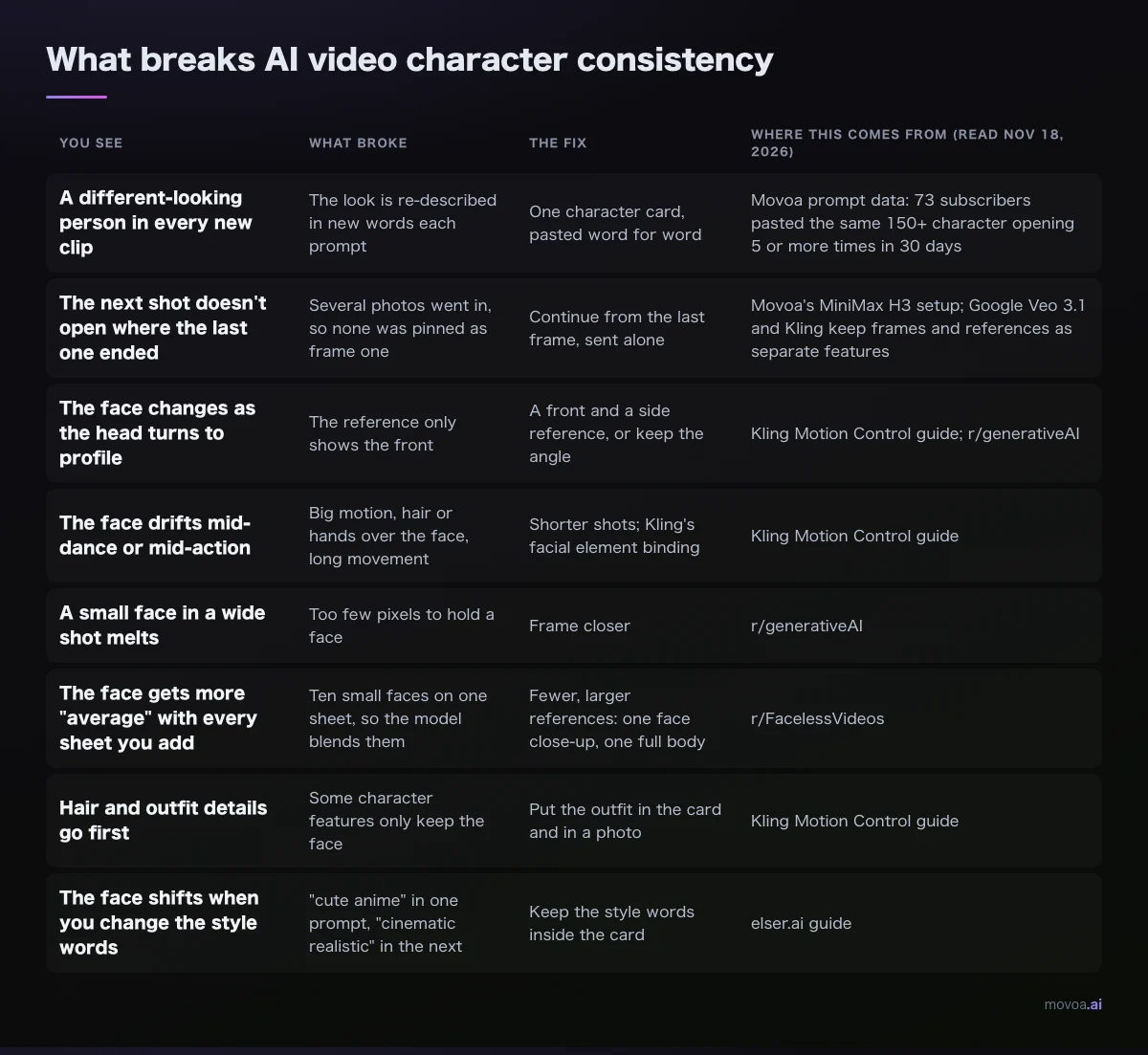
What breaks AI video character consistency
Each generation starts fresh. Even when you continue a clip, the model only knows what you send it this time: the words, the photos, and which photo (if any) is frame one. So character consistency is not something a model has or lacks. It is whether your inputs stayed the same. Each row below is one way they change from shot to shot, read from the tools' own guides and from the threads creators post when their character turns into someone else.
| You see | What broke | The fix | Where this comes from (read Nov 18, 2026) |
|---|---|---|---|
| A different-looking person in every new clip | The look is re-described in new words each prompt | One character card, pasted word for word | Movoa prompt data: 73 subscribers pasted the same 150+ character opening 5 or more times in 30 days |
| The next shot doesn't open where the last one ended | Several photos went in, so none was pinned as frame one | Continue from the final frame, sent alone | Movoa's MiniMax H3 setup; Google Veo 3.1 and Kling keep frames and references as separate features |
| The face changes as the head turns to profile | The reference only shows the front | A front and a side reference, or keep the angle | Kling Motion Control guide; r/generativeAI |
| The face drifts mid-dance or mid-action | Big motion, hair or hands over the face, long movement | Shorter shots; Kling's facial element binding | Kling Motion Control guide |
| A small face in a wide shot melts | Too few pixels to hold a face | Frame closer | r/generativeAI |
| The face gets more "average" with every sheet you add | Ten small faces on one sheet, so the model blends them | Fewer, larger references: one face close-up, one full body | r/FacelessVideos |
| Hair and outfit details go first | Some character features only keep the face | Put the outfit in the card and in a photo | Kling Motion Control guide |
| The face shifts when you change the style words | "cute anime" in one prompt, "cinematic realistic" in the next | Keep the style words inside the card | elser.ai guide |
First frame or reference photo: the character consistency switch behind 117 continuations
Most AI video generators take a photo in one of two ways, and for character consistency the two behave very differently.
How the number of photos changes character consistency
As a first frame, your photo is where the clip begins. The opening frame is your picture, and the model animates forward from it, so the face in frame one is exactly the face you sent.
As a reference, your photo tells the model who and what should appear. The person shows up, but no photo is pinned as frame one, and the opening is drawn fresh.
On MiniMax H3, the number of photos decides which one you get: one photo runs as the first frame; two or more run as references. Other tools split the same two jobs into separate features. In the Gemini app, Veo takes up to three reference images to guide a video (9to5google.com, Nov 2025), and Veo 3.1 keeps a separate first-and-last-frame mode next to those references (Google). Kling has Frames and Elements, and its own guide describes Elements as more flexible than the start and end frame (kling.ai quickstart guide).
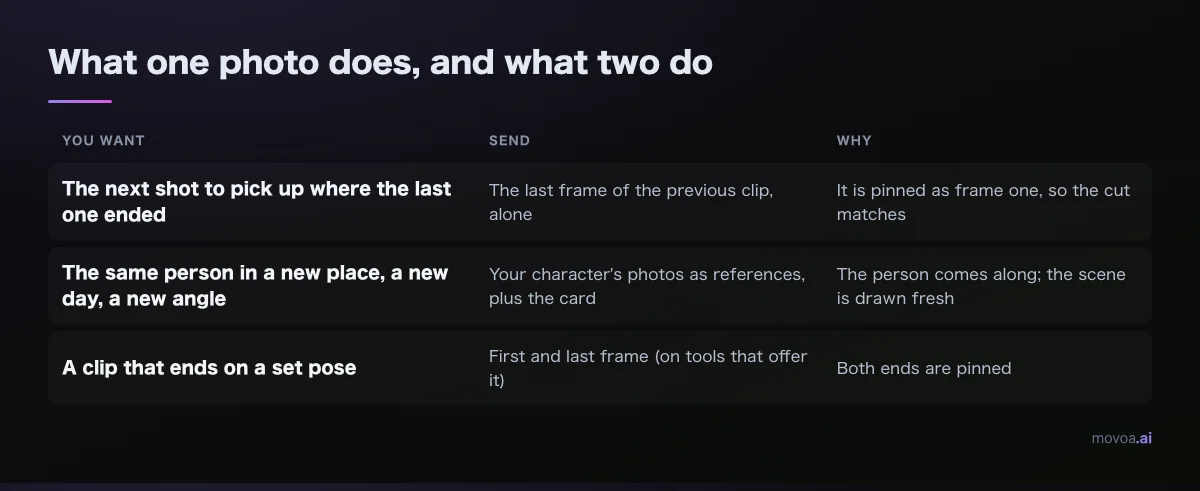
Which one to send:
| You want | Send | Why |
|---|---|---|
| The next shot to pick up where the last one ended | The final frame of the previous clip, alone | It is pinned as frame one, so the cut matches |
| The same person in a new place, a new day, a new angle | Your character's photos as references, plus the card | The person comes along; the scene is drawn fresh |
| A clip that ends on a set pose | First and last frame (on tools that offer it) | Both ends are pinned |
How to continue a shot without losing character consistency
Here is what went wrong in those 117 sessions. People pressed "Continue from this clip", the clip's closing frame went into the photo box, and then they tapped their saved character, which added the character's photos next to it. Two or more photos meant references, the closing frame stopped being frame one, and in those sessions the next shot opened on a new face.
Since November 13, Movoa keeps that frame alone when you continue. Tapping a character while continuing adds only the character's written line to the prompt, not the photos, so the frame stays pinned and the look still comes along in words. On any tool, the habit is four steps:
- Take the final frame of the clip you kept, not a screen grab from the middle.
- Put it in as the first frame, and nothing else in the photo slots.
- Paste the character card at the top of the prompt.
- Write only what happens next in this shot (the MiniMax H3 prompt guide has the shot-line format).
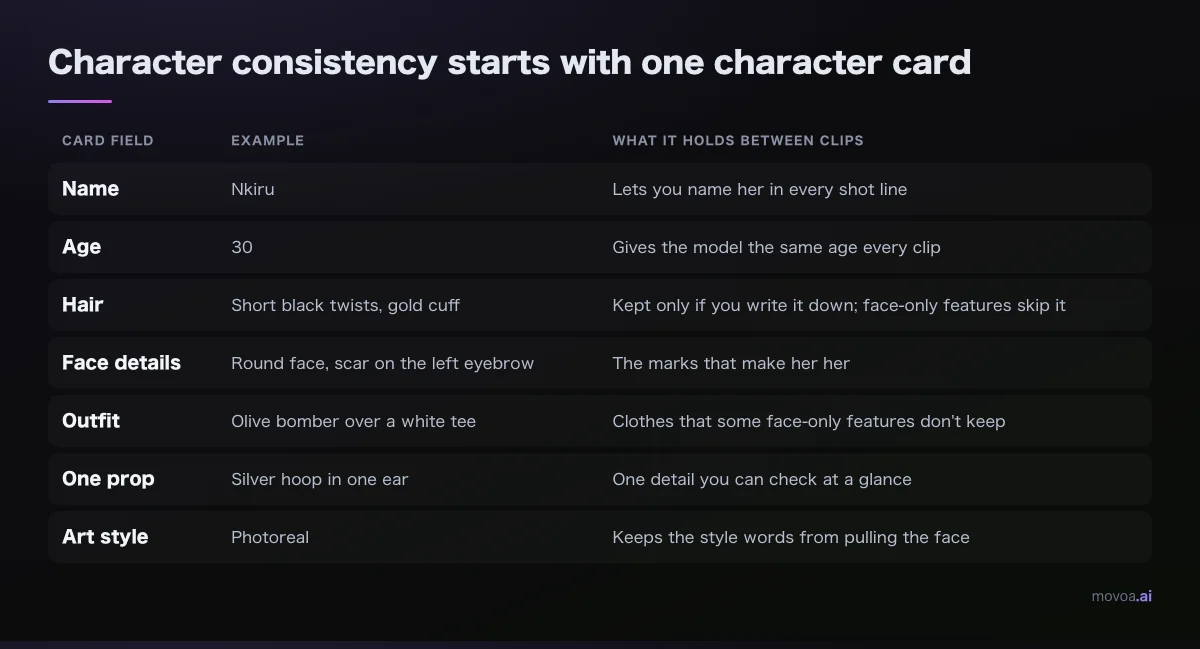
Character consistency starts with one character card
A look described in new words is a new instruction: "short dark hair" in one prompt and "black bob" in the next ask the model for two different people. The people who keep a series going on Movoa already know this. In the 30 days to November 17, 73 monthly subscribers pasted the same opening of 150 characters or more at the top of five or more prompts. That is a character card, kept by hand.
Write yours once, in one line you never rewrite:
[Name]: [age], [hair], [face details], [outfit], [one prop], [art style].
Filled in:
Nkiru: 30, short black twists with a gold cuff, round face, small scar on the left eyebrow, olive bomber jacket over a white tee, silver hoop in one ear, photoreal.
| Card field | Example | What it holds between clips |
|---|---|---|
| Name | Nkiru | Lets you name her in every shot line |
| Age | 30 | Gives the model the same age every clip |
| Hair | Short black twists, gold cuff | Kept only if you write it down; face-only features skip it |
| Face details | Round face, scar on the left eyebrow | The marks that make her her |
| Outfit | Olive bomber over a white tee | Clothes that some face-only features don't keep |
| One prop | Silver hoop in one ear | One detail you can check at a glance |
| Art style | Photoreal | Keeps the style words from pulling the face |
For a mascot or any non-human character, the same card works with different fields: silhouette, body proportions, colors, markings, costume and where the logo sits.
Keep the style words in the card too. A guide on elser.ai notes that switching from "cute anime style" in one prompt to "cinematic realistic fantasy style" in the next can move the face, the body, the light and the clothes all at once.
Save the card once, keep character consistency on every clip
On Movoa, open the Characters shelf in the generator, press New character, give it a name and paste the card. If photos are in the photo box, they are saved with the character. From then on, tapping the name puts the card at the top of your prompt, and on Photo to video, the photos into the clip. Tapping the character inserts the saved card for you.
Character consistency with two or three people in one shot
Give each person their own card and their own saved character, and name them in the shot line, as in "Nkiru hands Tomas the map". When two people share one vague description, the model has no way to tell whose face is whose.
Fix AI video character consistency by symptom
The face keeps changing in a dance video
Dance is the hardest case: spins, profile views, hair across the face, nonstop motion. Kling's own Motion Control guide is specific about what helps there (kling.ai Motion Control user guide, read Nov 18, 2026):
| Kling Motion Control rule | What it means for your dance clip |
|---|---|
| "Bind Facial Element to Enhance Facial Consistency" sits under the character image | Turn it on, and bind an existing element or create one |
| The element library uses facial information only | Clothing and hair still come from your image and prompt |
| Binding works only when the character faces the same way as the motion video | Match the direction of your photo to the dancer |
| Head turns need a front view and a side view | Upload the angles the dance actually uses |
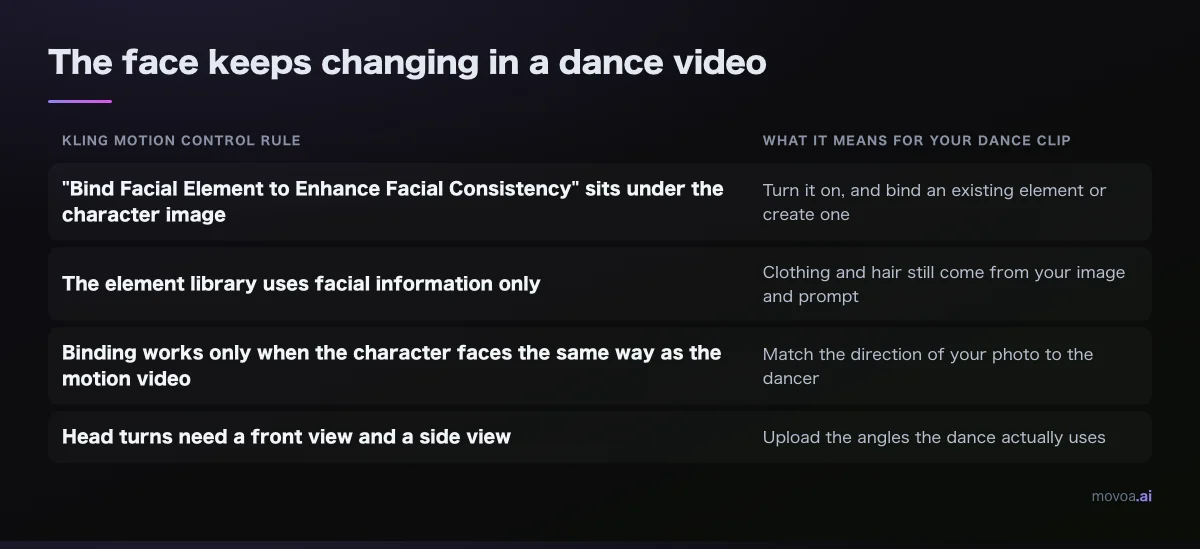
Whatever the tool, shorter dance clips hold character consistency better than long ones. Cut on the beat and continue from the closing frame.
Face morphing in video-to-video
In video-to-video, the face changes because the model is allowed to redraw it. Luma's Ray3 Modify makes that a slider (lumalabs.ai Ray3 Modify user guide, read Nov 18, 2026):
| Ray3 Modify setting | What it does | Use it when |
|---|---|---|
| Toward Adhere | Stays tight to the shapes and details of your input video | A real person's face is morphing |
| Toward Reimagine | Loosens that hold for stylized or non-human characters | You want a cartoon or creature, not the same face |
| Input video + character reference | Replaces the character and keeps the rest of the video unchanged (input up to 10 s) | Swapping your saved character into existing footage |
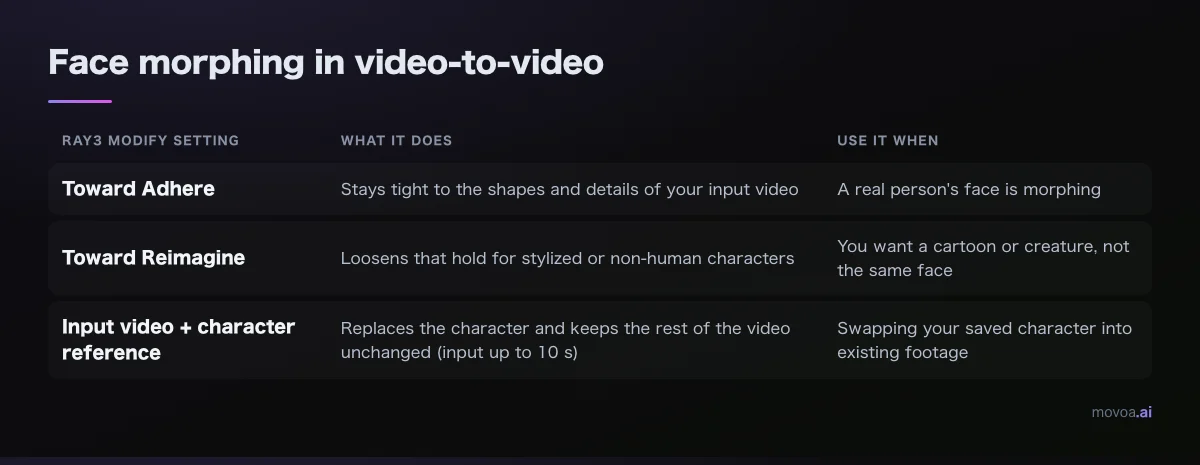
If a real person's face is morphing, move toward Adhere before you change anything else.
Character consistency across a whole shot
Drift within one take builds up over its length, and the far end of a long take is where faces wander. Keep each shot to one action, then chain the shots by continuing from the closing frame. A creator in r/comfyui working across 20 to 50 shots described the same split: hold identity with a narrow set of references, and handle pose and scene separately rather than asking one input to do both.
Which AI video generator is best for character consistency?
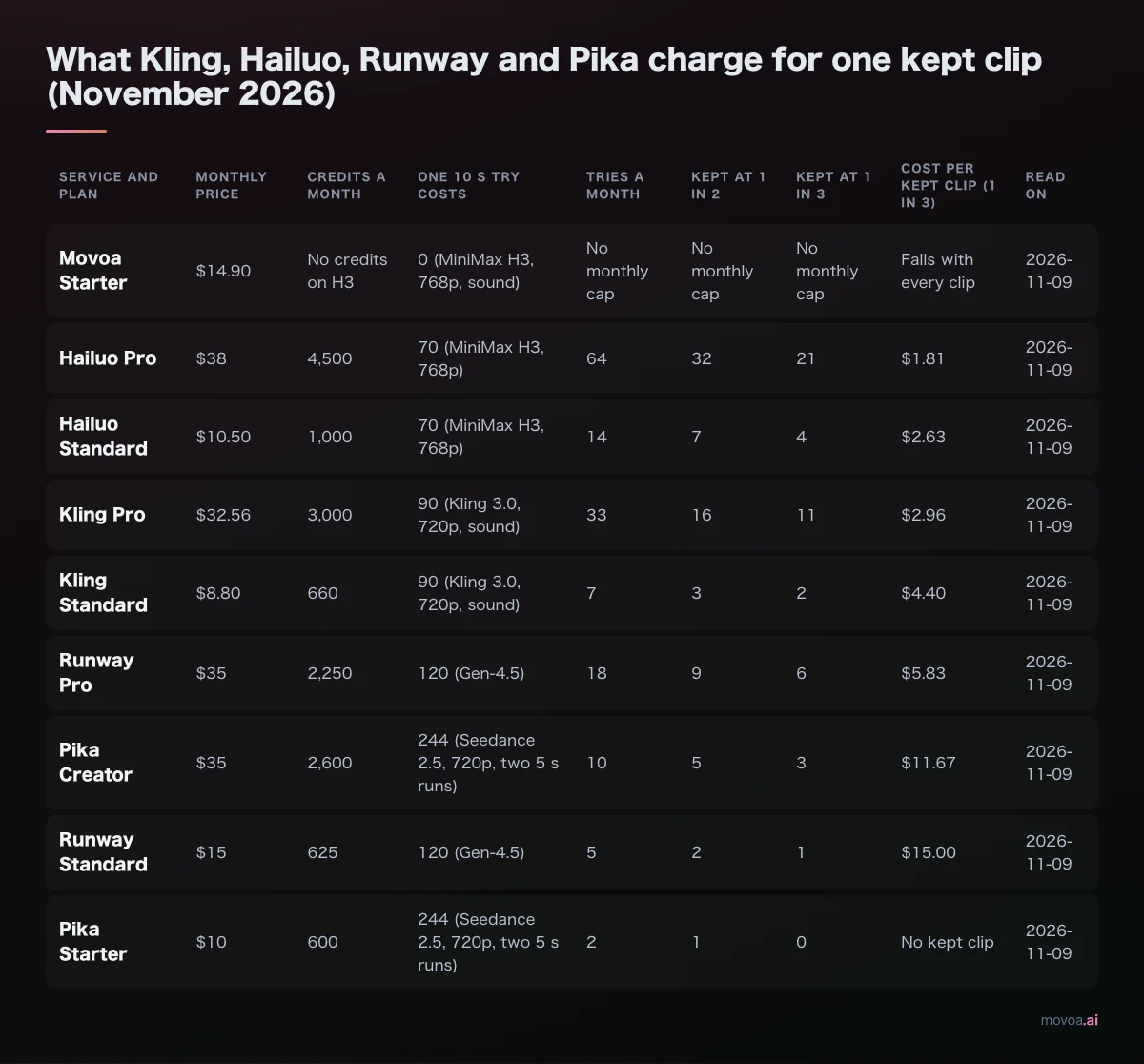
The best one for character consistency on a recurring character is the one that keeps the inputs fixed for you: a saved character that goes into every clip, and a continue button that pins the closing frame. That is Movoa: save a character once and tap it into every clip, continue any clip with its closing frame kept alone, sound on every MiniMax H3 clip, and unlimited H3 clips on every paid plan, so a retake that doesn't match never costs you a decision. For an episode-by-episode workflow, start from the AI series generator.
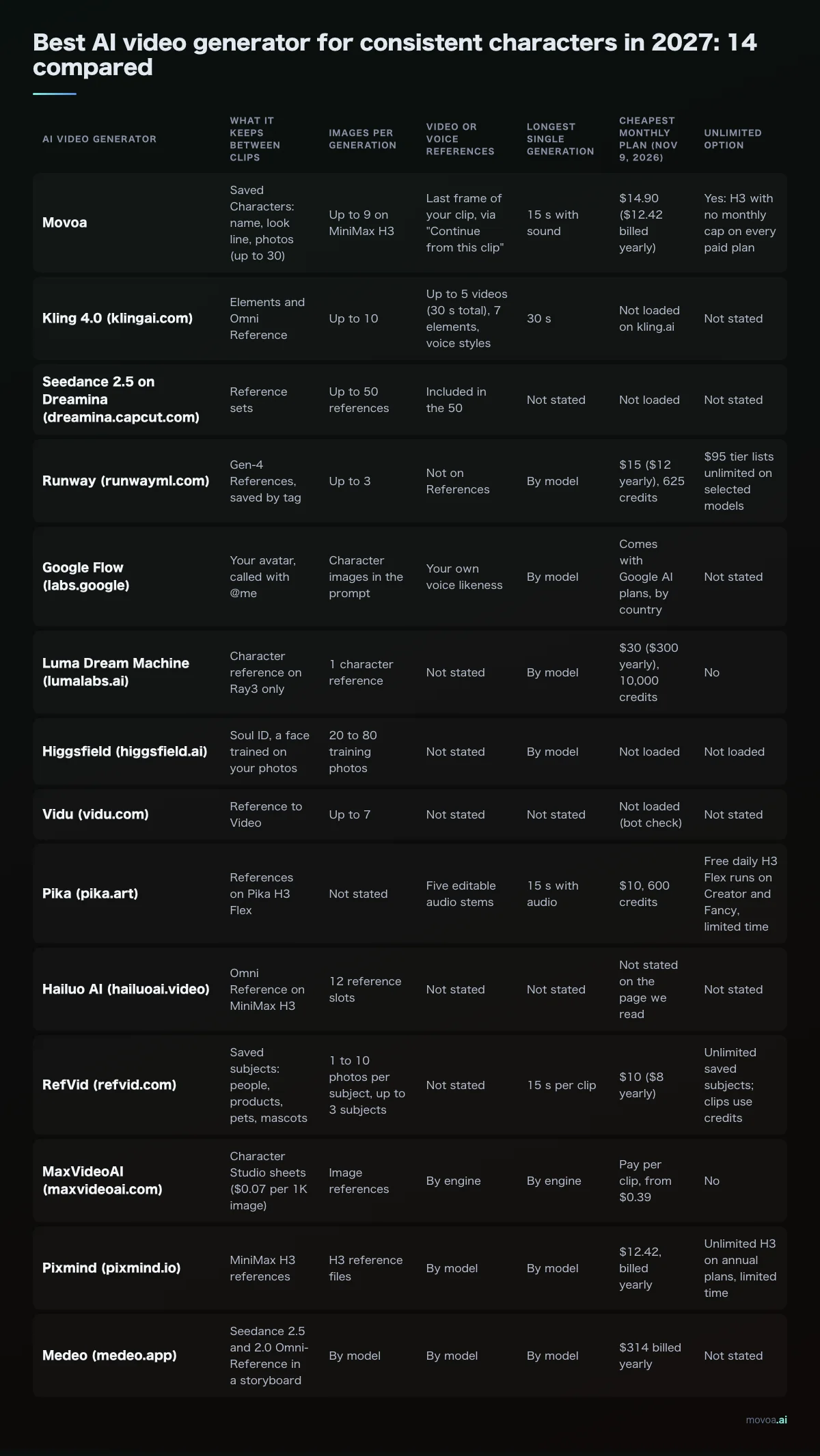
For a tool-by-tool view of character consistency features, with reference counts side by side, see the best AI video generators for consistent characters in 2026 and the 2027 update.
FAQ: AI video character consistency
Is one reference photo enough for character consistency?
For a shot that keeps the angle of your photo, yes. For head turns, add a side view; Kling's guide asks for a front view and a side view for accurate turns. Keep each photo large and clear.
Why are AI videos inconsistent from one clip to the next?
Each clip is generated fresh, so any change in the words, photos or first frame shows up as a different face. A fixed seed narrows randomness but won't carry a face to a new prompt or angle; a fixed card and the same photos do more for character consistency.
Is image-to-video better than text-to-video for character consistency?
For a recurring character, yes. Text alone leaves the model to invent the face again each time. Start from a photo (as the first frame, or as a saved character's reference) and keep the card in the prompt.
Can I fix a face that changed without regenerating the whole clip?
Trim the clip just before the face changes, take that frame, and continue from it as the first frame of a new shot; character consistency picks up again from that frame. In video-to-video, lower how freely the tool may redraw the face (on Luma, move Modify toward Adhere).
Do I need to train a LoRA to keep a character consistent?
For most series, no: start with a saved character, a few clean photos and a fixed card, and keep shots short; that covers character consistency for most series without training. Training pays off when references keep pulling a stylized design toward photoreal, as creators in r/comfyui report.
Is there a free way to get character consistency in AI video?
Yes. A free Movoa account saves characters, continues clips from their closing frame and makes MiniMax H3 clips at 480p with sound; the free AI video generator is the quickest place to try it. Using more than one photo in the same clip is a paid-plan feature; continuing a shot needs only one.
Continue the next shot with character consistency intact
| Step | What you send | What it holds |
|---|---|---|
| 1. Closing frame | The final frame of the clip you kept, alone in the photo box | Frame one of the next shot |
| 2. Character card | The same line, word for word, at the top of the prompt | Face, hair, outfit, style |
| 3. Shot line | Only what happens next | The action |
| 4. Retake | Run it again until it matches | The take you keep |
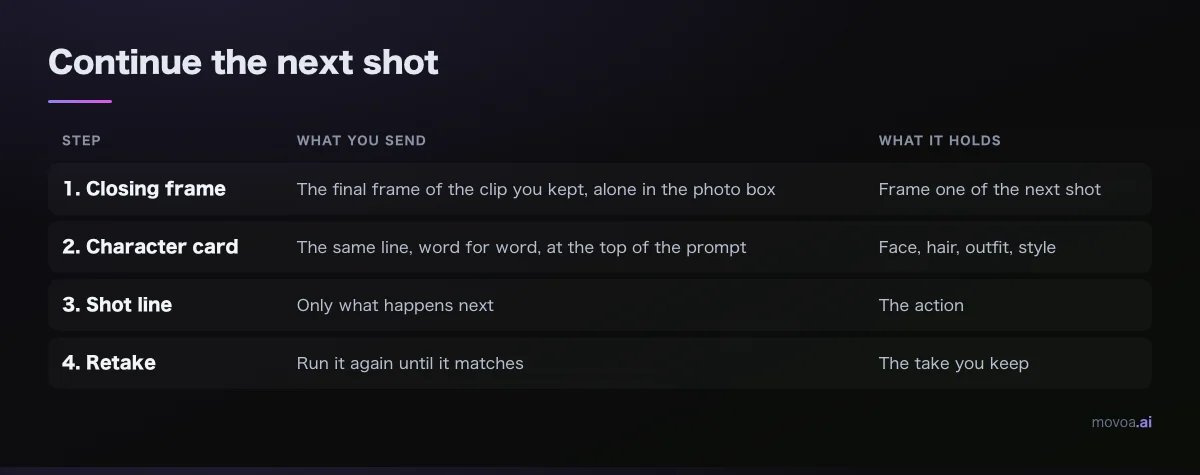
Open Movoa, press Continue from this clip on the take you kept, tap your character, and write the next shot.