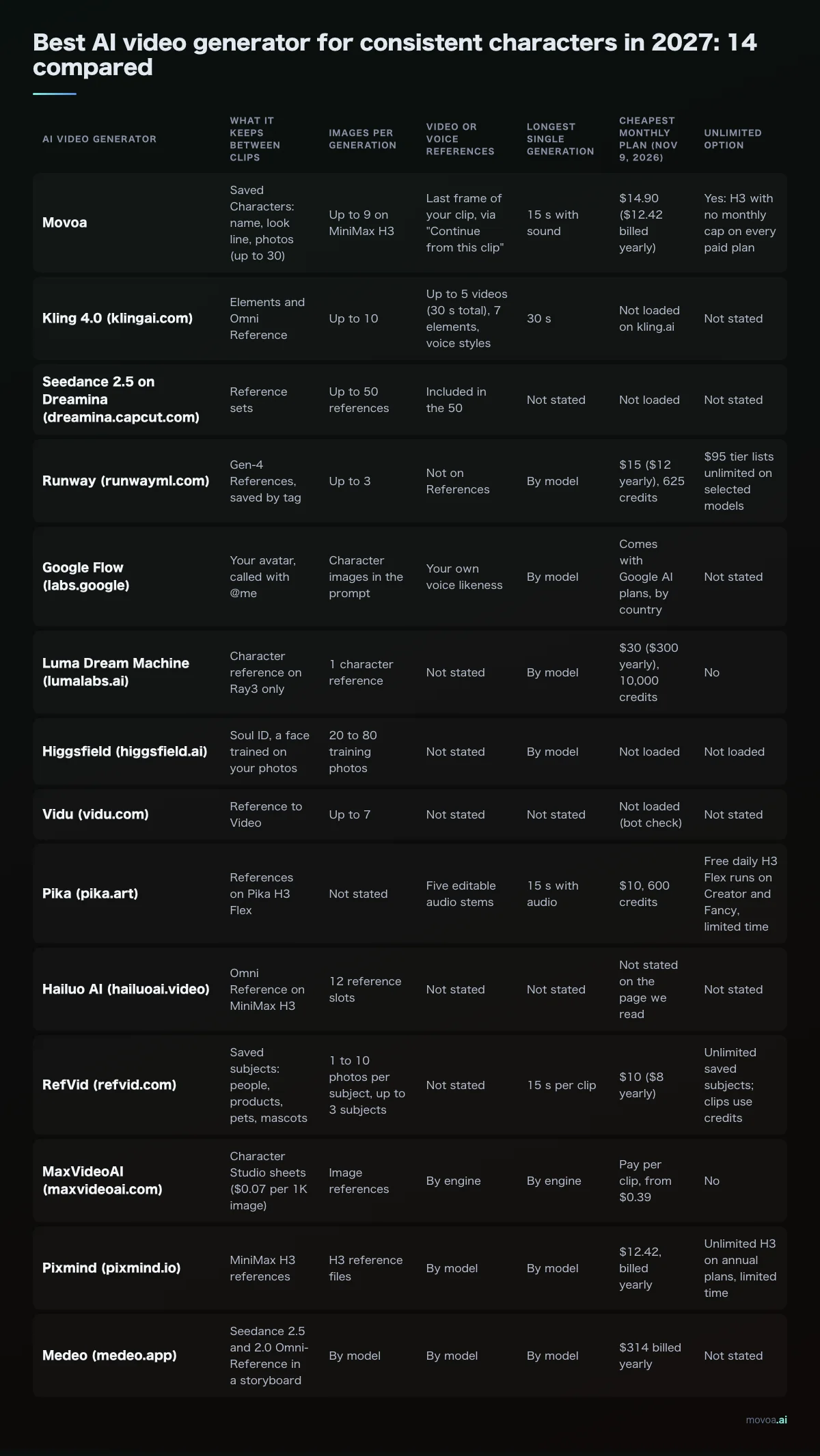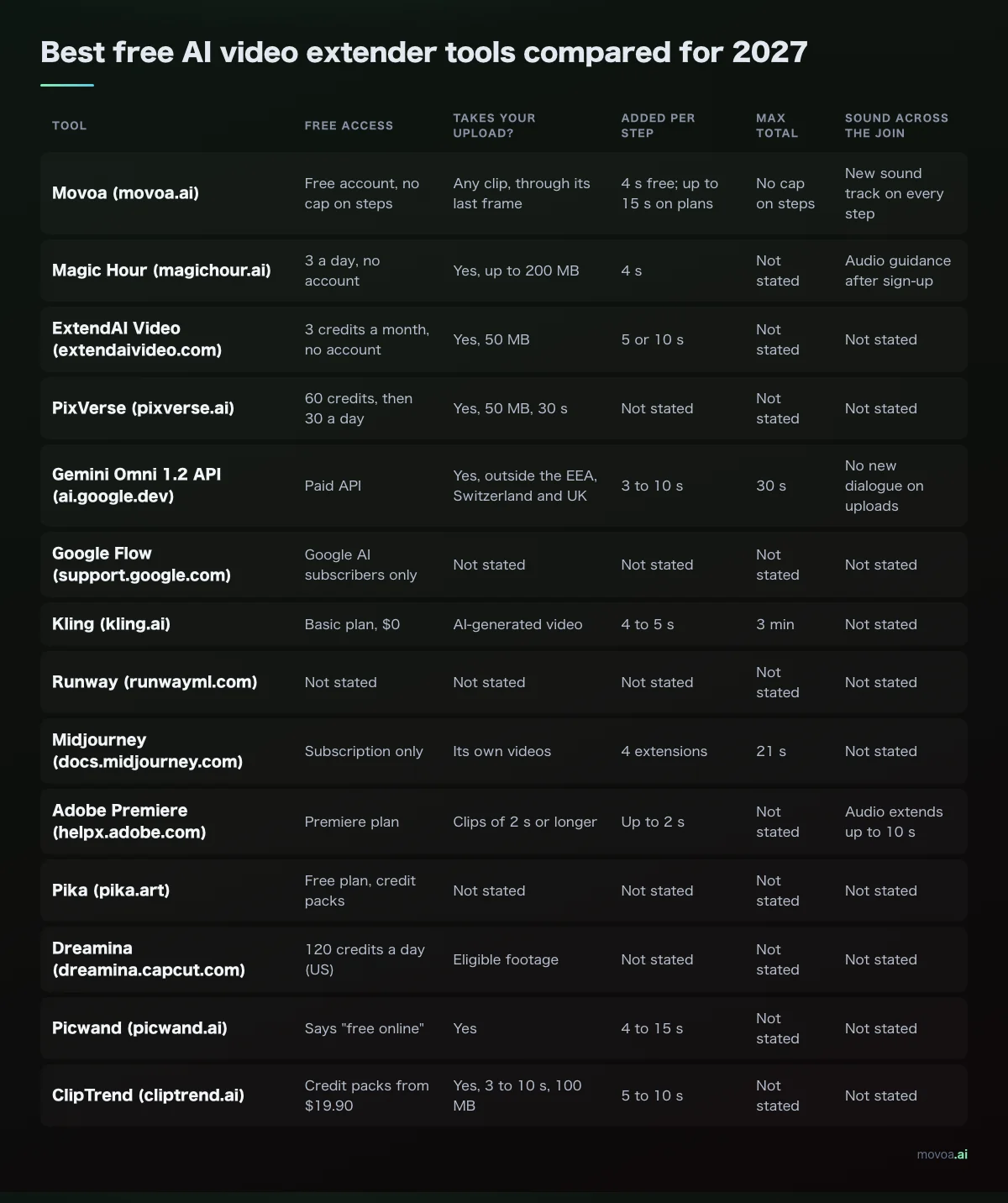
The best AI video generator for consistent characters is the one that saves your character once and sends the same photos and the same description with every clip, because a face that is rebuilt from a fresh description each clip comes back different, which is the drift creators describe most often in the threads we read. We read the character tools of 13 generators on their own pages on November 8, 2026, and the gap is wide: Runway takes 3 reference images per generation, Vidu 7, Hailuo's H3 generator 12 reference files, and Higgsfield trains a face on 20 to 80 photos.
- What holds a face in any AI video generator: a saved character (photos + a written look) that goes into every shot, several reference photos per clip, and starting the next shot from the last frame of the previous one.
- Best AI video generator for recurring characters overall, and for a series with the same cast: Movoa. Save a character once, tap it, and its look and photos go into the next clip; up to 9 reference photos per clip on MiniMax H3, sound on every H3 clip, unlimited H3 on every paid plan, and "Continue from this clip" for the next shot.
- Best for one trained face (AI influencer): Higgsfield Soul ID. Best for several characters in one scene: Vidu or Kling Elements. Best for film-style stills you animate: Runway References.
Last updated: November 8, 2026.
Best AI video generator for consistent characters: 13 compared
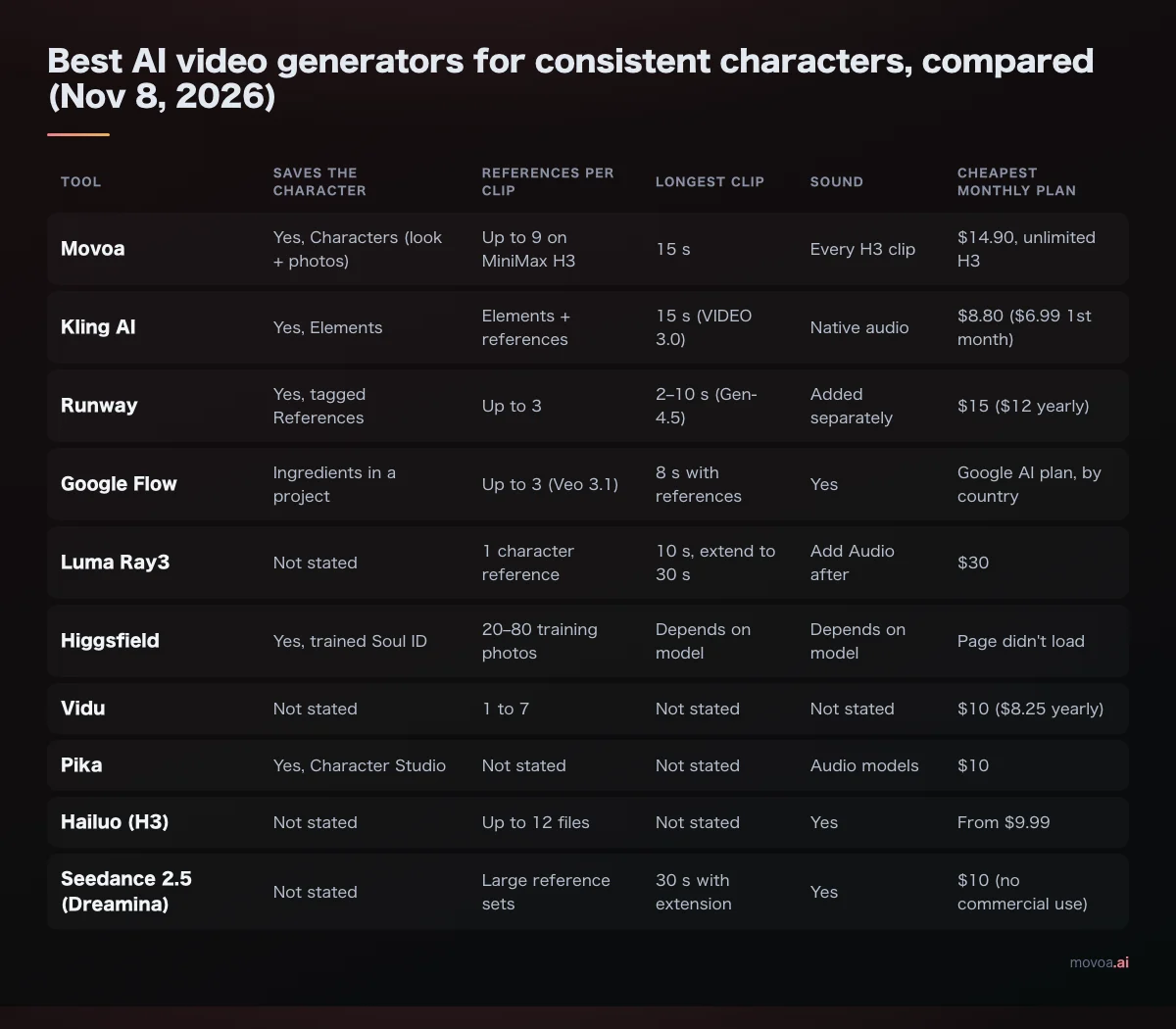
Every cell below was read on the vendor's own pricing, help or product page on November 8, 2026, unless the cell names another source. "Not stated" means the page we read does not say. Plans are the cheapest monthly plan in USD before tax, and prices can differ by country. * from Kling's 2026 model guide; ** from vidu.com's search listing, since the page showed only a loader for us.
| AI video generator | How it keeps the character | Saved for the next clip | References per generation | Longest clip | Sound | Next-shot tools | Free to start | Cheapest monthly plan |
|---|---|---|---|---|---|---|---|---|
| Movoa | Characters: name + look + photos | Yes, up to 30 | Up to 9 photos on H3 | 15 s | Every H3 clip | Continue from this clip; first + last frame | Free account: H3 480p, no daily cap, no watermark | $14.90: unlimited H3, commercial use |
| Kling AI (kling.ai) | Elements | Yes | Elements + Omni references | 15 s (VIDEO 3.0) | Native audio, voice control | Start/end frames, multi-shot | Not stated | $8.80 ($6.99 first month), 660 credits |
| Runway (runwayml.com) | Gen-4 References on a still, then animate | Yes, tagged | Up to 3 | 2–10 s (Gen-4.5)* | Added separately | Image to video | 125 one-time credits | $15 ($12 yearly), 625 credits |
| Google Flow (labs.google) | Ingredients reused clip to clip | Within a project | Up to 3 (Veo 3.1)* | 8 s with references* | Yes | First/last frames, extend | Credits with Google AI plans | By country |
| Luma Dream Machine (lumalabs.ai) | Character Reference on Ray3, not Ray3.14 | Not stated | 1 character reference | 10 s, extend to 30 s | Add Audio afterwards | Keyframes, Modify | Not listed | $30, 10,000 credits |
| Higgsfield (higgsfield.ai) | Soul ID, a trained face | Yes | 20–80 training photos | By model | By model | Animate Soul images | Page didn't load | Page didn't load |
| Vidu (vidu.com) | Reference to Video | Not stated | 1 to 7 | Not stated | Not stated | Start/end frames | "Free to Create" | $10 ($8.25 yearly)** |
| Pika (pika.art) | Character Studio | Yes | Not stated | Not stated | Audio models | Pikaframes | Free plan, no commercial license | $10, 600 credits |
| Hailuo AI (hailuoai.video) | Omni reference on MiniMax H3 | Not stated | Up to 12 files | Not stated | Yes | Not stated | 3,000 credits in its Design app | From $9.99 |
| Seedance 2.5 on Dreamina (dreamina.capcut.com) | Large reference sets | Not stated | Large sets, incl. sound | 30 s with extension* | Yes | Multi-shot | Not stated | $10, no commercial license |
| RefVid (refvid.com) | Saved subject on 9 models | Yes | 1–10 photos, 3 subjects | 30 s (Kling 4) | Included | Up to 3 shots | First 5 s clip | $10, 2,000 credits |
| MaxVideoAI (maxvideoai.com) | Character Studio identity | Yes | Image references | Up to 30 s, by engine | By engine | Recast | Not stated | Pay as you go from $10 |
| Pixmind (pixmind.io) | MiniMax H3 reference files | Not stated | H3 reference files | By model | Yes, on H3 | Not stated | 200 credits once | $12.42 yearly; unlimited H3 on annual (limited time) |
OpenAI's Sora app is not in the table: its page on November 8, 2026 was a notice about the Sora discontinuation.
Movoa: the best AI video generator for a series with the same cast
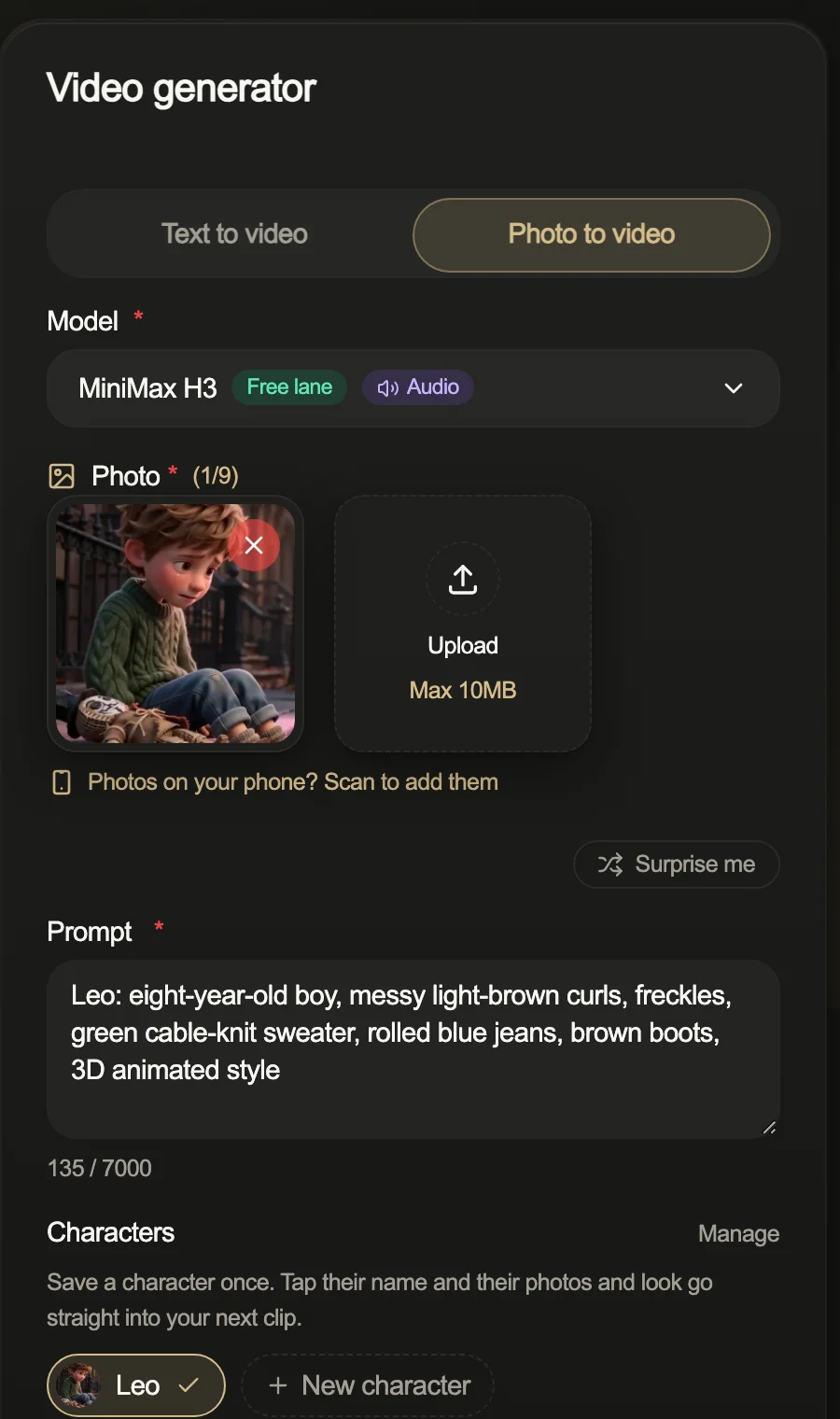
For a series, the same boy in the same sweater has to come back in episode 9. On Movoa you save him once: a name, a written look ("eight-year-old boy, messy light-brown curls, freckles, green cable-knit sweater") and the photos. Tap the name and the look goes to the top of your prompt; on photo to video, the photos go into the reference slots too, up to 9 per clip on MiniMax H3. Pick two characters and both come along.
Every H3 clip comes back with its own sound. When a shot works, "Continue from this clip" takes its last frame, puts it in as the first photo of the next shot and keeps your picked characters' photos with it, so shot 2 starts where shot 1 ended.
Retakes are where a series spends its money, and on every paid Movoa plan H3 is unlimited, so the tenth take of a shot costs what the first did. A free account makes H3 clips at 480p with no daily cap and no watermark, and the Characters shelf works on it. Clips come out 16:9, 9:16 or 1:1, so the same cast fits YouTube, TikTok, Shorts and Reels.
Kling AI: recurring actors and multi-shot scenes
Kling's Elements are saved subjects (a character, a product) that you drop into new shots in Kling's AI video generator. Kling's own 2026 model guide lists VIDEO 3.0 for "multi-shot scenes, recurring characters", with native audio and clips up to 15 seconds. Standard was $6.99 for the first month, then $8.80 a month for 660 credits, on Kling's plans page.
Runway: film-style stills you then animate
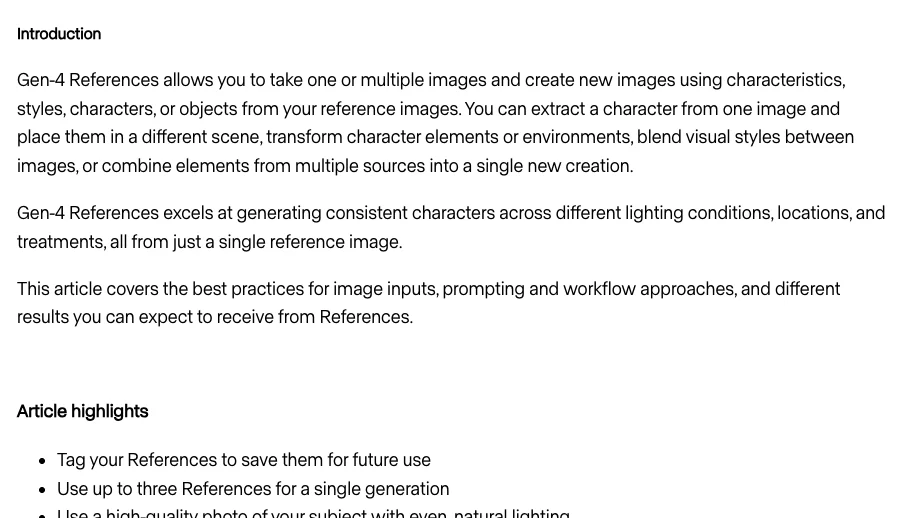
Runway's Gen-4 References keep a character across lighting and locations from a single reference image, take up to three References per generation, and let you tag a Reference to save it. They work on images: you approve the still, then animate it in Runway's AI video generator. Standard is $15 a month ($12 billed yearly) for 625 credits.
Google Flow: dialogue scenes with sound
Flow reuses the same "ingredients" (character and scene images) from clip to clip, and Veo generates picture and sound together; Google's Flow update covers the newer editing tools. Kling's model guide lists Veo 3.1 at up to three reference images and 8 seconds when references are used. Flow credits come with Google AI plans, priced by country.
Luma Dream Machine: one reference image, keyframes, Modify
Luma's character reference runs on Ray3. Its Ray3 FAQ (lumalabs.ai) says the newer Ray3.14 "lacks character consistency and the reference feature", so pick Ray3 in Luma's AI video generator for a recurring face. Plus is $30 a month for 10,000 credits with commercial use.
Higgsfield: one trained face for an AI influencer
Higgsfield's Soul ID help page says it trains on 20 or more photos of one real person (up to 80) and puts that face into every Soul image. Its own Soul ID guide adds that it locks a real person's features rather than inventing a new character, so it suits an AI influencer more than a cartoon cast; you then animate those images with the AI video generator models inside Higgsfield.
Vidu: several characters in one scene
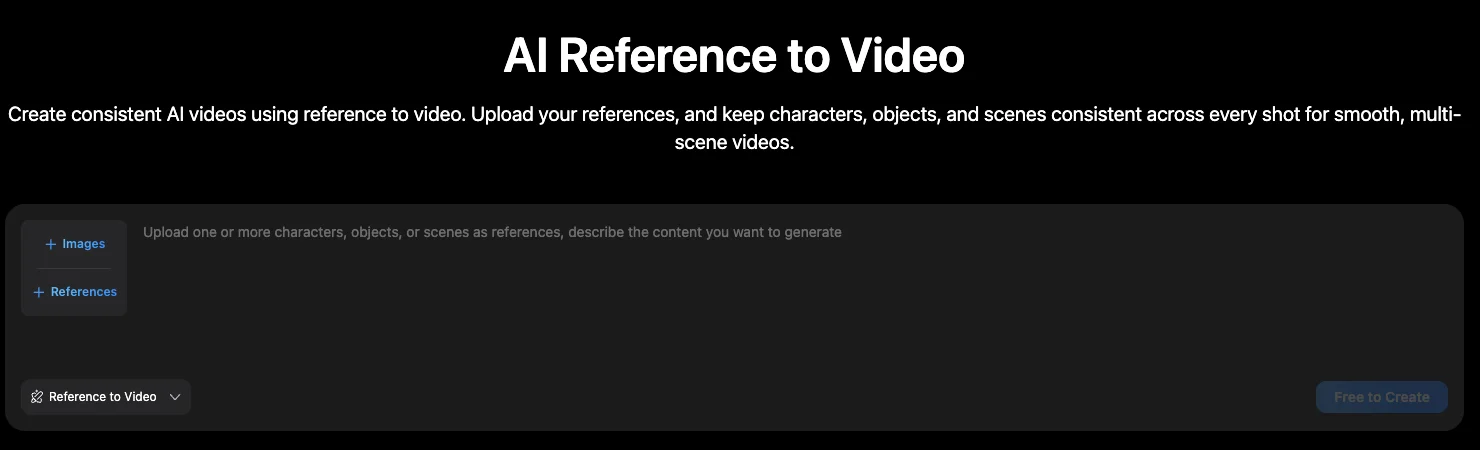
Vidu's Reference to Video page (go.vidu.com) takes 1 to 7 reference images at once, and Vidu's own blog walks through three characters in one scene with multi-reference.
Pika, Hailuo, Seedance, RefVid, MaxVideoAI and Pixmind
Pika's Character Studio saves a character to reuse; its free plan has no watermark but no commercial license. Hailuo's own MiniMax H3 generator shows 12 reference slots. Seedance 2.5 takes large reference sets, including sound, and Dreamina's Starter plan has no commercial license; you can also run Seedance 2.5 on Movoa. RefVid saves a subject of 1 to 10 photos and runs it on 9 models. MaxVideoAI's Character Studio reuses a saved identity for new outfits. Pixmind sells MiniMax H3 with reference files and, on annual plans, unlimited H3 for a limited time.
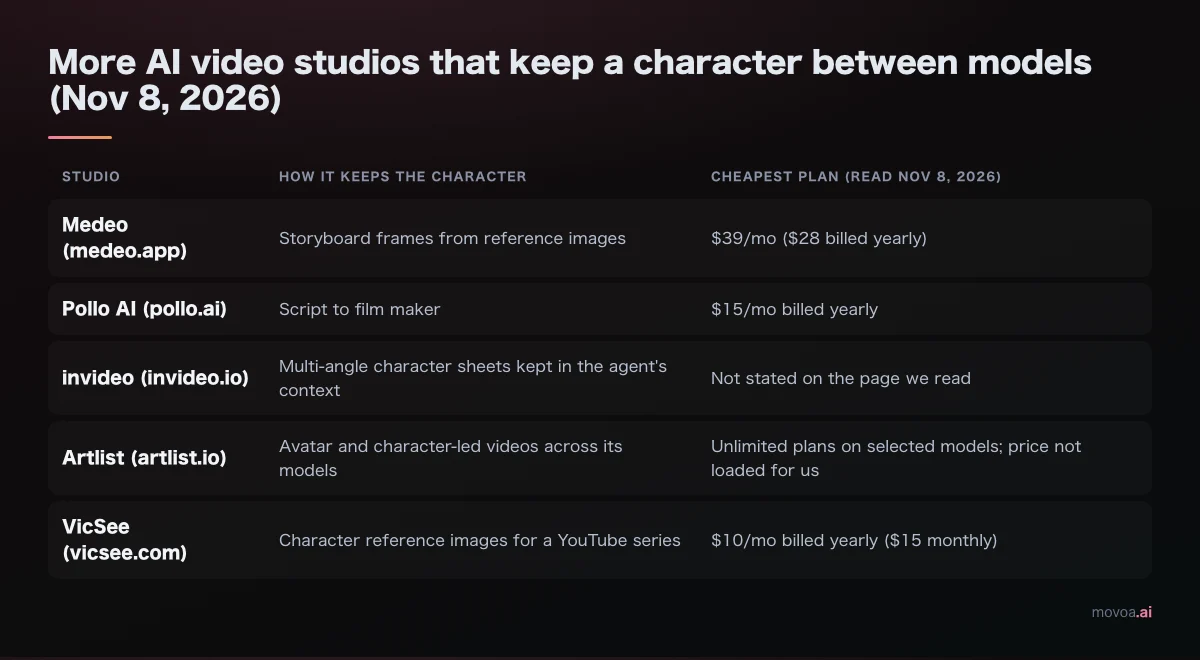
More studios that keep a character between models
| Studio | How it keeps the character | Cheapest plan (read Nov 8, 2026) |
|---|---|---|
| Medeo (medeo.app) | Storyboard frames from reference images | $39/mo ($28 billed yearly) |
| Pollo AI (pollo.ai) | Script to film maker | $15/mo billed yearly |
| invideo (invideo.io) | Multi-angle character sheets kept in the agent's context | Not stated on the page we read |
| Artlist (artlist.io) | Avatar and character-led videos across its models | Unlimited plans on selected models; price not loaded for us |
| VicSee (vicsee.com) | Character reference images for a YouTube series | $10/mo billed yearly ($15 monthly) |
What breaks character consistency in an AI video generator, and which feature fixes it
Separately generated clips don't share a memory of the face unless each one gets the same references or a saved character. Everything below is a way the face gets re-guessed. The left column is what creators describe in Reddit threads (reddit.com/r/generativeAI), an Adobe community feature request (community.adobe.com) and comments under YouTube tutorials; the right columns are the features that keep the character's inputs the same from shot to shot.
| What breaks | Why the face changes | The fix | Tools with that fix |
|---|---|---|---|
| Describing the character again every clip | Different words, different face | A saved character whose look text is reused word for word | Movoa Characters, Kling Elements, Pika Character Studio |
| One photo from one angle | A close-up or profile makes the model invent the rest | A three-angle sheet: face front, face three-quarter, full body | Any tool with 3+ references: Runway, Vidu, H3 on Movoa or Hailuo |
| Cutting from wide shot to close-up | The new framing re-guesses the face | The same references on every shot, not only the first | Saved characters (Movoa, Kling, Pika, RefVid) |
| Outfit, hair or a prop on one hand drifting | Small details are the first to go | Put the outfit and the prop in the written look and in a photo | Movoa Characters (look + photos together) |
| Screenshotting a frame from the finished clip | A screen grab can be lower resolution or caught mid-motion | Start the next shot from the clip's last frame, with the original photos alongside | Movoa "Continue from this clip", first/last frame tools |
| Two characters swapping faces | The model blends two references into one person | One saved character per person, each named in the prompt | Vidu multi-reference, Kling Elements, Movoa (several characters per clip) |
| The face changing mid-motion (turns, fast action, hands over the face) | The model never saw the face from that side | Shorter shots; a reference that shows that angle | Any AI video generator; shots of 4–10 s |
| Long single takes drifting near the end | Error builds up across the take | Shorter shots stitched together | Any AI video generator |
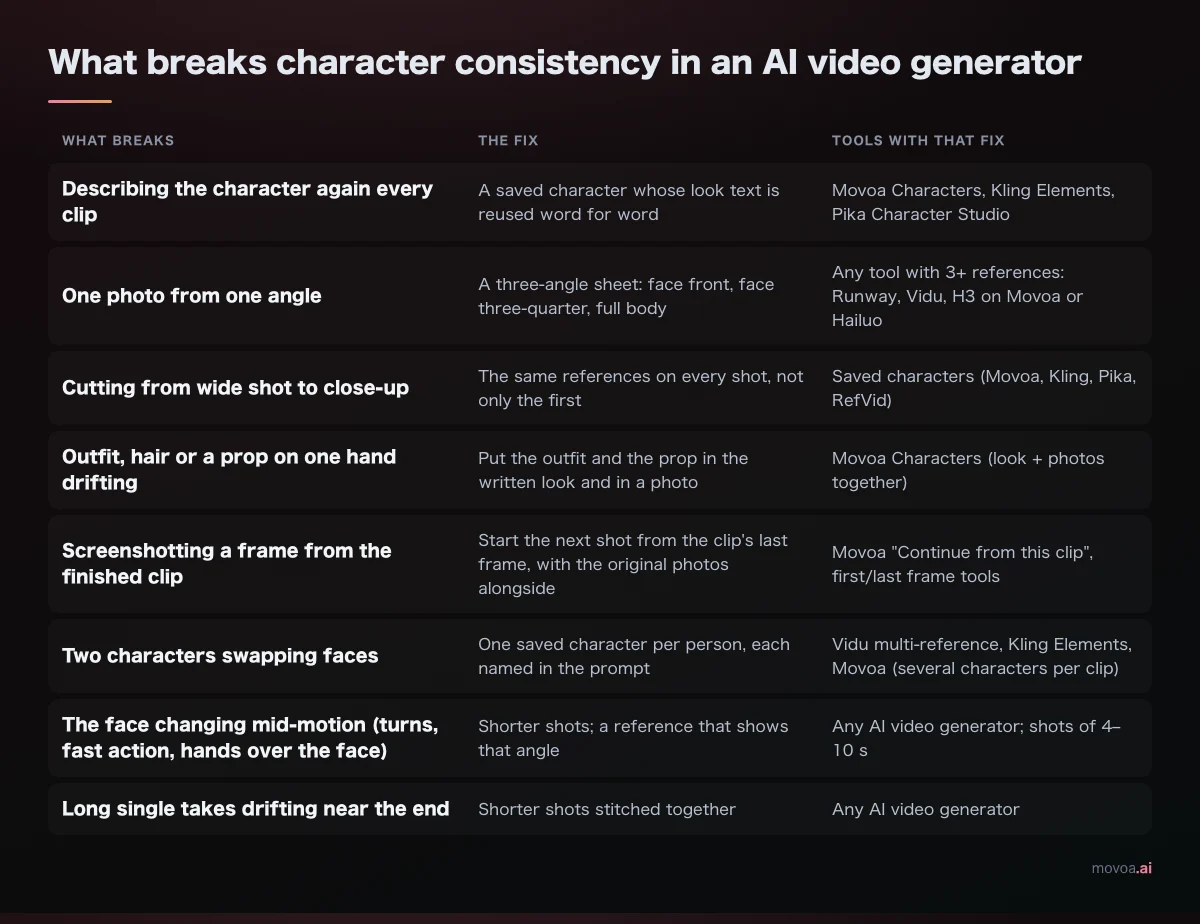
The pattern across all eight rows: lock the references first, keep them on every shot, and keep shots short.
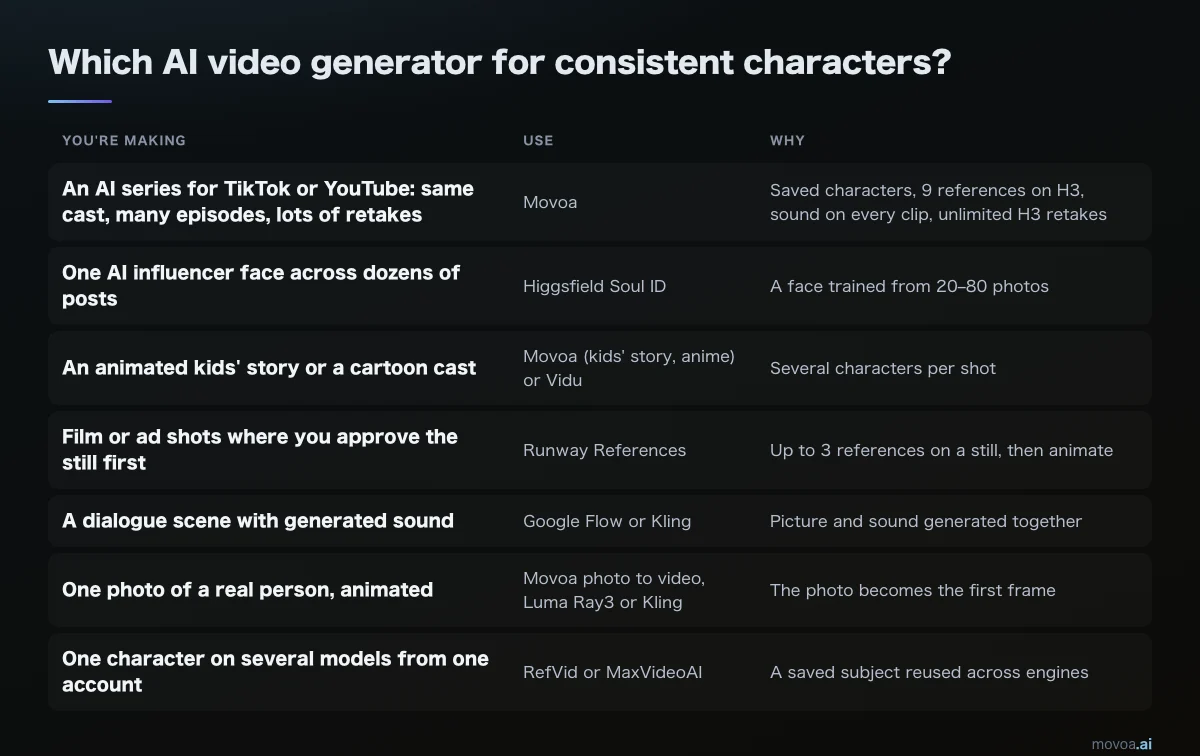
Which AI video generator should you use for consistent characters?
| You're making | Use | Why |
|---|---|---|
| An AI series for TikTok or YouTube: same cast, many episodes, lots of retakes | Movoa | Saved characters, 9 references on H3, sound on every clip, unlimited H3 retakes |
| One AI influencer face across dozens of posts | Higgsfield Soul ID | A face trained from 20–80 photos |
| An animated kids' story or a cartoon cast | Movoa (kids' story, anime) or Vidu | Several characters per shot |
| Film or ad shots where you approve the still first | Runway References | Up to 3 references on a still, then animate |
| A dialogue scene with generated sound | Google Flow or Kling | Picture and sound generated together |
| One photo of a real person, animated | Movoa photo to video, Luma Ray3 or Kling | The photo becomes the first frame |
| One character on several models from one account | RefVid or MaxVideoAI | A saved subject reused across engines |
| A brand mascot or product character | Kling Elements or Movoa Characters | A saved subject with fixed colors and props in the look |
How to keep the same character from episode 1 to 10 in an AI video generator
Build the character once
Make three images of the character: face front, face three-quarter, full body in the outfit. Keep the head in every image when the face matters; a headless body panel only helps as an extra outfit reference. On a tool with several reference slots, put the images in separate slots rather than one combined sheet, which is what creators in the tutorial comments we read reported working better.
Then write the look in one line you will never rewrite: age, hair, face details, outfit, one prop, art style. The line must say what the photos show and nothing that contradicts them; a prompt that re-describes the face differently from the photo is a common cause of a doubled or blended character.
Character sheet: [name], [age], [hair], [face details], [outfit], [one prop], [art style].
Three images: face front, face three-quarter, full body. Plain background, even light.

Shot prompt: [name] [action] in [place]. Camera: [shot size, movement]. Sound: [what we hear].
Keep a location the same the way you keep a person: one wide image of the set, added as a reference next to the character photos on every shot in that place.
Save it and tap it into every clip
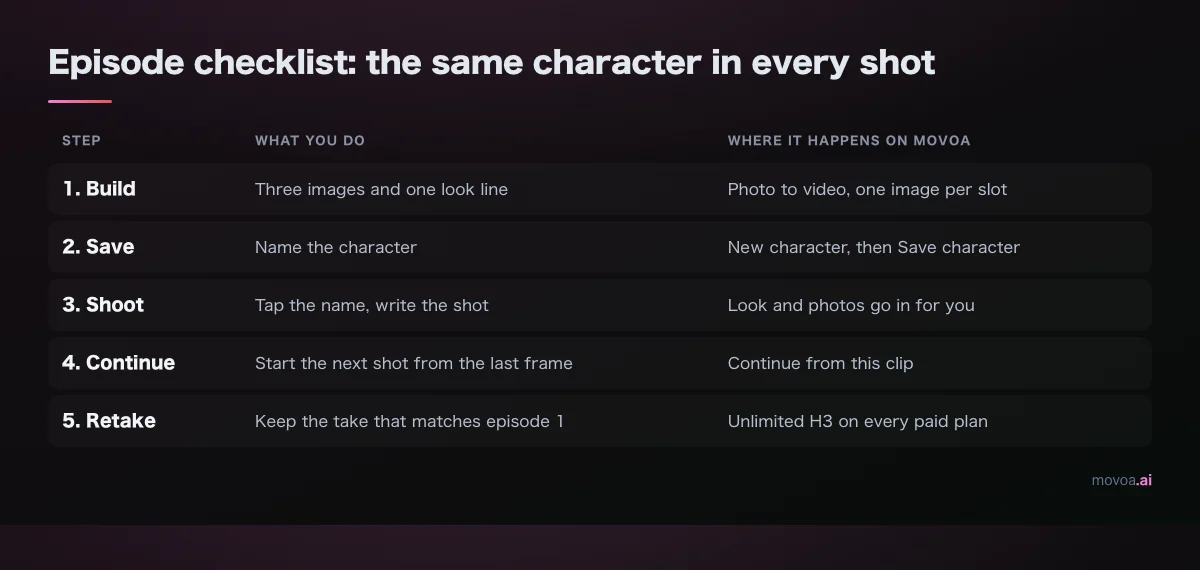
On Movoa, open Photo to video, add the three images, press "New character", give it a name and paste the look. From then on, tapping the name puts both into the clip. Pick two characters and both sets of photos come along.
Start the next shot from the last frame
Press "Continue from this clip": its last frame opens the next shot, with your characters' photos still in.
Retake until it matches, without counting
A series needs several takes per usable shot. On a credit plan each retake is charged; on Movoa's paid plans H3 is unlimited, so you keep the take that matches episode 1 instead of the one you could afford. How that adds up over a month: credits vs unlimited plans, and which plans are unlimited: the cheapest unlimited plans.
The episode checklist
| Step | What you do | Where it happens on Movoa |
|---|---|---|
| 1. Build | Three images and one look line | Photo to video, one image per slot |
| 2. Save | Name the character | New character, then Save character |
| 3. Shoot | Tap the name, write the shot | Look and photos go in for you |
| 4. Continue | Start the next shot from the last frame | Continue from this clip |
| 5. Retake | Keep the take that matches episode 1 | Unlimited H3 on every paid plan |
FAQ: AI video generator for consistent characters
Can an AI video generator keep the same character across different videos?
Yes, if every clip gets the same references. In our table 7 of the 13 tools save a character for the next clip (Movoa, Kling, Runway, Higgsfield, Pika, RefVid, MaxVideoAI); on the others you add the same photos to each clip yourself.
Do I need to train a LoRA for a consistent AI character?
No. Saved characters and reference photos (Movoa Characters, Kling Elements, Runway References, Vidu Reference to Video) give you a saved-character or reference workflow without LoRA training. Higgsfield's Soul ID does train, on 20 to 80 photos, which suits one real person's face.
Is there a free AI video generator with consistent characters?
Yes. A free Movoa account saves characters and makes MiniMax H3 clips at 480p with sound, no daily cap and no watermark. Pika's free plan has Character Studio without a commercial license, RefVid's first 5-second clip is free, and Runway gives 125 one-time credits.
How many reference photos should I use for one character?
Three is a good start: face front, face three-quarter, full body, each in its own slot. Runway takes up to 3 per generation, Vidu up to 7, MiniMax H3 up to 9 on Movoa and 12 reference files on Hailuo.
Can I use my own drawings as a character reference?
On Movoa, yes: any JPEG, PNG or WebP image you upload, drawing or photo, can be saved as a character photo with its written look. Runway's References and Vidu's Reference to Video also take an image you supply.
How do I stop two characters from swapping faces?
Save each person as their own character with their own photos, name both in the prompt, and keep the shot short. An AI video generator that takes several references per clip (Vidu, Kling Elements, H3 on Movoa) handles two characters in one scene.
Sources for this AI video generator comparison
Every cell was read on November 8, 2026. Vendor pages: Runway's Gen-4 References help article and pricing, Google's Flow update, Kling's plans page and 2026 model guide, Luma's pricing and Ray3 FAQ, Higgsfield's Soul ID help page, Vidu's Reference to Video page, Pika, Hailuo AI, Dreamina and each studio's pricing page. Where a page did not load for us, the cell says so. Movoa's row comes from the product itself.
- Roundups cited for this question that we read first: techyorker.com, rottenwifi.com, itechguides.com, usawire.com, programminginsider.com, mstudio.ai, kansova.com, aitoolanalysis.com
- Consistency guides behind the "what breaks" table: batchframes.com, cinemadrop.com, pixo.video, vofy.art, seedance2pro.io
Test it on one character
Save one character, make shot 1, then press "Continue from this clip" twice and put the three faces side by side: that is the whole test of any AI video generator for consistent characters, and on Movoa it costs nothing on a free account and nothing extra on an unlimited H3 plan. Save your first character and make the first clip.