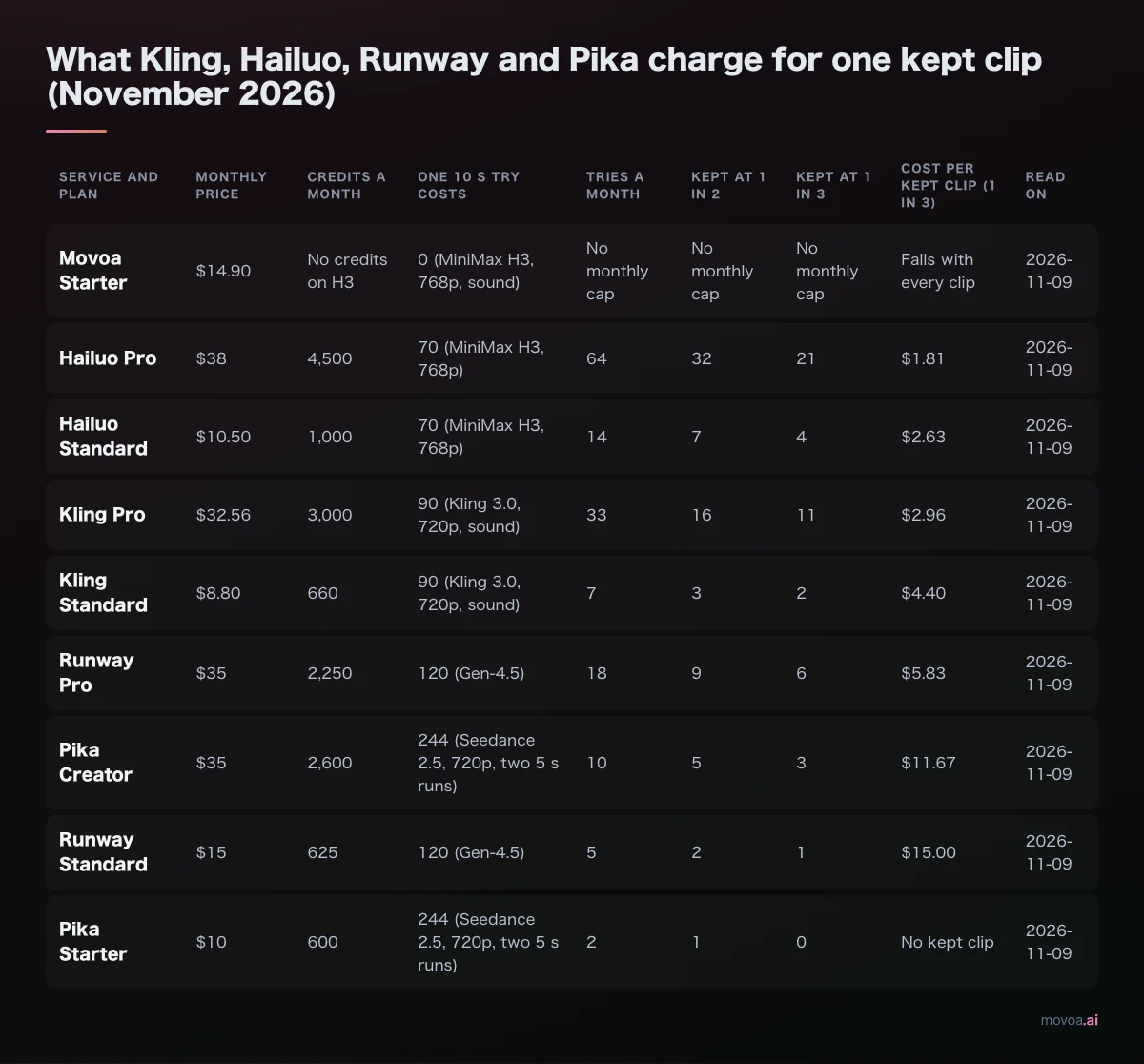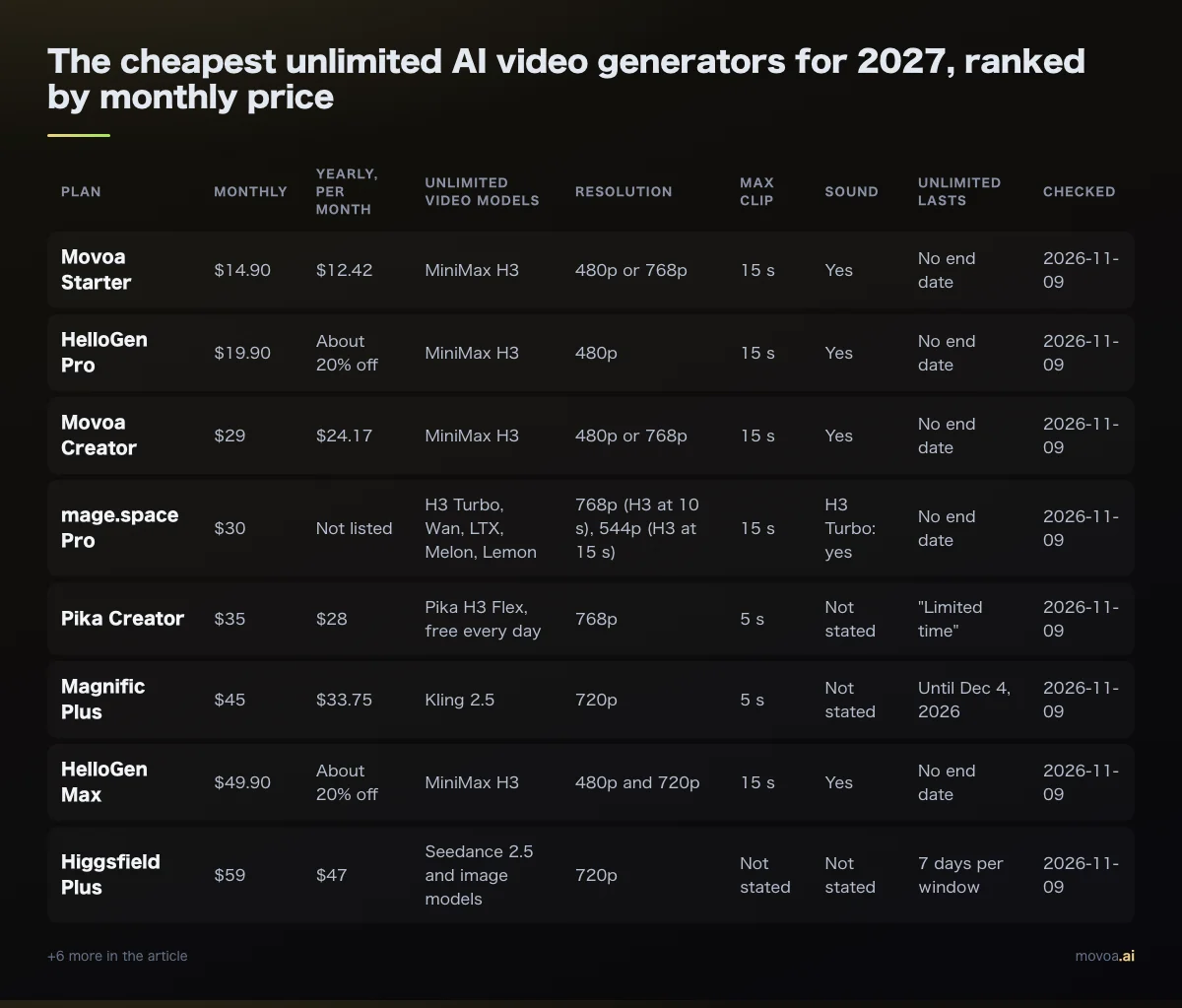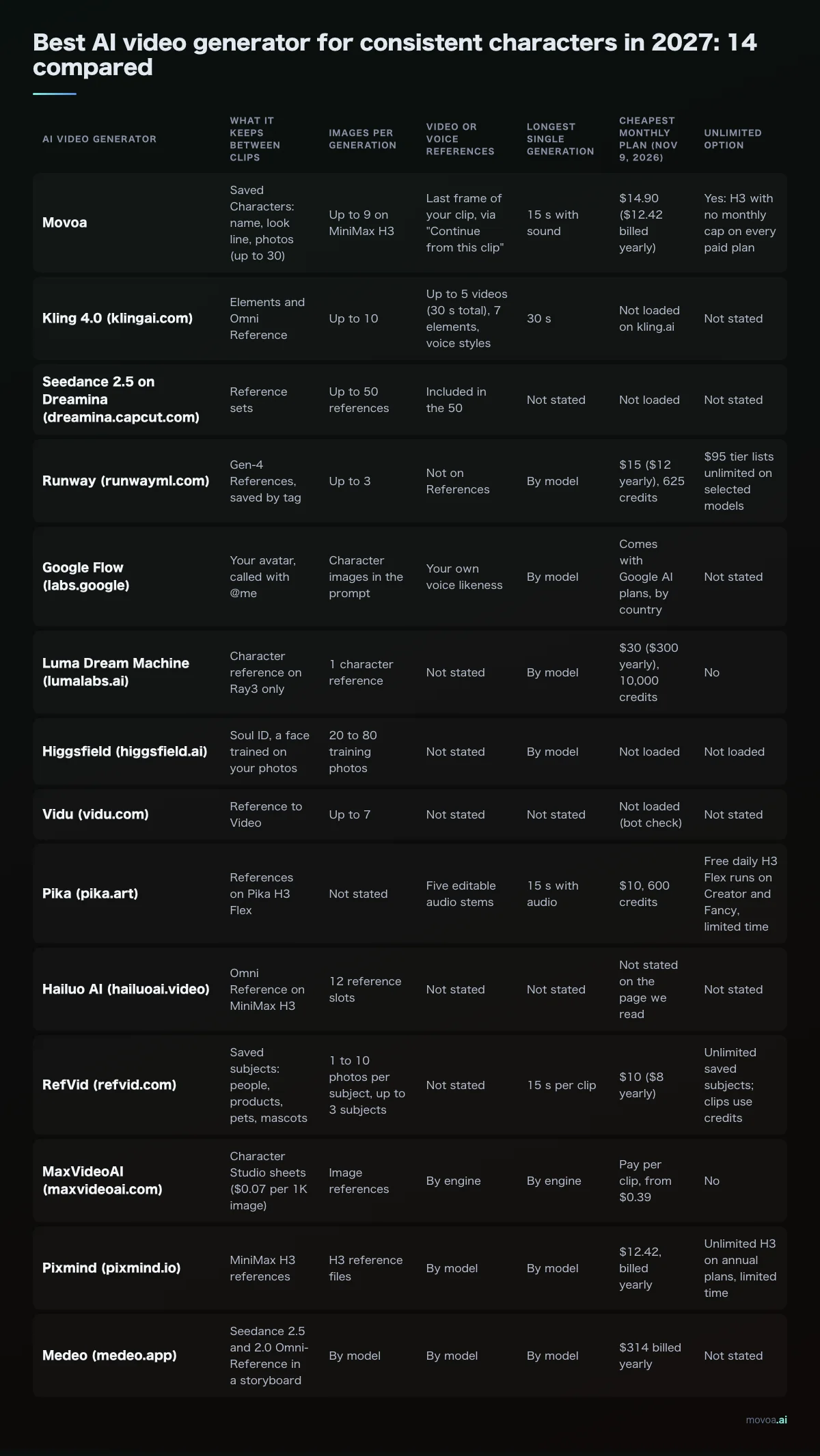
Free image to video AI going into 2027 is thinner than the lists make it look: of 16 tools we checked on November 9, 2026, Pika, Luma and Midjourney give no free video at all, and Kling, Hailuo, Runway, OpusVideo and MoveFrame give you one pack or one clip and stop. Google Flow, PixVerse and Dreamina refill every day, and Movoa is the only hosted tool whose page promises no daily cap on a free account, with sound on every clip.
The free image to video AI to start 2027 with depends on what "free" has to mean for you:
You want Pick (checked Nov 9, 2026) Keep animating photos every day, sound included, no counting Movoa: free account, no daily cap, no watermark on video The most free seconds from a big lab Google Flow: 50 credits a day, up to 350 seconds a week at 360p Start right now, no account Movoa or MoveFrame No limit and no website at all Wan 2.2 open weights on your own graphics card
Free image to video AI generators compared for 2027
We opened each vendor's own pricing, plan or help page on November 9, 2026 and wrote down what it says for a $0 account. Model names are the ones each page lists today.
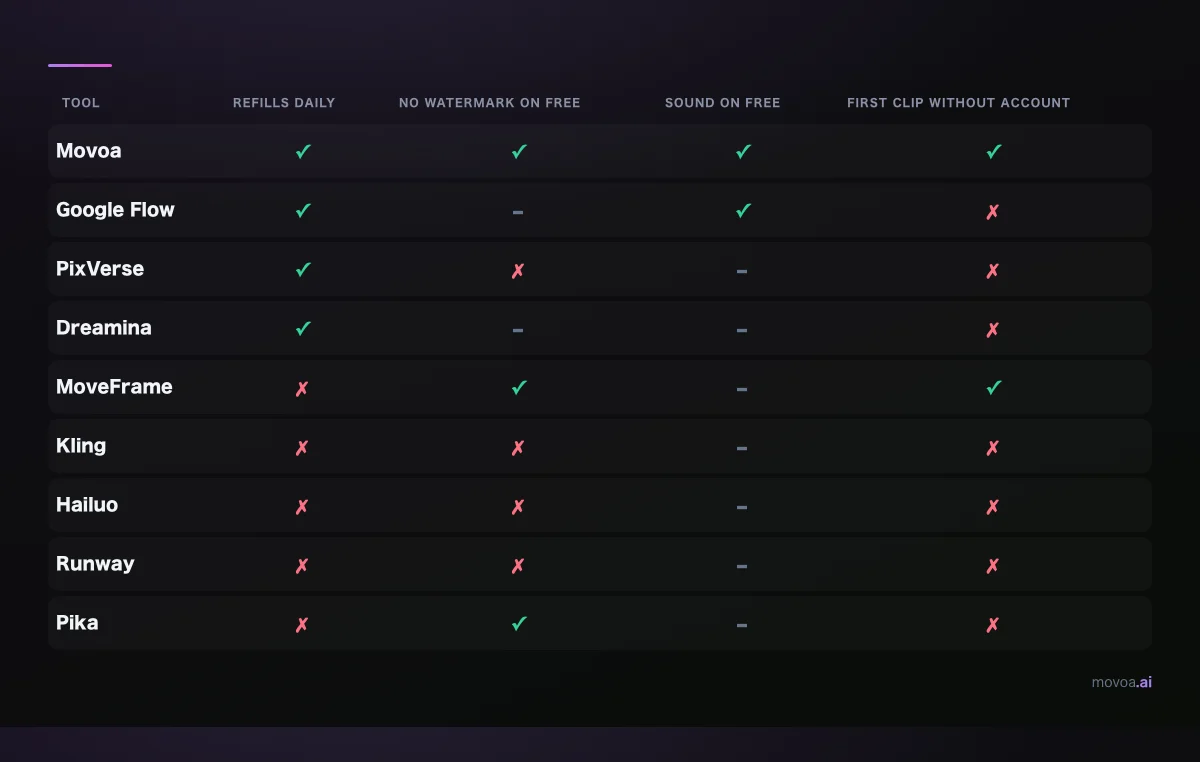
Green: the vendor's page says yes. Red: it says no. Grey: the page does not say.
| Tool | Free model | What a $0 account gets | Refills | Longest free clip | Free resolution | Watermark on free | Sound on free | Account | Commercial use on free |
|---|---|---|---|---|---|---|---|---|---|
| Movoa (movoa.ai) | MiniMax H3 | Start free with no sign-up; free with an account, no daily cap | No daily cap | 4 s | 480p | None on video | Yes, every clip | Not needed to start | Personal use |
| Google Flow (labs.google) | Omni Flash 1.2, Veo 3.1 Lite | 50 credits a day | Daily, no rollover | 10 s (Omni), 8 s (Veo 3.1 Lite) | 360p or 720p | Not stated | Omni preset voices | Google account | Not stated |
| PixVerse (pixverse.ai) | Not listed for Basic | 60 credits once, then 30 a day | Daily, 00:00 UTC | Not stated | Up to 540p | Yes; watermark-free is paid | Not stated | Account | Not stated |
| Dreamina (dreamina.capcut.com) | Not stated | "Free daily credits", amount not published | Daily | Not stated | Not stated | Not stated | Not stated | Account | Not stated |
| Grok Imagine (x.ai) | Grok Imagine | "Free to try", limits not published | Not stated | 15 s | 720p | Not stated | Not stated | Not stated | Not stated |
| Vidu (vidu.com) | Not stated | Bonus credits when you log in | Not stated | Not stated | Not stated | Not stated | Not stated | Account | Not stated |
| Adobe Firefly (adobe.com) | Firefly Video Model | Limited daily generations; video runs on generative credits, listed on paid plans | Daily | 5 s clips on paid plans | Not stated | Not stated | Not stated | Adobe account | Firefly models: commercially safe |
| Kling (klingai.com) | Not stated | Limited-time sign-in gift; daily credits are for subscribers | No | Not stated | Below 1080p (1080p and 4K are paid) | Yes; removal is paid | Not stated | Account | No |
| Hailuo (hailuoai.video) | MiniMax H3, Wan 3.0 | One welcome pack, expires 3 days after you get it | Once | Not stated | Not stated | Yes | Not stated | Account | Stated for paid plans only |
| Runway (runwayml.com) | "A selection" of models | 125 credits once, about 10 s of Gen-4.5 | Never | Not stated | Not stated | Yes | Not stated | Account | Not stated |
| MoveFrame (moveframe.app) | Not stated | First video free | Once | 5 s | 480p | None | Not stated | Not needed | Not stated |
| OpusVideo (opusvideo.org) | Eight models, Seedance 2.0 Mini by default | 15 credits when you make an account | Once | Not stated | Up to 720p | None on downloads | Native audio on some models | Account to generate | Not stated |
| Midjourney (midjourney.com) | Midjourney video | No free plan; Basic, Standard, Pro and Mega are all paid | None | 5 s per generation on paid plans | SD (480p) on Basic | n/a | n/a | Paid subscription | Paid plans only |
| Wan 2.2 (github.com/Wan-Video) | Wan2.2 TI2V-5B, I2V-A14B | Runs on your own GPU | No cap | Not stated | 720p (480p or 720p for I2V-A14B) | None added | Not stated | None | Apache 2.0 |
Read Refills first: on November 9, 2026, "Once" meant the free part ends after one pack.
Free image to video AI: how many free seconds you get in a week
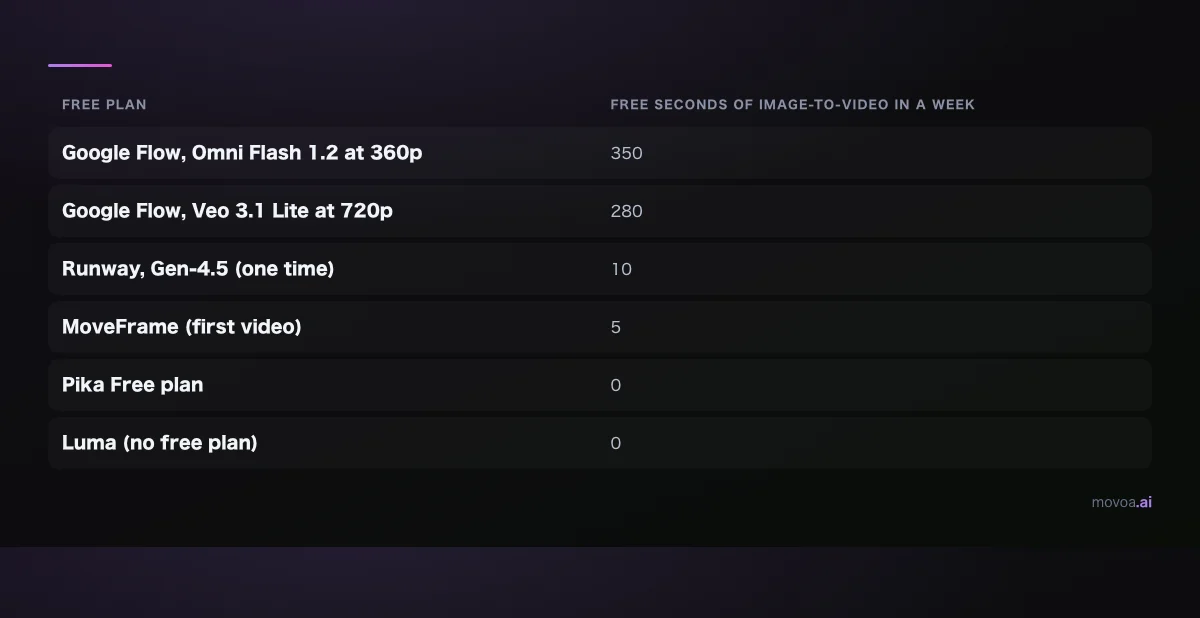
Computed only from rates the vendor publishes. PixVerse, Dreamina, Grok Imagine, Vidu and OpusVideo do not publish a per-clip cost on the pages we read, so they are left off.
Google Flow gives the most free seconds of any hosted tool that publishes its rates: 50 credits a day buys 50 seconds of Omni Flash 1.2 at 360p (1 credit per second), which is 350 seconds over a week. Spent on Veo 3.1 Lite instead, the same 50 credits buy five 720p clips of up to 8 seconds a day, at 10 credits each. Runway's 125 credits come once: at Gen-4.5's 12 credits per second that is about 10 seconds, ever. Movoa is not on the chart because a free account has no weekly ceiling to draw.
Daily refills vs a one-time pack vs nothing
- Refills every day. Google Flow (50 credits; the next 50 arrive a day after your first generation, and unused credits do not roll over), PixVerse (30 credits, reset at 00:00 UTC, after a 60-credit start) and Dreamina ("free daily credits", no number given). Adobe Firefly's free plan has "limited daily generations", but its plans page puts Generate Video among the premium features paid for with generative credits.
- One pack, then stop. Runway (125 credits that never refill), OpusVideo (15 credits when you make an account), Hailuo (a welcome pack that expires three days after it lands), Kling (a limited-time gift at sign-in; its plan table gives daily free credits to subscribers only) and MoveFrame (one free 5-second video).
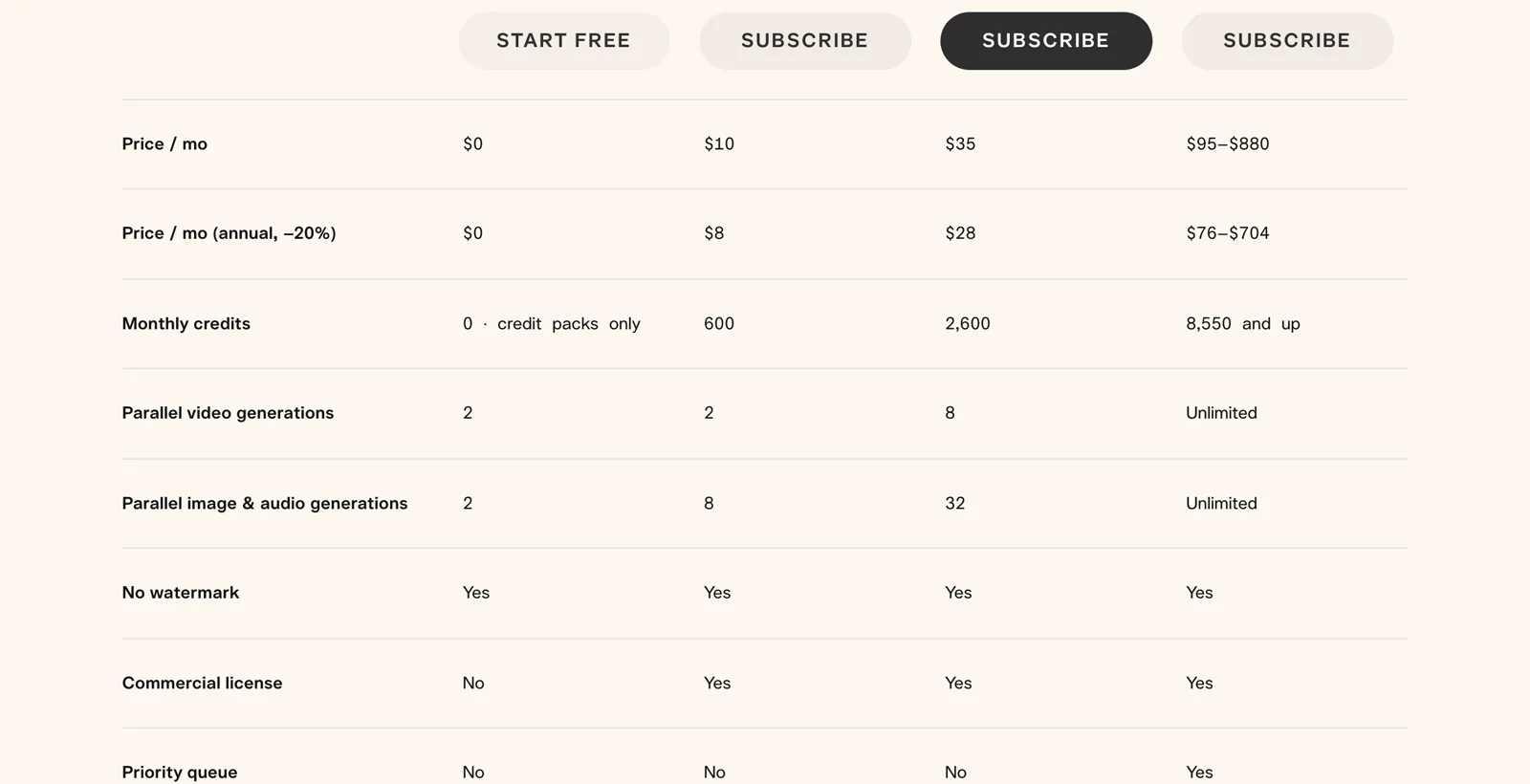
- Nothing. Pika's Free plan lists "0 · credit packs only" for monthly credits, so a free account cannot make a single video until you buy a pack. Luma has no free plan at all; its cheapest plan is Plus at $30 a month. Midjourney animates an image into a 5-second clip, but only on its four paid plans.
What changes in free tiers before 2027 starts
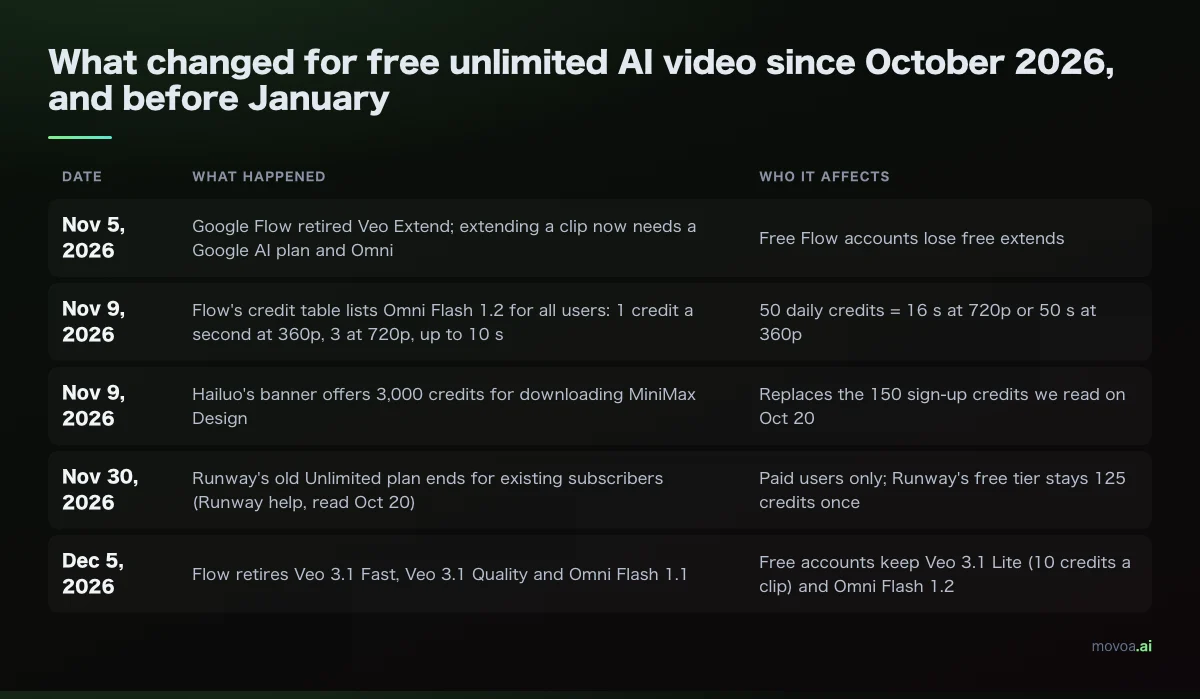
Google Flow's help pages say Veo 3.1 Fast, Veo 3.1 Quality and Omni Flash 1.1 retire on December 5, 2026, and Veo Extend already retired on November 5. From then on, a free Flow account animates photos with Omni Flash 1.2 (360p or 720p, up to 10 seconds) or Veo 3.1 Lite (720p, 4 to 8 seconds, from a first frame or a first and last frame). Extending a clip now needs a Google AI Plus, Pro or Ultra plan.
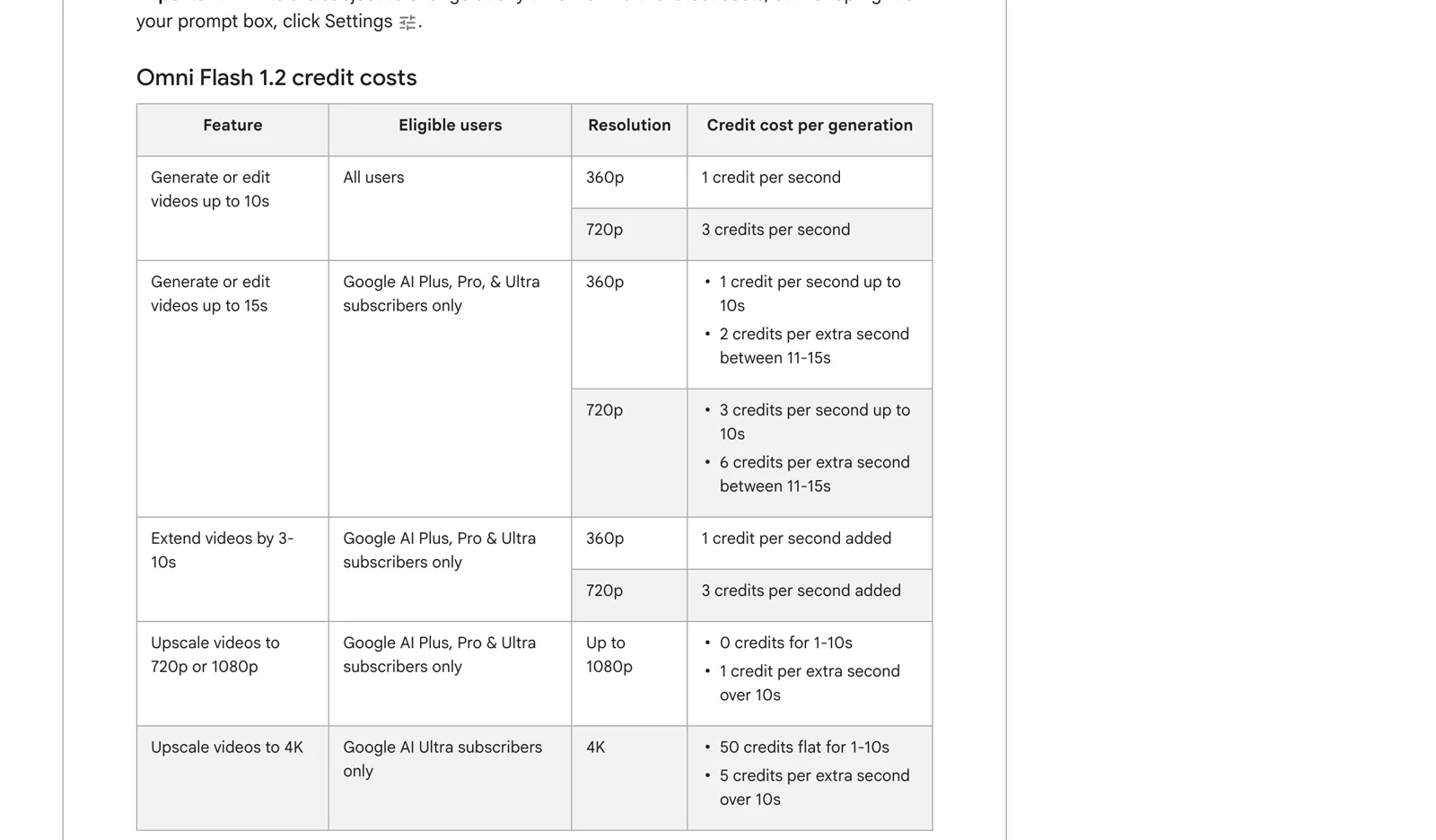
The 50-a-day allowance itself is unchanged. Google's page says plainly that it can change "at any time", so check the credit cost in Flow's prompt settings before you plan a week around it.
Free image to video AI with sound and no watermark
Movoa is the only hosted tool in the table whose own page says yes to both: every free clip comes back with a sound track, and the video carries no watermark. Free Movoa clips run on MiniMax H3, the same model behind every paid Movoa plan, so the free clip shows you what you would keep making.
Everyone else gives you one of the two, or neither:
- No watermark, but no sound promised: MoveFrame (a single free video) and Pika (no free credits to spend). OpusVideo also downloads without a watermark and lists native audio on some of its models, but the free part is 15 credits, once. Wan adds no watermark when you run it yourself.
- Sound, watermark not stated: Google Flow's Omni Flash 1.2 lets you pick a preset voice; its help pages do not mention a visible watermark either way.
- Watermark on free downloads: Hailuo, Kling, PixVerse and Runway. On all four, removing it is a paid-plan benefit.

Free with no sign-up and no credit card?
Two tools let you start before you create any account: Movoa (with sound, from the free AI video generator with no sign-up) and MoveFrame (a single 5-second video at 480p). Neither asks for a card. Every other hosted tool here needs an account first, except Grok Imagine, whose page does not say: a Google account for Flow, an Adobe account for Firefly, and a site account for the rest. On Movoa, a free account is what removes the cap: sign in and keep making H3 clips with no daily limit.
Running free image to video AI on your own GPU
With the hardware, open weights are the one route with no account, no cap and no website. Two model families are worth knowing going into 2027:
| Open model | Image to video | Sound | Hardware described | License |
|---|---|---|---|---|
| Wan 2.2 TI2V-5B | Yes, 720p at 24 fps | No audio track listed | Consumer cards "like 4090" | Apache 2.0 |
| Wan 2.2 I2V-A14B | Yes, 480p or 720p | No audio track listed | Larger than TI2V-5B | Apache 2.0 |
| MiniMax H3 (Hugging Face) | Yes, 4 to 15 s, 768p default | Native 32 kHz stereo | Model card sample: 4 GPUs; a community ComfyUI workflow targets 12 GB cards | MiniMax H3 Community License |
Wan 2.2 TI2V-5B is the simplest pick for one desktop card. MiniMax H3's weights are public too, with sound generated alongside the picture: its model card's sample server uses four GPUs, and a community ComfyUI workflow posted on r/comfyui targets 12 GB cards at about 14 minutes per 30-second render. If you want H3 with sound without the setup or the wait, the free lane on Movoa runs the same model in a browser tab.
How to use free image to video AI on one photo (4 steps on Movoa)
- Open photo to video and drop in one picture. Your photo becomes the first frame of the clip.
- Say what should happen in one line, for example "She turns to the camera and laughs". Our MiniMax H3 prompt guide has wording that works for motion and sound.
- Generate. The free clip is 4 seconds at 480p, with sound.
- Download and post it, then make the next one. With a free account there is no daily cap to count down.
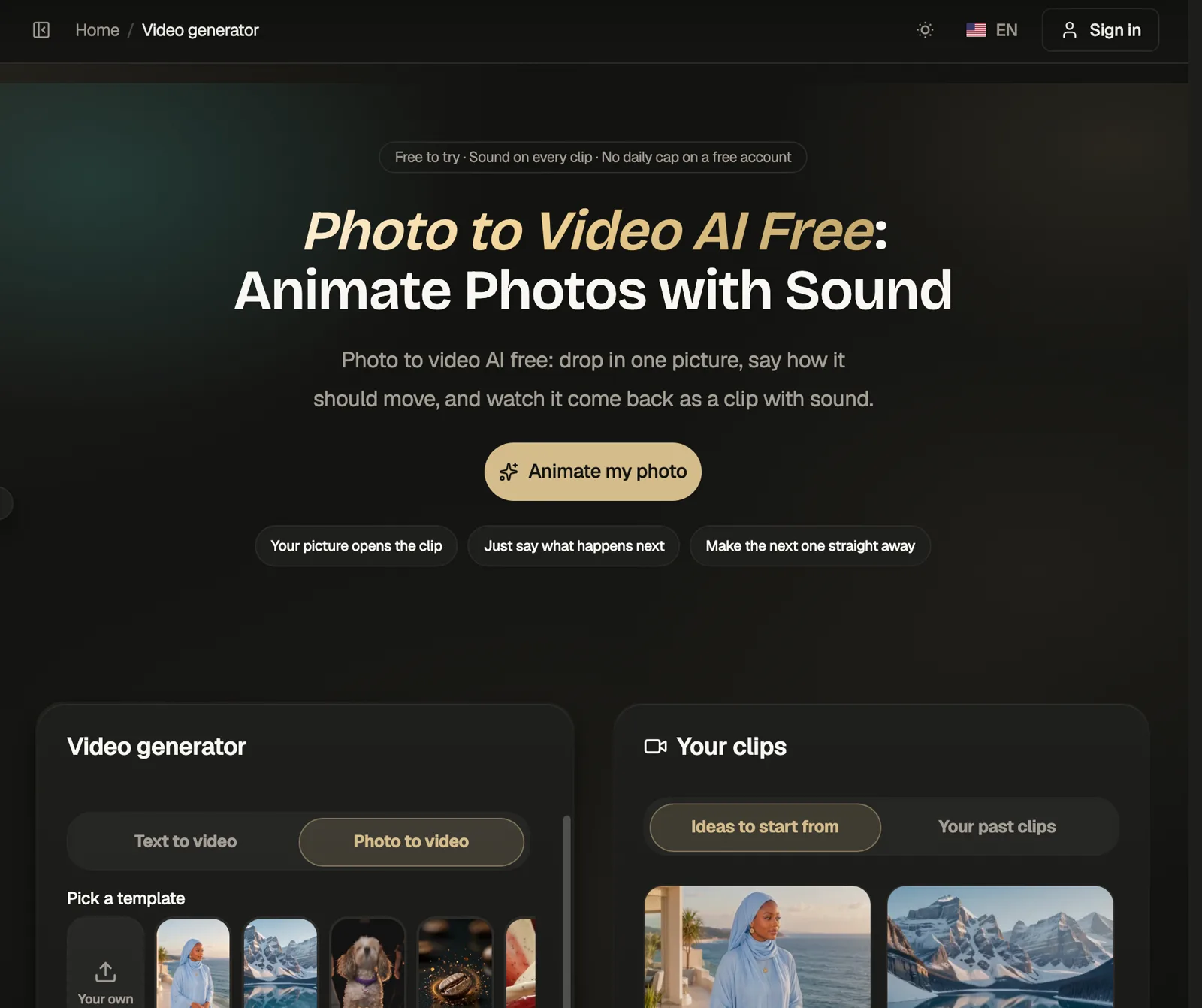
Old family pictures work too: animate old photos makes the people in an old family picture blink, smile and look back at you, and talking photo has the person in a portrait say the words you type. No photo yet? Text to video starts from a sentence instead. For text prompts and every model, not only photos, see our list of free AI video generators with no daily cap.
Free image to video AI FAQ
What is the best free image to video AI going into 2027?
Movoa is the best free image to video AI going into 2027 if you want to keep going: a free account has no daily cap, every clip has sound, and the video carries no watermark. For the most free seconds from a big lab, Google Flow: 50 credits a day, up to 350 seconds a week at 360p.
Which free image to video AI has no daily limit?
Among the hosted tools we checked on November 9, 2026, only Movoa, on a free account. Wan 2.2 has no limit either, but it runs on your own graphics card.
Is there a free image to video AI with no sign-up and no watermark?
Yes: you can start on Movoa and on MoveFrame with no account, and neither adds a watermark. Movoa's clips come with sound, and a free account keeps them coming with no daily cap.
Does Google Flow still give free credits in 2027?
Its help page on November 9, 2026 lists 50 free credits a day for every account. From December 5, 2026 the free models are Omni Flash 1.2 and Veo 3.1 Lite, because Veo 3.1 Fast, Veo 3.1 Quality and Omni Flash 1.1 retire that day.
Do Kling, Runway and Pika have a free plan for image to video?
Kling has a $0 Basic plan with a limited-time sign-in gift, a watermark, and daily credits reserved for subscribers. Runway gives 125 credits once, about 10 seconds of Gen-4.5. Pika's Free plan has 0 monthly credits, so you buy a pack before your first video.
Can I use free image to video clips commercially?
Usually not. Kling and Pika list commercial use only on paid plans, Hailuo states your commercial rights for paid plans, and Movoa's free clips are for personal use, with commercial use on the paid plans. Wan 2.2 is Apache 2.0, and Adobe calls its own Firefly models commercially safe.
How long can a free image to video clip be?
Movoa's free clip is 4 seconds, MoveFrame's 5, Veo 3.1 Lite's up to 8, and Omni Flash 1.2's up to 10 in Google Flow. Grok Imagine lists video up to 15 seconds at 720p but does not publish its free limits.
Sources
All read on November 9, 2026. Primary pages are linked; vendor pricing pages are named with their domain so you can open them yourself:
- Google Flow help: Manage your Google Flow credits
- Google Flow help: models and supported features
- Runway help: Free plan details
- Hailuo payment policy
- Wan 2.2 on GitHub
- MiniMax H3 on Hugging Face
- PixVerse subscription plans: pixverse.ai
- Kling membership plans: app.klingai.com
- Pika pricing page · Luma pricing: lumalabs.ai/pricing · Runway pricing: runwayml.com/pricing
- Adobe Firefly plans: adobe.com/products/firefly/plans · Grok: x.ai/grok · Vidu pricing: vidu.com/pricing
- Midjourney: Comparing plans and Video
- Dreamina: dreamina.capcut.com · MoveFrame: moveframe.app · OpusVideo: opusvideo.org/image-to-video
Other free image to video lists that answer the same question from other angles: aipresso.com, bigvu.tv, toolchase.com, datacamp.com, renderforest.com and pexo.ai.
Animate your photo free on Movoa, with sound on every clip and no daily cap on a free account.