Going into 2027, the best AI video generator for consistent characters is Movoa for a series you retake a lot: it saves the character once and sends it into every clip, with no monthly cap on H3. The bar itself moved in 2026, from keeping a face to keeping the face, the voice and the place. Kling 4.0 takes 15 reference assets in a single generation, voice styles included, and Dreamina lists Seedance 2.5 at up to 50 references, while Runway's References still stop at 3 and OpenAI closed the Sora app on April 26, 2026.
- What keeps a character the same in 2027: a saved character (one look line + photos) that rides into every shot, a reference image for each set, and the next shot started from the last frame of the one before.
- Best AI video generator for a series with the same cast: Movoa. Save a character once and tap it into every clip, up to 9 photos per clip on MiniMax H3, sound on every H3 clip, and H3 with no monthly cap on every paid plan. The credit plans in the table charge each retake; on Movoa the twelfth take of a shot costs what the first did.
- Others by job: Kling 4.0 for references that mix images, video and voice · Seedance 2.5 for the most references in one project · Higgsfield Soul ID for one real person's face · Google Flow's avatar (@me) for your own face and voice · Vidu for several characters in one scene.
Last updated: November 9, 2026. Every cell below was re-read that day.
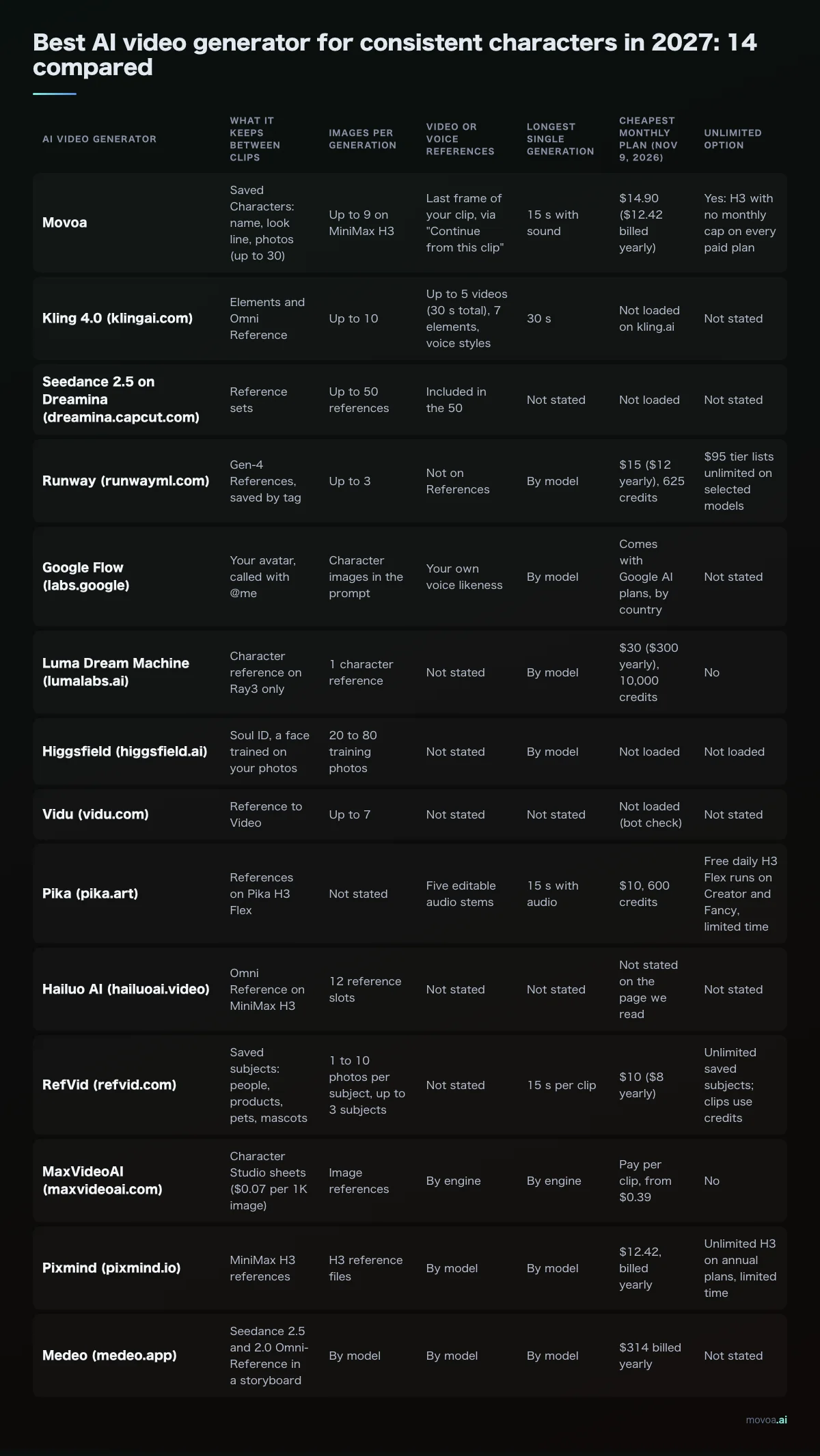
Best AI video generator for consistent characters in 2027: 14 compared
We opened each AI video generator's own pricing, help or model page on November 9, 2026. "Not loaded" means the page showed us a blank shell or a bot check; "not stated" means the page we read does not say. Prices are the cheapest monthly plan in USD before tax, and can differ by country.
| AI video generator | What it keeps between clips | Images per generation | Video or voice references | Longest single generation | Cheapest monthly plan (Nov 9, 2026) | Unlimited option |
|---|---|---|---|---|---|---|
| Movoa | Saved Characters: name, look line, photos (up to 30) | Up to 9 on MiniMax H3 | Last frame of your clip, via "Continue from this clip" | 15 s with sound | $14.90 ($12.42 billed yearly) | Yes: H3 with no monthly cap on every paid plan |
| Kling 4.0 (klingai.com) | Elements and Omni Reference | Up to 10 | 15 assets combined: up to 10 images, 5 videos (30 s total), 7 elements, 3 video elements, voice styles | 30 s | Not loaded on kling.ai | Not stated |
| Seedance 2.5 on Dreamina (dreamina.capcut.com) | Reference sets | Up to 50 references | Included in the 50 | Not stated | Not loaded | Not stated |
| Runway (runwayml.com) | Gen-4 References, saved by tag | Up to 3 | Not on References | By model | $15 ($12 yearly), 625 credits | $95 tier lists unlimited on selected models |
| Google Flow (labs.google) | Your avatar, called with @me | Character images in the prompt | Your own voice likeness | By model | Comes with Google AI plans, by country | Not stated |
| Luma Dream Machine (lumalabs.ai) | Character reference on Ray3 only | 1 character reference | Not stated | By model | $30 ($300 yearly), 10,000 credits | No |
| Higgsfield (higgsfield.ai) | Soul ID, a face trained on your photos | 20 to 80 training photos | Not stated | By model | Not loaded | Not loaded |
| Vidu (vidu.com) | Reference to Video | Up to 7 | Not stated | Not stated | Not loaded (bot check) | Not stated |
| Pika (pika.art) | References on Pika H3 Flex | Not stated | Five editable audio stems | 15 s with audio | $10, 600 credits | Free daily H3 Flex runs on Creator and Fancy, limited time |
| Hailuo AI (hailuoai.video) | Omni Reference on MiniMax H3 | 12 reference slots | Not stated | Not stated | Not stated on the page we read | Not stated |
| RefVid (refvid.com) | Saved subjects: people, products, pets, mascots | 1 to 10 photos per subject, up to 3 subjects | Not stated | 15 s per clip | $10 ($8 yearly) | Unlimited saved subjects; clips use credits |
| MaxVideoAI (maxvideoai.com) | Character Studio sheets ($0.07 per 1K image) | Image references | By engine | By engine | Pay per clip, from $0.39 | No |
| Pixmind (pixmind.io) | MiniMax H3 references | H3 reference files | By model | By model | $12.42, billed yearly | Unlimited H3 on annual plans, limited time |
| Medeo (medeo.app) | Seedance 2.5 and 2.0 Omni-Reference in a storyboard | By model | By model | By model | $314 billed yearly | Not stated |
Left out: Pollo AI (pollo.ai), invideo (invideo.io) and VicSee (vicsee.com), whose pricing pages said nothing about keeping a character on November 9. OpenAI's Sora is out too: OpenAI's help center says the Sora web and app experiences were discontinued on April 26, 2026, and the API on September 24, 2026, so its Characters feature (renamed from Cameo) no longer exists for new episodes.
Movoa: the AI video generator that keeps one cast, retakes included
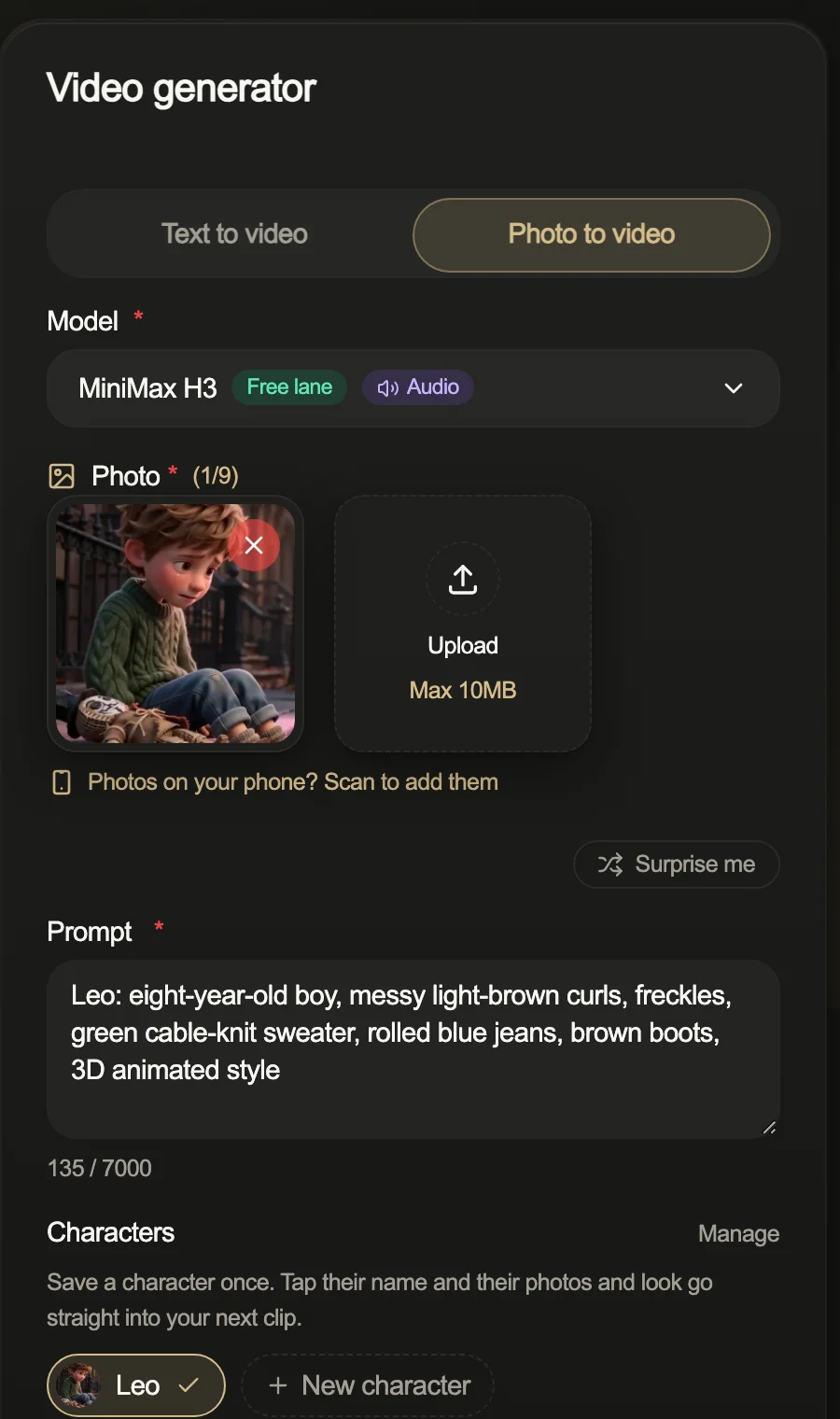
On Movoa you write the character down once: a name, one look line ("Mina, ten, black bob with a red clip, round glasses, yellow raincoat") and the photos. Tap the name and that line goes to the top of the prompt; on photo to video the photos fill the reference slots too, up to 9 per clip on MiniMax H3. Two people in the scene? Tap two names. Up to 30 characters stay on your shelf.
- Next shot: "Continue from this clip" grabs the last frame of the take you kept and opens the next shot with it as the first photo, your characters' photos still attached.
- Sound: every H3 clip comes back with its own sound.
- Clean frames: a "No on-screen text or subtitles" switch keeps captions out, so you add your own in the edit.
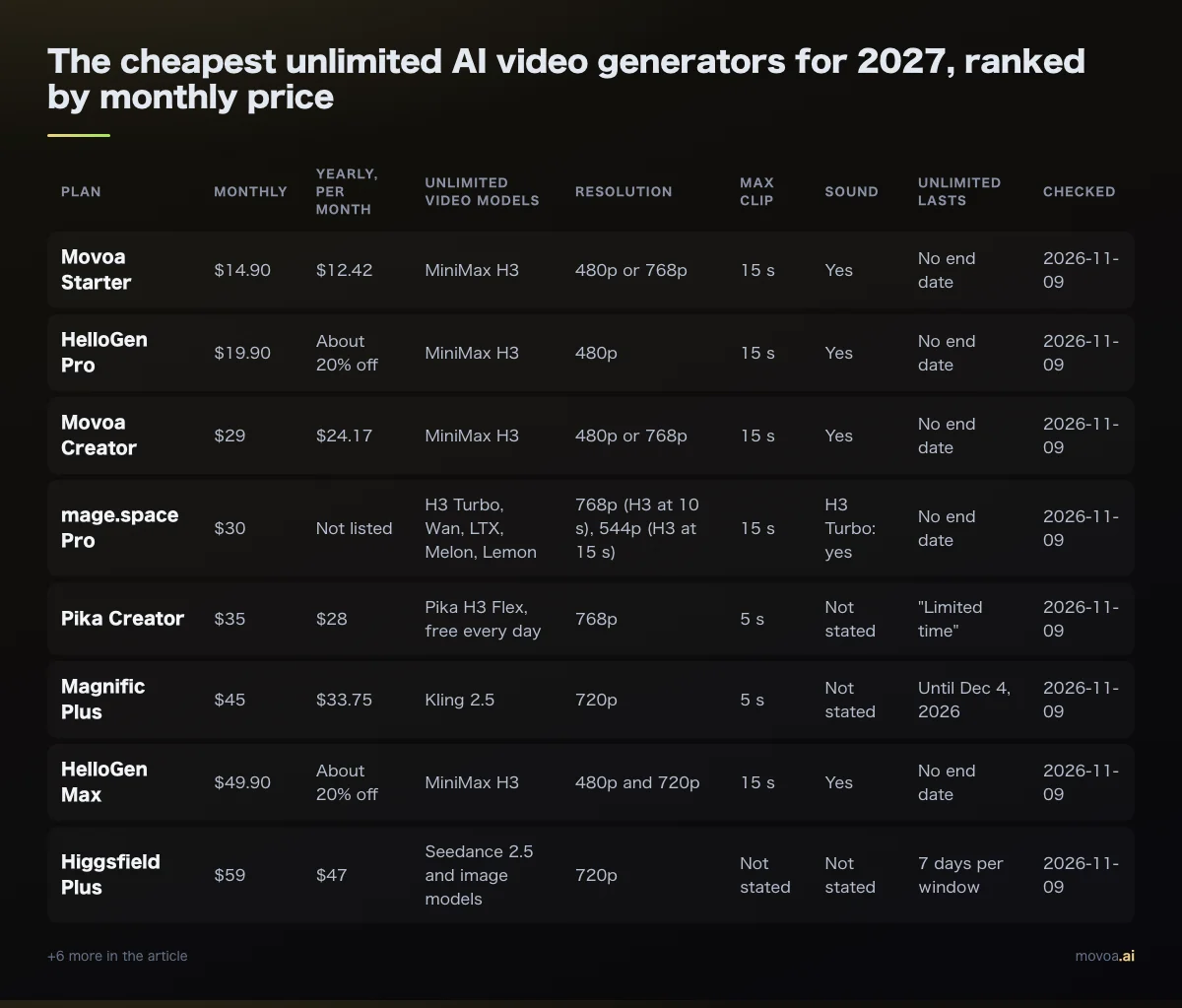
Here is where Movoa wins outright. Of every AI video generator in the table, only Movoa pairs a saved character shelf with no monthly cap on its cheapest monthly plan ($14.90): the retakes a series eats don't come out of a credit balance, while the metered plans above spend credits on every take, and the other unlimited offers sit on a $95 tier (Runway, selected models) or on annual plans for a limited time (Pixmind). A free account makes H3 clips at 480p with no daily cap and no watermark, so you can test the whole loop before paying. H3 clips come out 16:9 for YouTube or 9:16 for TikTok, Shorts and Reels.
Kling 4.0: the AI video generator that takes video and voice references
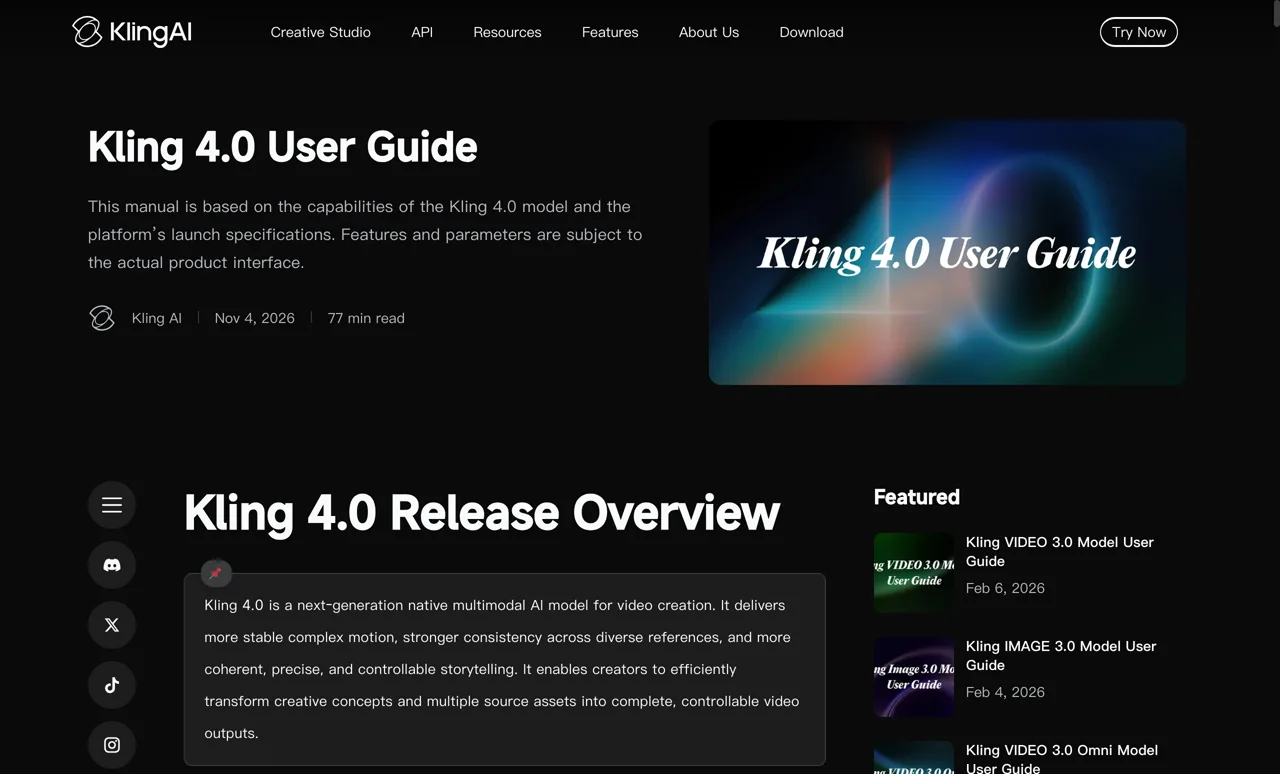
Kling's own Kling 4.0 user guide (klingai.com) lists up to 15 reference assets per task, drawn from up to 10 images, 5 videos adding up to 30 seconds, 7 elements and 3 video elements, plus voice styles. One generation runs up to 30 seconds, with up to 10 keyframes to pin where a character stands at each beat, and Kling says lip sync and two-channel stereo improved in the same release. Its blog dates the full model to October 2026, after early access from September 28. Kling's plans page showed us only a list of benefits (monthly credits, a dedicated queue, 4K), not prices.
Seedance 2.5: references by the dozen
Dreamina's model picker describes Seedance 2.5 as "more realistic, longer videos, precise editing. Up to 50 references." That is the highest count in our table. Dreamina's price list did not load for us, so we can't tell you whether a Seedance plan there includes unlimited generations. You can also run Seedance 2.5 on Movoa.
Runway: approve a still, then animate it
Runway's Gen-4 References help article says one reference image can carry a character through new lighting and locations, that you can save a reference by tagging it, call it with @ and share it with your workspace, and that up to three References go into one generation. References make images; you then animate the approved still. Standard is $15 a month ($12 billed yearly) for 625 credits, which Runway's pricing page puts at 52 seconds of Gen-4.5.
Google Flow: your own face and voice as the character
Flow's help center now has a page for creating an avatar with "your own highly accurate visual and audio likeness"; you type @me in a prompt to put yourself in the shot. Google's account help says you make it by recording your selfie and voice, so it suits a presenter or a vlog persona more than a cast of invented people. Flow credits come with Google AI plans, priced by country.
Luma, Higgsfield and Vidu
Luma's Ray3 FAQ is blunt that Ray3.14 "lacks character consistency and the reference feature", so pick Ray3 when the character matters; Plus is $30 a month for 10,000 credits. Higgsfield's Soul ID learns one face from 20 to 80 photos in about 3 to 5 minutes, per its own guide, and asks for usage rights if the photos are of someone else. Vidu's Reference to Video takes up to seven images (characters, props, a set) in one generation, which is why it comes up for two- and three-character scenes.
Pika, Hailuo and the multi-model AI video generator studios
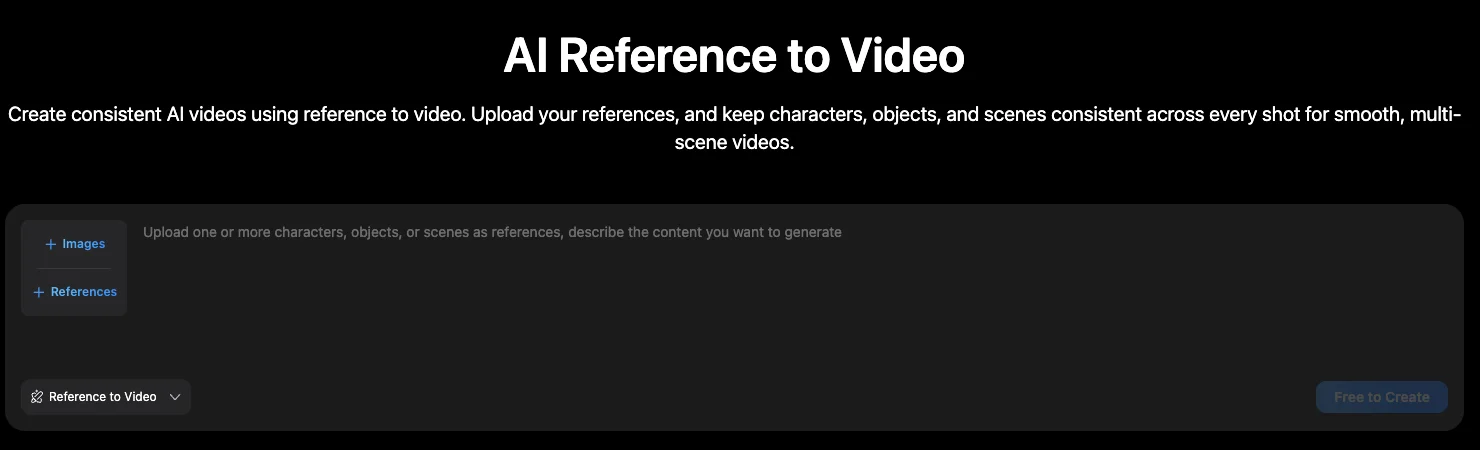
Pika's H3 Flex makes a 15-second clip with audio at 768p, split into five editable audio stems, per Pika's own posts. Hailuo's MiniMax H3 page shows 12 reference slots under Omni Reference. RefVid saves a subject from 1 to 10 photos, puts up to 3 subjects in one shot, and sells clips singly ($2.99 for up to 5 s, $6.99 for up to 15 s) or from $10 a month. MaxVideoAI, Pixmind and Medeo run other makers' models with references; their rows above show what each charges.
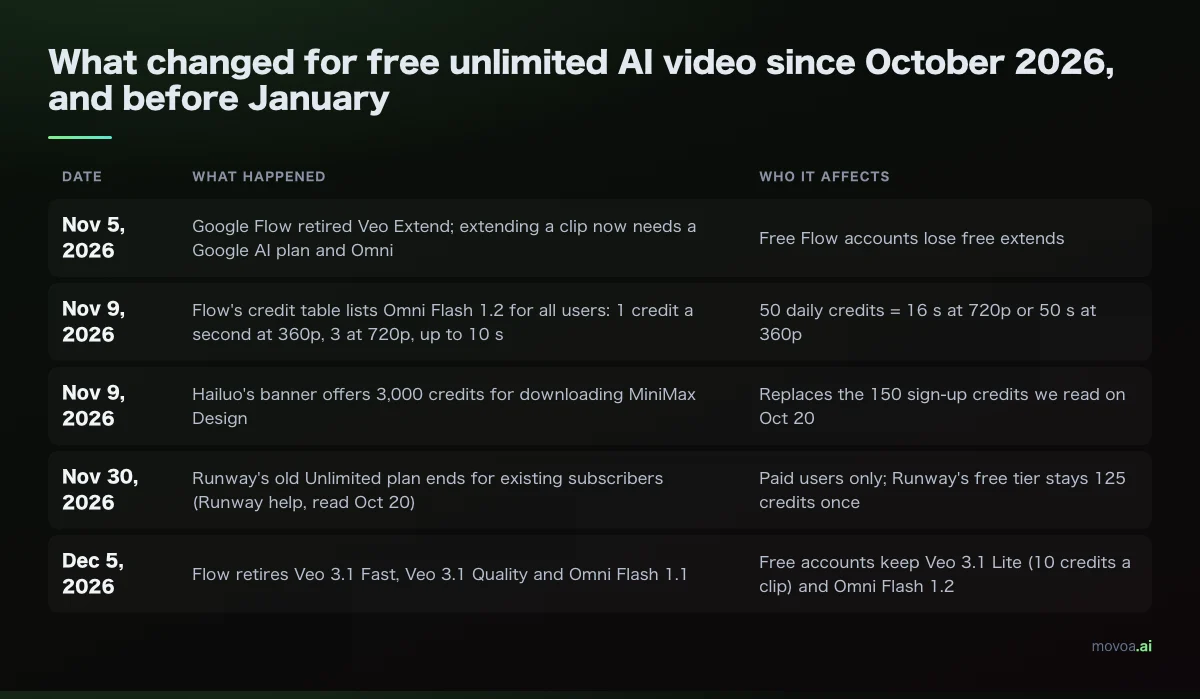
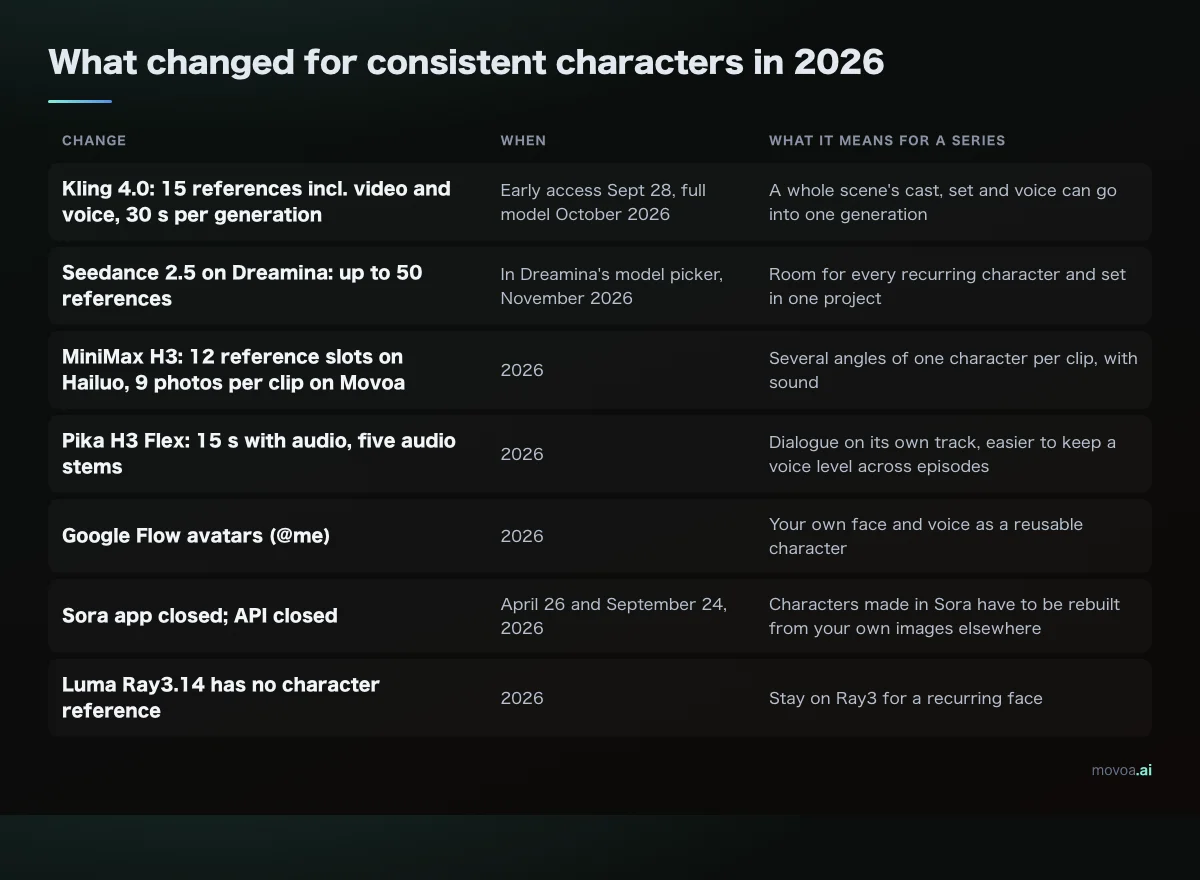
What changed for AI video generator character consistency in 2026
Each row is dated from the vendor's own page.
| Change | When | What it means for a series |
|---|---|---|
| Kling 4.0: 15 references incl. video and voice, 30 s per generation | Early access Sept 28, full model October 2026 | A whole scene's cast, set and voice can go into one generation |
| Seedance 2.5 on Dreamina: up to 50 references | In Dreamina's model picker, November 2026 | Room for every recurring character and set in one project |
| MiniMax H3: 12 reference slots on Hailuo, 9 photos per clip on Movoa | 2026 | Several angles of one character per clip, with sound |
| Pika H3 Flex: 15 s with audio, five audio stems | 2026 | Dialogue on its own track, easier to keep a voice level across episodes |
| Google Flow avatars (@me) | 2026 | Your own face and voice as a reusable character |
| Sora app closed; API closed | April 26 and September 24, 2026 | Characters made in Sora have to be rebuilt from your own images elsewhere |
| Luma Ray3.14 has no character reference | 2026 | Stay on Ray3 for a recurring face |
Face, voice, set: what each AI video generator can lock
Once the face holds, voice, acting and sets are what's left. Under one YouTube tutorial: "how do we lock in personality, acting, and voice? … What we really need is consistent acting and voice." Under another: how to "lock a location inside a sheet" so the set holds from every camera angle. And on Reddit, the mascot makers ask the same of a brand character. Each of these is its own input.
| What has to stay the same | The input that holds it | Where you get that input |
|---|---|---|
| Face, hair, outfit | A saved character: look line + 3 photos (front, three-quarter, full body) | Movoa Characters, Kling elements, Runway References, Vidu, H3 on Hailuo |
| Voice and delivery | A voice reference, or the voice written into the look line | Kling 4.0 voice styles, Google Flow avatar (your own voice); on any other AI video generator, describe the voice the same way every time |
| The set, from every angle | One wide image of the location as a reference on every shot there | Any AI video generator with 3+ reference slots |
| A real product in hand | The product photo as its own reference, never only in words | RefVid products, Kling elements, a Movoa character slot used for the product |
| A brand mascot | Fixed colors and one prop written into the look line + a clean turnaround image | Movoa Characters, Kling elements |
| Two people in one shot | One saved character each, both named in the prompt | Movoa (pick two), Vidu, Kling 4.0 |
| An anime or cartoon cast | The same style words in every look line | Movoa's anime and cartoon generators, Vidu |
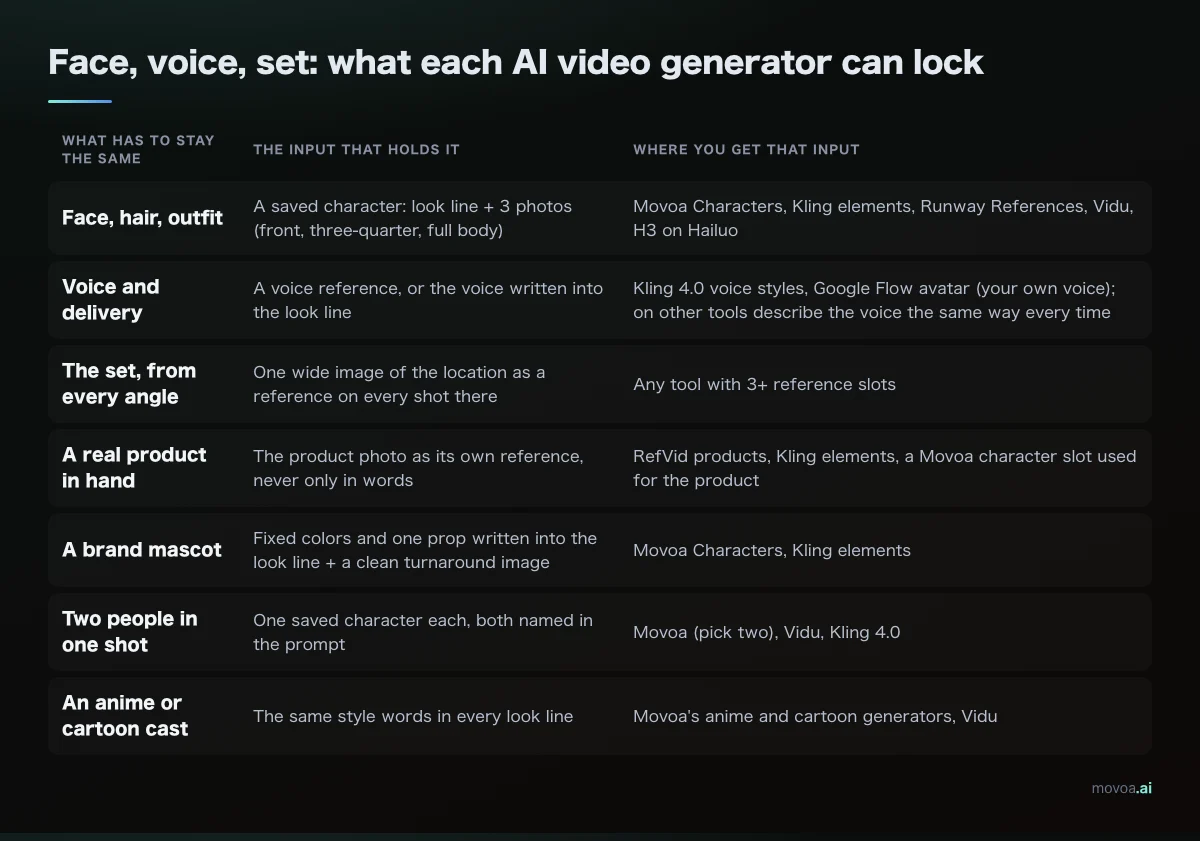
Outside Kling 4.0's voice styles and Google's own-voice avatar, no AI video generator in the table takes a voice sample. Write the voice the same way in every prompt ("warm, low, a slight rasp, speaks slowly") and keep it in the saved look line.
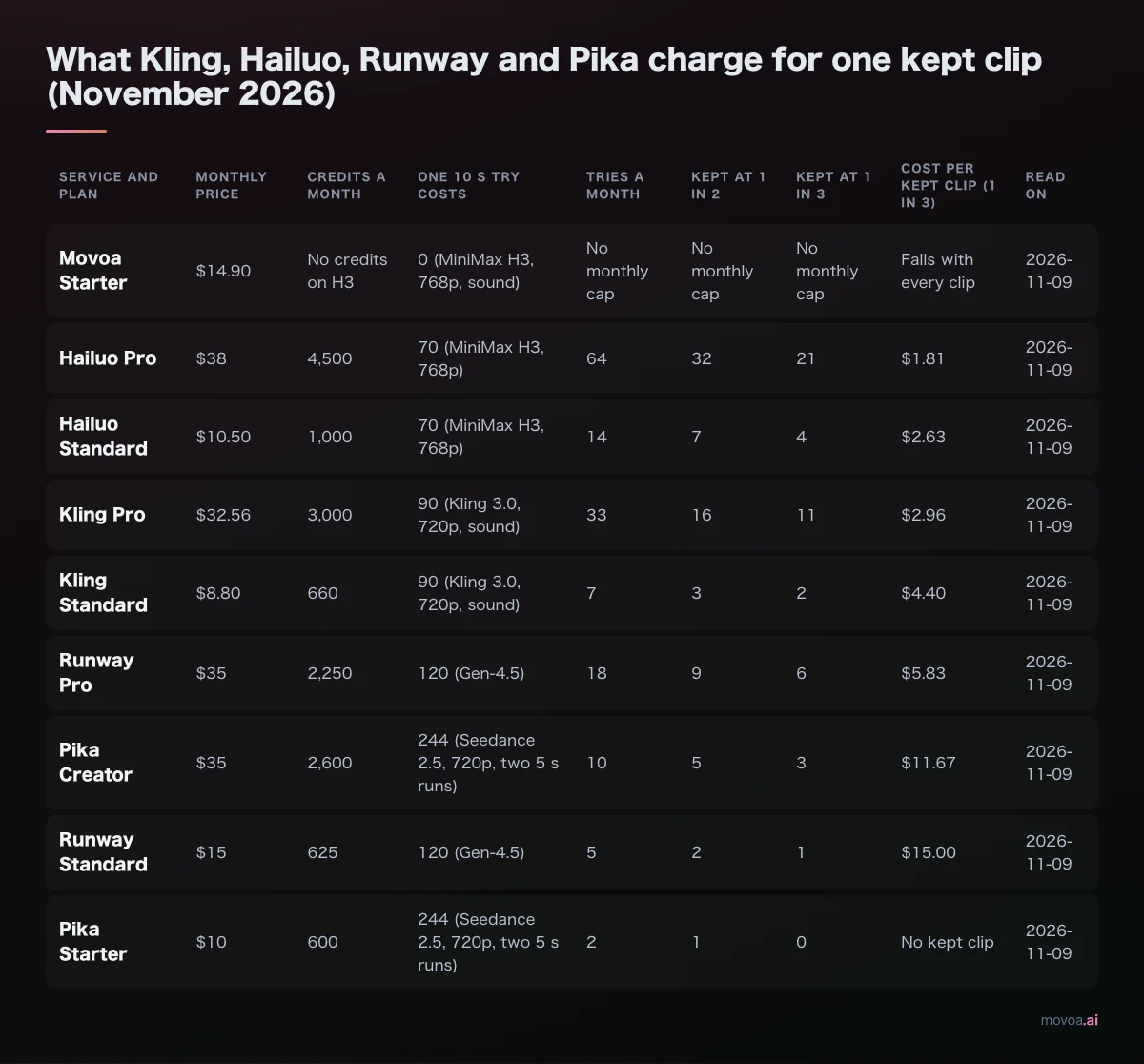
How many retakes does an AI video generator plan buy?
A usable shot rarely comes on the first take. One commenter on a Seedance tutorial put it plainly: feeding six or seven character videos as references "will make cost explode", because each input is charged by length. Another asked whether Seedance "has unlimited generations after subscription". This is what each plan page says your money buys, read November 9, 2026.
| Plan | Price a month | What the vendor's page says it buys |
|---|---|---|
| Movoa Starter | $14.90 ($12.42 yearly) | MiniMax H3 at up to 768p with no monthly cap, sound, commercial use |
| Runway Standard | $15 ($12 yearly) | 625 credits = 52 s of Gen-4.5 |
| Runway Pro | $35 ($28 yearly) | 2,250 credits = 187 s of Gen-4.5 |
| Luma Plus | $30 | 10,000 credits |
| Pika (entry paid plan) | $10 | 600 credits |
| Pika Creator | $35 | 2,600 credits + free daily H3 Flex runs (limited time) |
| RefVid | $10 ($8 yearly) | Monthly credits; single clips $2.99–$6.99 without a plan |
| Pixmind Basic | $12.42 billed yearly | 168,000 credits a year; unlimited H3 on annual (limited time) |
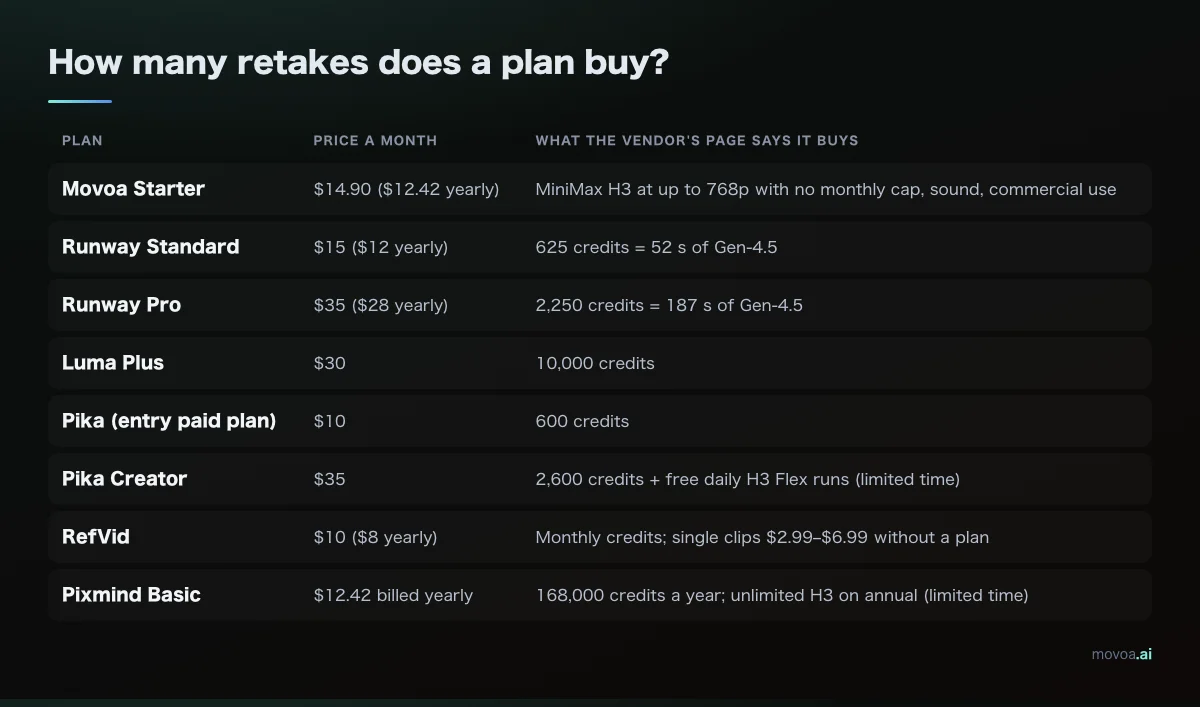
On a metered plan, every retake spends credits, so the take you keep can be the one your balance allowed. On Movoa's plans H3 retakes are already paid for, from the cheapest monthly plan up.
Build a character bible before episode 1 in any AI video generator
The first reference image
Generate the first reference as a still: plain background, even light, the character standing straight, in the outfit they will wear all season. Then make two more from it: a face close-up from the front and one from three-quarter. Keep each in its own reference slot rather than stitched into one sheet. If the character is drawn, your own drawing works the same way.
One look line and one voice line
Write the look in a single line you never rewrite: age, hair, face, outfit, one prop, art style. Under it, one voice line. The look line must match the photos; a prompt that describes the face differently from the photo is a common way to get a blended face.
Look: [name], [age], [hair], [face details], [outfit], [one prop], [art style].
Voice: [pitch], [pace], [texture], [accent if any].
Shot: [name] [action] in [place]. Camera: [shot size, movement]. Sound: [what we hear].
Filled in for one character:
Look: Mina, ten, black bob with a red clip, round glasses, yellow raincoat, a green umbrella, soft 3D cartoon style.
Voice: high, quick, a little breathless, American accent.
Shot: Mina jumps over a puddle at the school gate and laughs. Camera: medium shot, slow push in. Sound: rain on the umbrella, her laugh, distant school bell.
One set image per location
For each place the story returns to (the kitchen, the classroom, the spaceship bridge), make one wide image and add it next to the character photos on every shot there. The same wide image on every shot gives the model the same room to work from each time.
Re-add the references on every scene
Re-add the same references in every new generation, even when only the outfit changes; the generators in our table attach references per generation, not per project. A saved character does that for you: on Movoa the photos and look line go in each time you tap the name.
Start shot 2 from shot 1's last frame
Press "Continue from this clip" on the take you kept. The last frame becomes the first photo of the next shot and the character photos come with it, so the cut matches. For a whole episode built shot by shot, see the MiniMax H3 prompt guide.
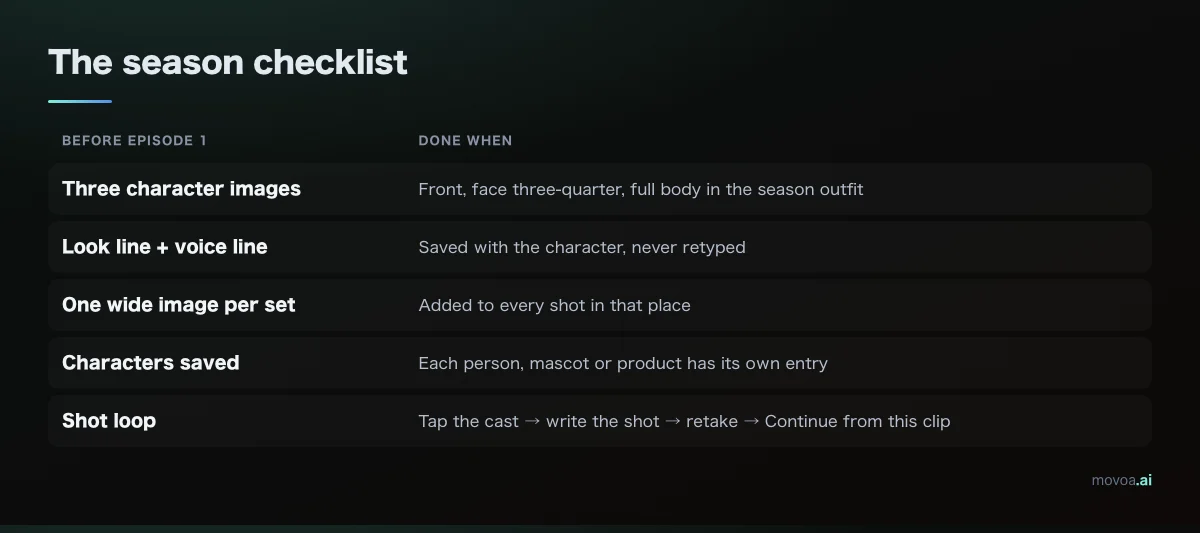
The season checklist
| Before episode 1 | Done when |
|---|---|
| Three character images | Front, face three-quarter, full body in the season outfit |
| Look line + voice line | Saved with the character, never retyped |
| One wide image per set | Added to every shot in that place |
| Characters saved | Each person, mascot or product has its own entry |
| Shot loop | Tap the cast → write the shot → retake → Continue from this clip |
FAQ: AI video generator for consistent characters in 2027
Can an AI video generator keep the same voice for a character?
Partly. Kling 4.0 takes voice styles as references and Google Flow's avatar carries your own voice. On every other AI video generator in our table, write the voice the same way in every prompt and keep that line saved with the character. Every MiniMax H3 clip on Movoa comes with sound generated from your prompt.
Do I have to add the reference image again in every scene?
Yes, each new generation needs the character reference attached. A saved character (Movoa Characters, Kling elements, Runway's tagged References) attaches it for you with one tap.
How do I make the first reference image of my character?
Generate one clean full-body still on a plain background, then a front face close-up and a three-quarter face from it. Use those three as the character's photos.
Can I keep the same location consistent across shots?
Yes: one wide image of the set, added as a reference on every shot in that place, next to the character photos.
Is there a free AI video generator for consistent characters in 2027?
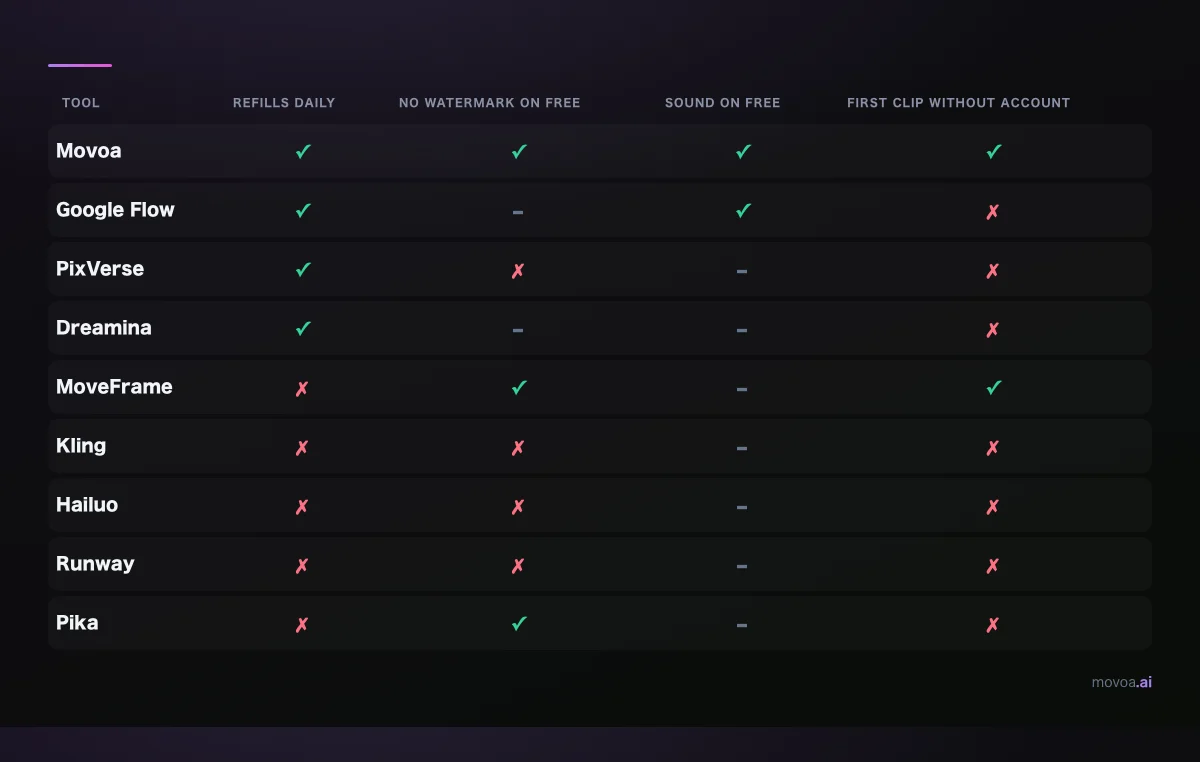
Yes. A free Movoa account saves characters and makes MiniMax H3 clips at 480p with sound, no daily cap and no watermark; you can make your first clip without signing up. Runway gives 125 one-time credits and Pixmind 200 welcome credits.
Which AI video generator handles two consistent characters in one scene?
One that takes several references per clip and lets you name each person: Movoa (pick two saved characters), Vidu (up to 7 images) or Kling 4.0 (up to 10 images and 7 elements).
Do I need to train a LoRA, or is a reference image enough?
For most series, references are enough: saved characters on Movoa, Kling elements, Runway References and Vidu all work without training. Higgsfield's Soul ID does train, on 20 to 80 photos of one real person.
Can I use a real person's face as the character?
Use your own, or one you have the rights to. Google Flow's avatar is built only from your own likeness, and Higgsfield asks for usage rights when the photos show someone else.
Is it easier to keep an anime or cartoon character consistent than a realistic person?
The method is the same: same photos, same style words in every look line. Movoa has anime and kids' story generators built for it.
Sources for this AI video generator comparison
Read on November 9, 2026: Kling's Kling 4.0 user guide (klingai.com), its Kling 4.0 blog post and plans page; Dreamina's model list; Runway's pricing and Gen-4 References help article; Google Flow's help center; Luma's pricing and Ray3 FAQ; Higgsfield's Soul ID guide; Vidu's Reference to Video page; Pika's pricing and H3 Flex posts; Hailuo AI's H3 page; OpenAI's Sora discontinuation notice; and the pricing pages of RefVid, MaxVideoAI, Pixmind, Medeo, Pollo AI, invideo and VicSee. Movoa's row comes from the product itself.
- Roundups cited for this question that we read first: techyorker.com, rottenwifi.com, itechguides.com, usawire.com, programminginsider.com, mstudio.ai, kansova.com, aitoolanalysis.com
- Consistency guides behind the face, voice and set table: batchframes.com, cinemadrop.com, pixo.video, vofy.art, seedance2pro.io, paintbrush.gg
- Creator questions quoted: YouTube tutorial comments and Reddit threads in r/aivideomaking
Make episode 1 in an AI video generator this week
Build the bible, save the cast, shoot three shots with "Continue from this clip" and put episode 1 next to episode 2. On Movoa that test costs nothing on a free account, and on a paid plan every retake of H3 is already included, from $14.90 a month. Save your first character and make episode 1.