An AI product video generator can turn one product photo into a vertical TikTok ad in a few minutes, but the free tier is where the catch hides: of the 10 tools we checked on November 8, 2026, not one free plan says it gives you both a clean export and the right to run the clip as an ad. So test for free, and pay only for the product video you will actually run.
Pick by what the product video has to do:
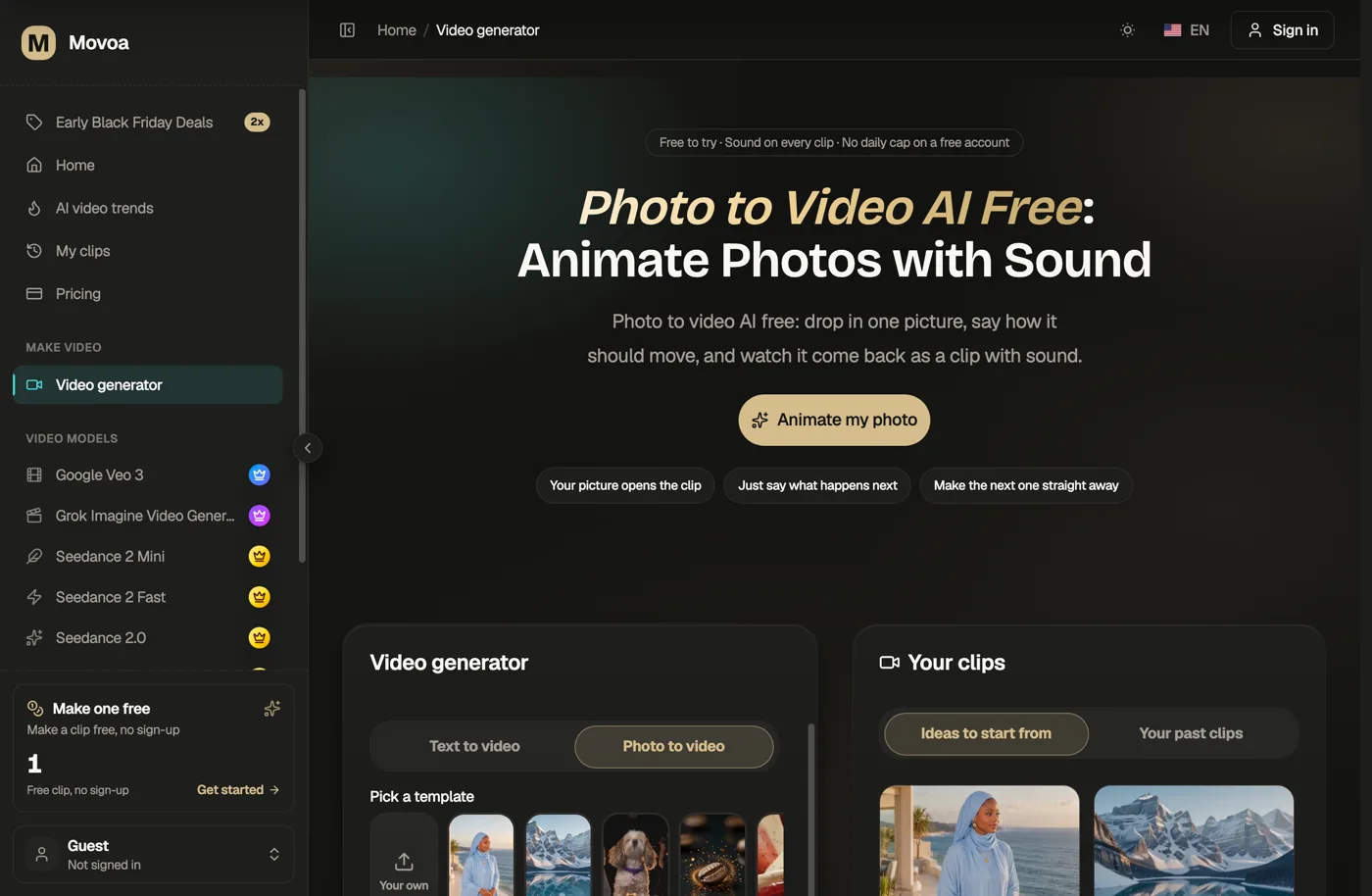
You want Best pick (checked Nov 8, 2026) Animate your own product photo, with sound, free and unwatermarked Movoa photo to video: no daily cap on a free account Run that same product video as a paid ad Movoa Starter, $14.90/mo: unlimited MiniMax H3 at 768p, commercial use A TikTok-native ad built where you buy the media TikTok Symphony Creative Studio An AI presenter holding up your product Creatify (10 free credits a month, watermarked) or Topview A free product video you may use commercially Runway: 125 one-time credits, commercial use allowed, watermark on free
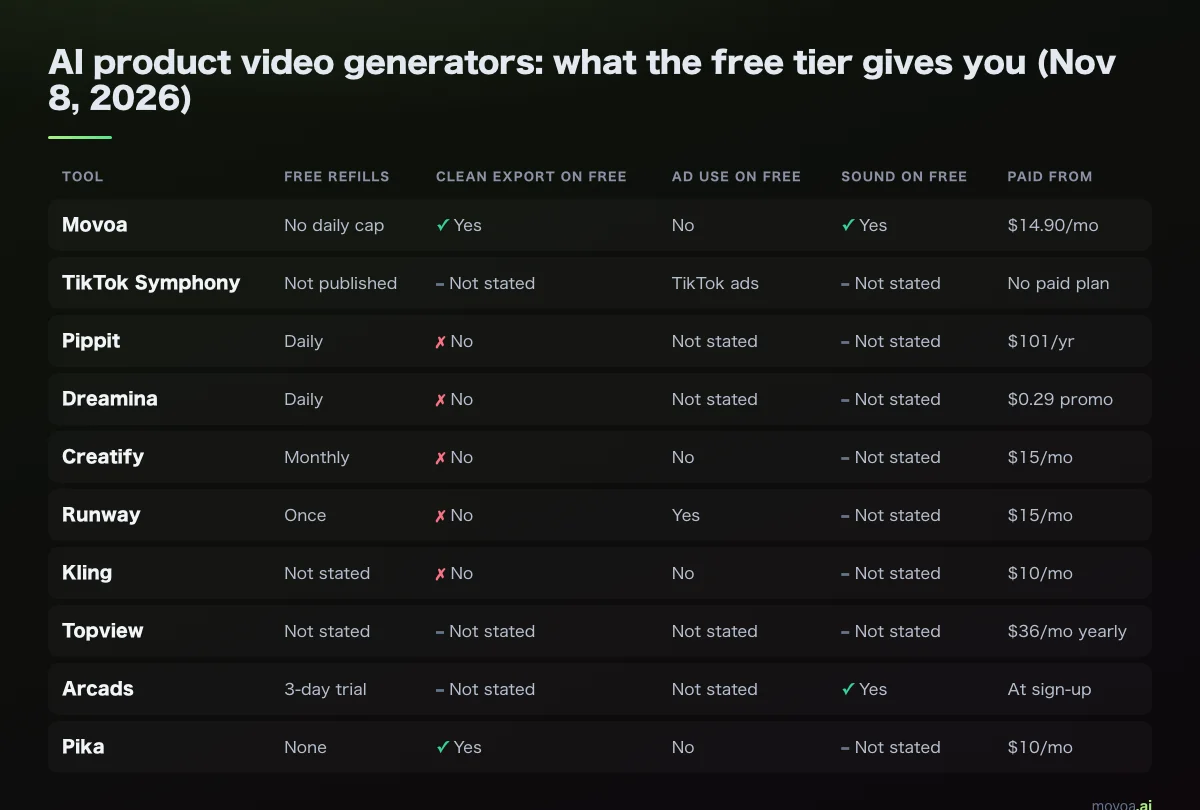
AI product video generators compared (checked November 8, 2026)
Every cell comes from the vendor's own pricing, help or FAQ page, read on November 8, 2026, except where the cell says otherwise. "Not stated" means the vendor's page does not say either way. "Ad use" means the vendor says you may use free-tier output commercially. Three things are separate here: making a video for free, downloading it without a watermark (a "clean export"), and being allowed to put it in a paid ad.
| Tool | You give it | You get | Free allowance | Renews | Watermark on free | Ad use on free | Sound on free | Paid from | Checked |
|---|---|---|---|---|---|---|---|---|---|
| Movoa | Product photo + one line on how it moves | Animated product clip, photo is the first frame | MiniMax H3, 480p, 4 s clips with sound | No daily cap on a free account | None on video | Paid plans only | Yes | $14.90/mo | 2026-11-08 |
| TikTok Symphony Creative Studio | Product details, images or a link | TikTok-style video ads, image to video | Free to open with a TikTok for Business account; limits not published | Not stated | Not stated | Built for TikTok ads | Not stated | No paid plan listed | 2026-11-08 |
| Pippit | Product link or photos | Product videos, avatars, talking photos | Daily credits, no card | Daily | Yes (removal listed on paid plans only) | Not stated | Not stated | Starter $101/yr | 2026-11-08 |
| Dreamina | Photo + prompt | Animated clip | Daily free credits | Daily | Yes, per Reddit user reports; vendor page silent | Not stated | Not stated | First-month promo from $0.29 | 2026-11-08 |
| Creatify | Product URL or one product image | UGC avatar ads, product videos | 10 credits a month (5 credits per 15 s of ad) | Monthly | Yes, on every free export | Not stated | Not stated | $15/mo ($10 billed yearly) | 2026-11-08 |
| Runway | Photo + prompt | Cinematic clip | 125 credits, about 10 s of Gen-4.5 | Once | Yes ("No watermarks" starts at Standard) | Yes, per Runway's help center | Not stated | $15/mo ($12 billed yearly) | 2026-11-08 |
| Kling | Photo + prompt | Animated clip | Free account credits; amount not on the plan page | Not stated | Yes (removal is a paid benefit) | No (commercial use is a paid benefit) | Not stated | $10/mo ($6.99 first month) | 2026-11-08 |
| Topview | Product URL or images | Avatar and product ads | Free credits, no card | Not stated | "Free plans may include watermarks" | Not stated for free | Not stated | $36/mo billed yearly | 2026-11-08 |
| Arcads | Script, product photo or site | AI actor ads | No free plan: 3-day trial, 1,000 credits, card required | Trial only | Not stated | Not stated | Yes (actors speak) | Shown at sign-up | Arcads' own guide, 2026-10-21 |
| Pika | Photo or prompt | Clips, plus a Product Ad app | Account only; credits come in packs | None | No | No commercial license on Free | Not stated | $10/mo | 2026-11-08 |
Two columns decide whether a free product video can go into an ad account: the watermark and the ad rights. If you only want the general free image-to-video picture, our free image to video roundup covers that; this page is about selling a product.
Two kinds of AI product video: animated product shots vs avatar ads
An AI product video generator does one of two jobs. Photo-to-video tools move your actual photo: the camera pushes in, light sweeps across the label, a hand picks the item up. Avatar tools put an AI presenter next to your product and have them talk about it.
When an animated product shot is enough
Use photo-to-video when the look of the product is what sells it, and add the price and hook as text afterwards. Movoa, Dreamina, Runway, Kling and Pika all take your photo as input; on Movoa it is the literal first frame, so the video starts from your product, and the frames after it are generated. Movoa runs this on MiniMax H3, and every clip comes back with its own sound.
When you need an avatar or UGC-style ad
If the product needs explaining (a gadget, a supplement, an app), sellers on TikTok lean on a product video with a person talking to camera. Creatify, Topview, Arcads and Pippit start from a product link. Expect to pay for it: Creatify's free plan is 10 credits a month with a watermark on every export, and Arcads has no free plan, only a card-backed 3-day trial.
We ran two real product photos through an AI product video generator
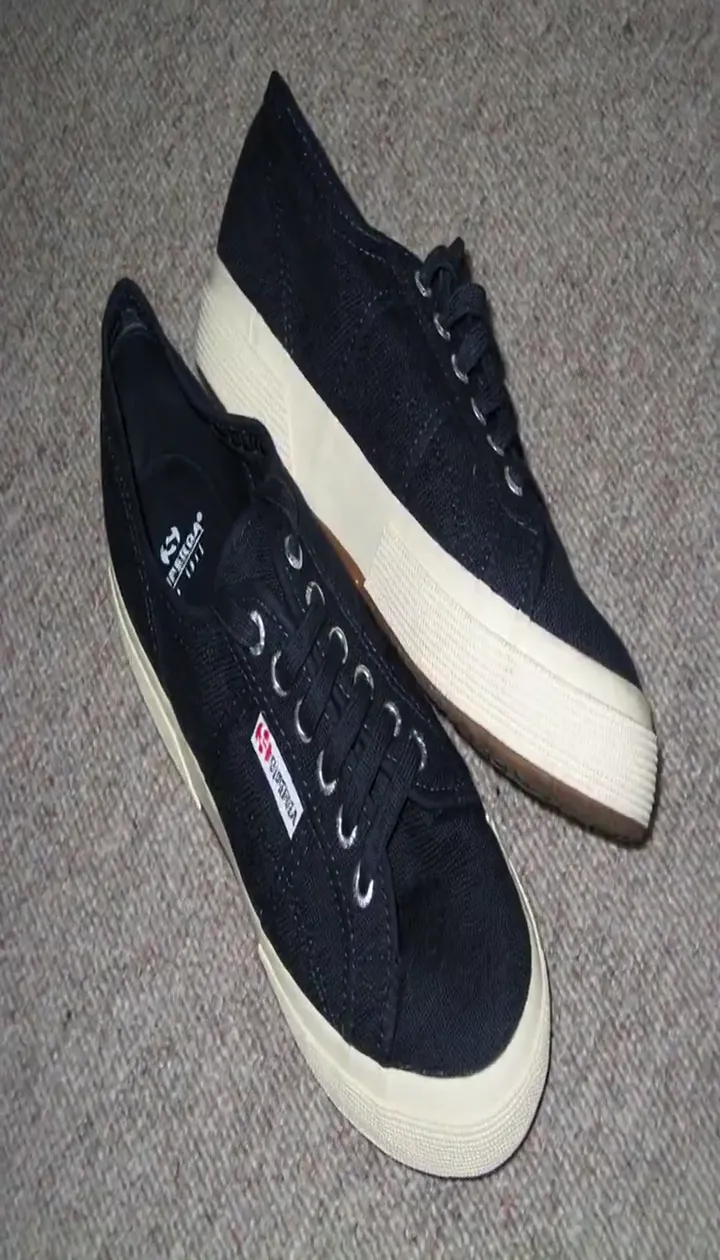
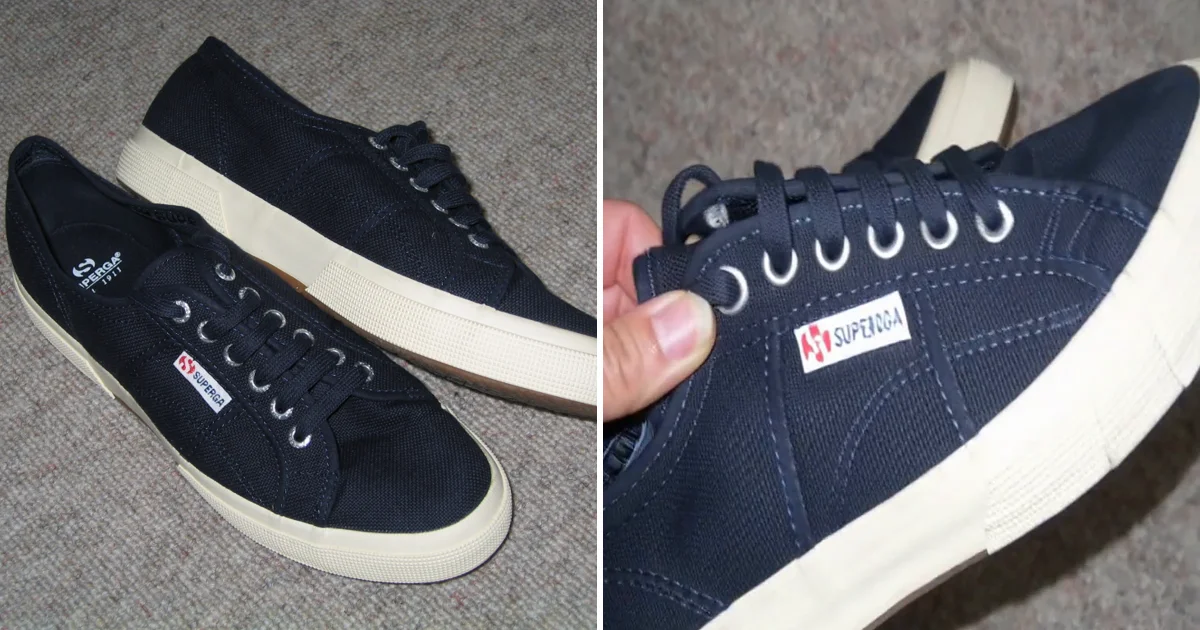
Pricing pages don't show whether the product survives the animation, so we ran two public photos through Movoa's AI product video generator (MiniMax H3 at 768p, 12 seconds, 9:16; that is the Starter shape, free accounts get 480p, 4-second clips of the same engine) on November 8, 2026. One is the photo a small seller actually has: sneakers shot on a carpet with a compact camera. The other is a clean studio shot with two products in it. Those are the two cases sellers ask about on r/generativeAI: one wants "video clips from" photos of home décor items for product ads, another wants "that exact table" placed into AI-generated scenes. Same settings for both, and we checked frames every half second against the source photo.
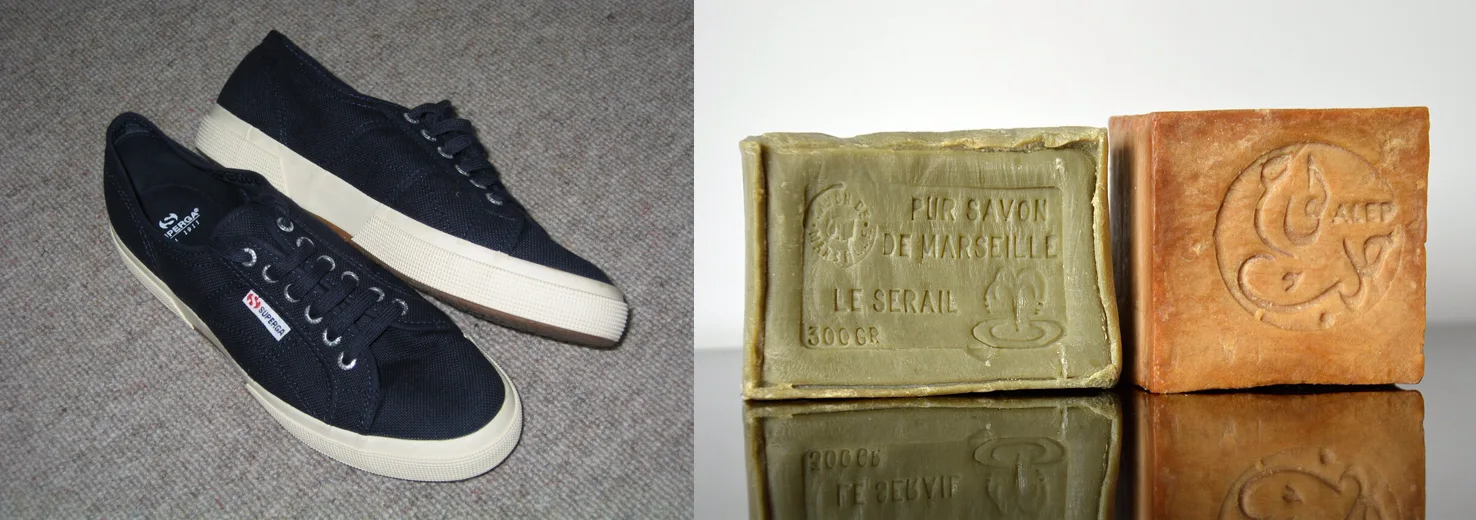
Test 1: sneakers from a casual photo
Prompt: "Handheld social-media product shot: the camera slowly orbits a pair of navy canvas sneakers resting on a beige carpet, then a hand reaches in and lifts the front sneaker to show its cream rubber sole. Natural room light, upbeat lo-fi beat with soft fabric rustle. Keep the sneakers' shape, laces, stitching and colors exactly as in the photo."
The camera orbits, a hand comes in and turns the shoe over to show the sole, and the shape and laces hold for all 12 seconds. The brand name on the side label stays readable as the hand brings the shoe up to the camera, and the hand moves like a real one. The product video came back with its own beat and fabric sounds: music and effects, not narration. The sole wasn't in the photo, so the sole you see is generated; if the sole is a selling point, shoot it and use that photo as the first frame.
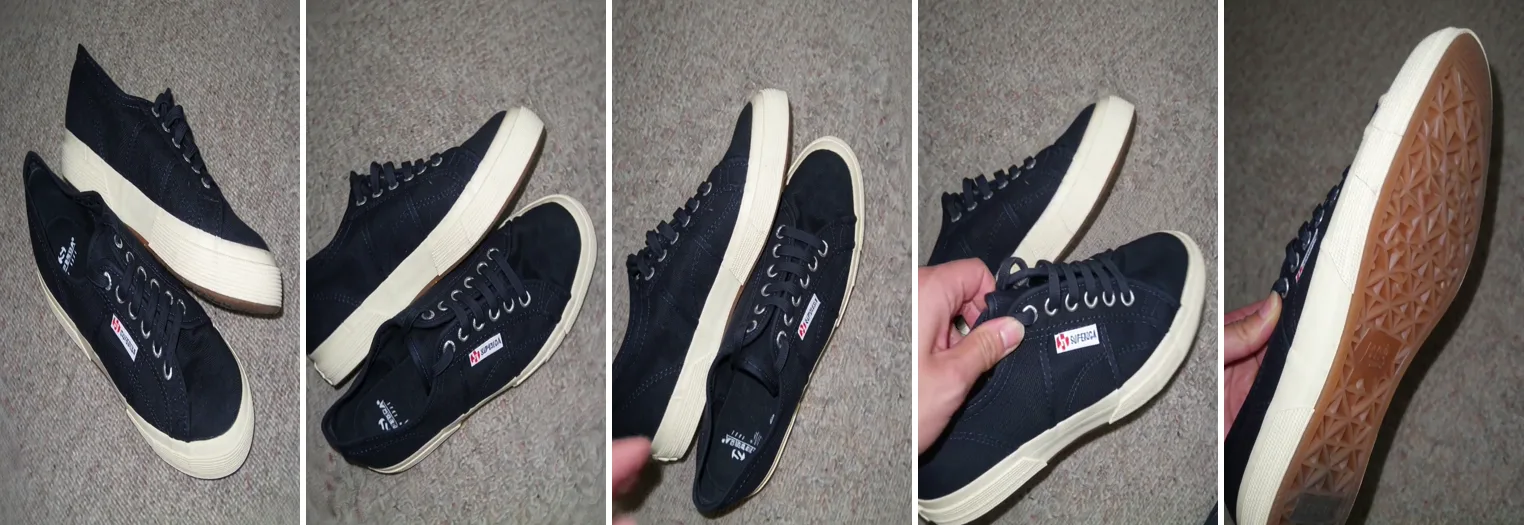
Test 2: two soaps in one studio photo
Prompt: "Slow cinematic push-in on two blocks of handmade olive-oil soap standing on a glossy black surface. Soft studio light sweeps across the embossed lettering, a few water droplets fall… The soaps keep their exact shape, color and stamped text."
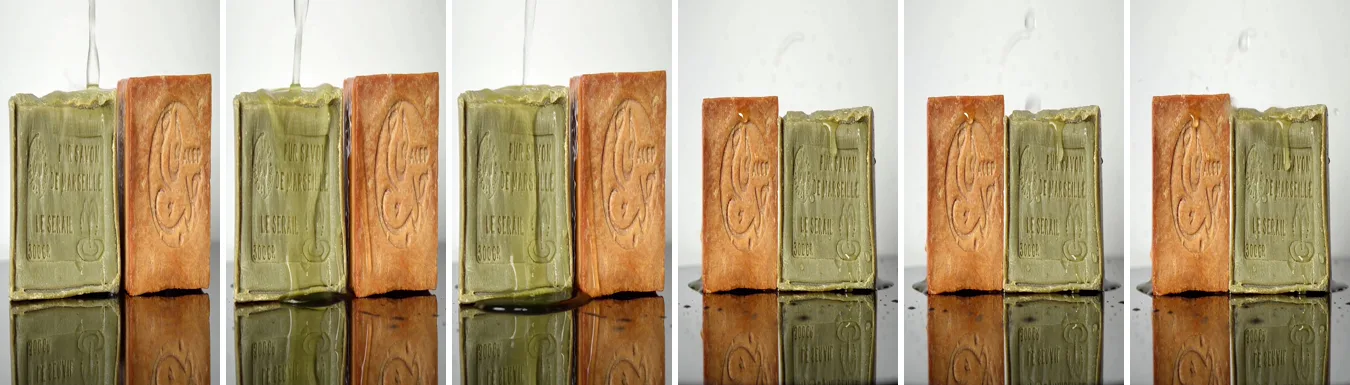
The water and light look like a spa ad. Then at about 3 seconds the shot cuts, and after the cut the two soaps have swapped sides. Each soap keeps its color and stamped text. The lesson is about the photo: two products in one frame leave the order open.
How to keep the product exact in an AI product video
The single-product photo held its shape, laces and label text for the whole 12 seconds; the two-product photo kept each soap intact but swapped their order at the first cut. So the photo you upload decides most of what comes back.
What the test says about your photos
Keep to one product per frame, label facing the camera (adtestbench.com gives the same rule); the soap video shows what happens when you don't.
- One product per photo. Bundles and sets get re-arranged. Make one product video per item and cut them together.
- Name what must not change. End the prompt with the parts a buyer checks: logo, label text, color, number of items.
- Photograph what you want shown. Anything the photo doesn't show (the sole, the back label) gets invented.
- Check every frame before it runs. Use AI motion for the camera, light and mood. Where an exact label, size, part or code is the point of the ad, show real footage or a real close-up instead.
Which free AI product video generator can you actually run as a TikTok ad?
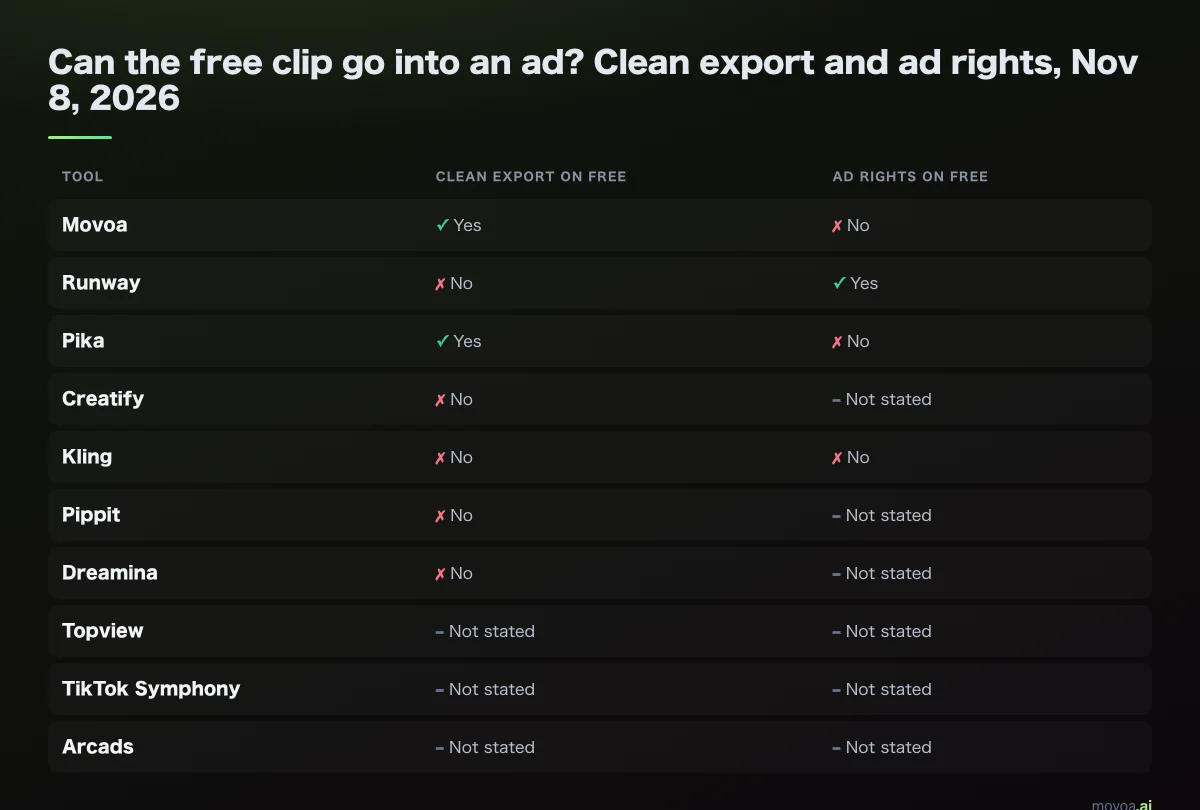
Here is the same finding row by row:
| Tool | Clean export on free | Ad rights on free | Can the free clip go in an ad? |
|---|---|---|---|
| Movoa | Yes | No (paid plans) | Test free, run on Starter |
| Runway | No | Yes | Only with a watermark |
| Pika | Yes | No | No |
| Creatify | No | Not stated | No |
| Kling | No | No | No |
| Pippit | No | Not stated | No |
| Dreamina | No, per user reports | Not stated | No |
| Topview | May be watermarked | Not stated | Unclear |
| TikTok Symphony | Not stated | Not stated; built for TikTok ads | Inside TikTok only |
| Arcads | Not stated | Not stated | Trial needs a card |
TikTok Symphony Creative Studio is built for making TikTok ads and is free to open, but its pages we read don't state the licence on free output, so treat it like the other "not stated" rows.
Movoa is the best place to test a product video for free, then move to Starter before it goes into a paid ad. Why Movoa: on a free account there is no daily cap, so you can re-run the same product until it holds (the soap swap is the reason you will want to), and the free product video has sound and no watermark, so you judge the real result, not a stamped preview. It runs in a phone browser too. Starter at $14.90 a month adds commercial use, 768p and clips up to 15 seconds, with MiniMax H3 never running out, so you can re-roll a shot until the product looks right without counting credits. Why that matters when you need ten takes of one shot: credits vs unlimited AI video.
How to turn a product photo into a TikTok product video ad (5 steps)
- Pick one photo of one product, label toward the camera. A phone photo works; our sneaker clip came from a casual one.
- Write one line on how the camera moves and one on what must stay fixed: "slow orbit, a hand lifts it to show the sole; keep the logo and color as in the photo." Then check the frames anyway. Our MiniMax H3 prompt guide has more patterns.
- Choose 9:16 for TikTok, Reels and Shorts.
- Generate with sound on. On Movoa photo to video the clip comes back with its own audio track, so it isn't silent when it autoplays in the feed.
- Add the hook, price and any voiceover in CapCut: put several product videos on one timeline, trim each to a few seconds, add text, export, and upload the file in TikTok Ads Manager. No product photo yet? Describe the product in text to video to rough out the idea, or browse every model on the Movoa video generator.
Shopify, TikTok Shop and Amazon: where a product video goes
The same product video can serve three placements, but each platform states its own limits:
| Placement | Shape | Length and size | Source |
|---|---|---|---|
| TikTok in-feed ad | 9:16 recommended, at least 540×960 | Up to 10 minutes | TikTok Ads help center |
| Shopify product media | Any | Up to 10 minutes, up to 1 GB | Shopify Help Center |
| Amazon product video | 16:9 or 9:16 | See Seller Central for the video type | Amazon Seller Central |
A 768×1344 product video from our test clears TikTok's minimum and drops straight into a Shopify product gallery. For Amazon, check which video slot you are filling before you export.
FAQ
What is the best free AI product video generator?
For animating your own product photo, Movoa: no daily cap on a free account, sound on every clip and no watermark on video. For a TikTok-only ad built inside TikTok's ad tools, TikTok Symphony Creative Studio. For avatar ads, Creatify's free plan gives 10 credits a month, with a watermark on every export.
Can AI turn a product photo into a video?
Yes. Photo-to-video tools take your photo and animate it from a text prompt; on Movoa the photo is the literal first frame. In our test a casual sneaker photo became a 12-second clip with a camera orbit and a hand lifting the shoe, and the brand name on the label stayed readable.
Can I use free AI product videos in TikTok ads?
Usually not as they come: Runway allows commercial use on free but watermarks the clip, and Pika exports clean but excludes commercial use. Movoa allows ad use on paid plans from $14.90 a month.
Which AI product video generator has no watermark on free?
Movoa (on video) and Pika, per their own pages on November 8, 2026. Neither includes commercial use on the free tier.
How do I make a TikTok product video with AI for free?
Use one product per photo, name what must not change, pick 9:16 and generate with sound; that is the recipe behind the sneaker video above. The free product video is for testing; running it as an ad needs a plan that grants commercial use.
Do AI product videos come with sound?
On Movoa, every clip has its own audio track, free clips included; avatar tools such as Arcads add a speaking voice. Most other vendors don't say.
Resources
All read November 8, 2026 unless noted.
- Movoa: pricing and photo to video
- TikTok: Symphony Creative Studio (ads.tiktok.com/creative/creativestudio) · TikTok newsroom, "Meet our latest Symphony Generative AI Tools" (newsroom.tiktok.com, June 16, 2025) · in-feed ad specs (TikTok Ads help center, "TikTok Auction In-Feed Ads")
- Pippit pricing (pippit.ai/pricing) · Dreamina (dreamina.capcut.com) · Reddit: Dreamina visible watermarks
- Creatify pricing (creatify.ai/pricing) · Creatify FAQ
- Runway pricing (runwayml.com/pricing) · Runway commercial use
- Kling membership plans (klingai.com)
- Topview pricing and FAQ (topview.ai)
- Arcads, best AI product video tools guide (arcads.ai, read October 21, 2026)
- Pika pricing (pika.art/pricing)
- Shopify product media types · Amazon Seller Central video help
- Test photos from Wikimedia Commons: "Bars of pure Marseille and Aleppo soap, 2024" by DimiTalen (CC0) · "Blue Superga shoes" by ConverseChucks (CC BY-SA 2.0; our sneaker video is a derivative shared under the same licence)
- Roundups we read before writing, for what other lists already say: adsandassets.com · adtestbench.com · camclo3d.com · supertooldirectory.com · thetoolshelf.com · vdobloom.com · vibbit.ai · avocadoai.co · startupeditor.com · designkit.com · itechguides.com · rewarx.com · versein.ai · morphed.app · wavespeed.ai · blog.reviews.io
Two product videos, one rule: the product has to come out of the video looking like the product. Put your best product photo into Movoa photo to video and see it move, with sound, for free; when one is good enough to run, Starter gives you the right to put it in the ad.