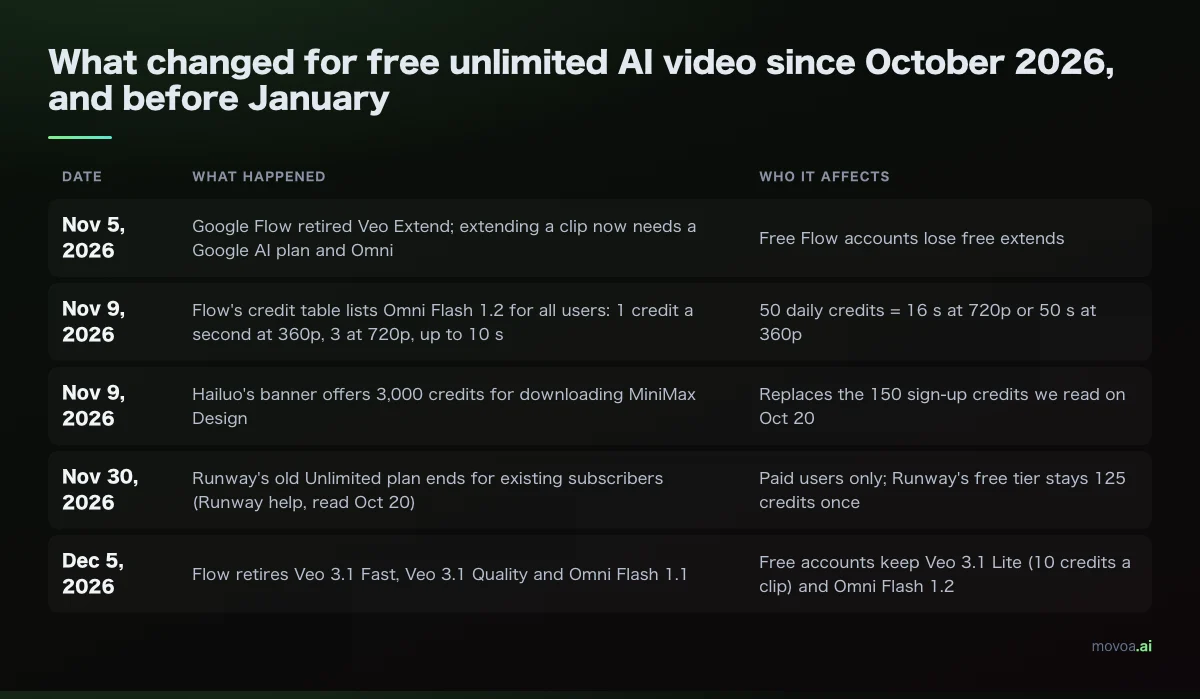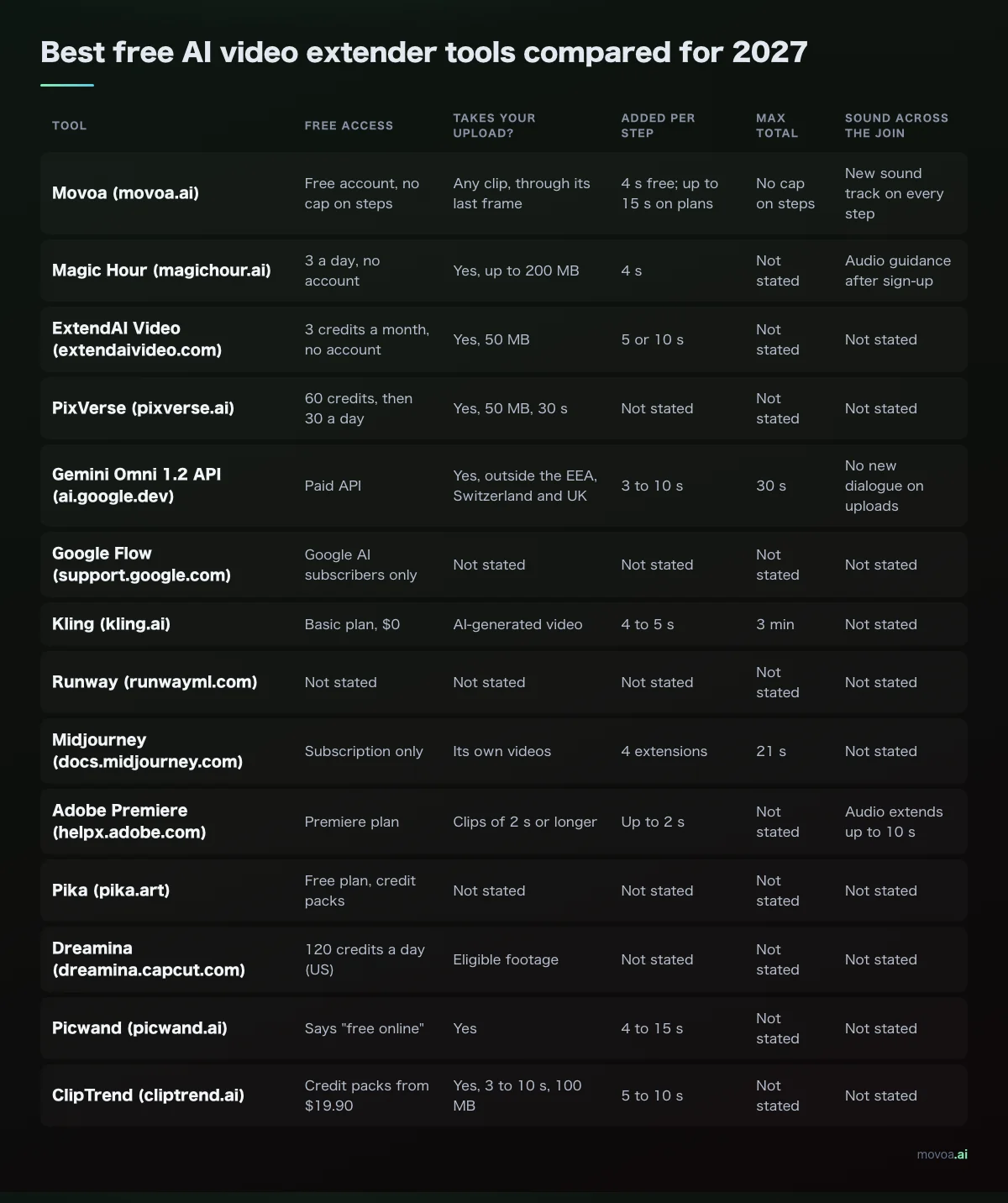
The best free AI video extender depends on where your clip came from, and the rules changed this week: on November 5, 2026 Google retired Veo Extend in Flow, so the Flow video extender now takes a paid Google AI plan. For a clip you filmed yourself, the Magic Hour video extender adds 4 seconds free with no account; for an AI story you are building shot by shot, continuing from the last frame works on any clip and costs nothing on Movoa. We checked 14 tools on their own pages on November 8, 2026.
There are three ways to make a clip longer, and each has a different best free pick:
You want Best free pick (checked Nov 8, 2026) Add a few seconds to a clip you filmed Magic Hour video extender: 4 s per extension, 3 a day, no account Chain shots into a longer story Movoa: Continue from this clip, 4 s steps with sound, no cap on steps with a free account One long shot with no join at all Google Vids on Omni 1.2 Flash: three 15 s videos a month free The longest native video extender chain Kling: 4 to 5 s per step, up to 3 minutes, on a paid plan
How to make AI videos longer than 10 seconds: a video extender and two other routes
Most models stop between 5 and 15 seconds a run, so anything longer is built one of three ways, and a long short film can use all three.
Route 1: render it long in one pass
The cleanest long shot is the one with no join. Single-run length went up fast this autumn: Google's Omni 1.2 Flash (November 5, 2026) renders up to 15 seconds natively, "up from 10 seconds with Omni 1.1", and ByteDance's Seedance 2.5 goes to 30 seconds in one clip.
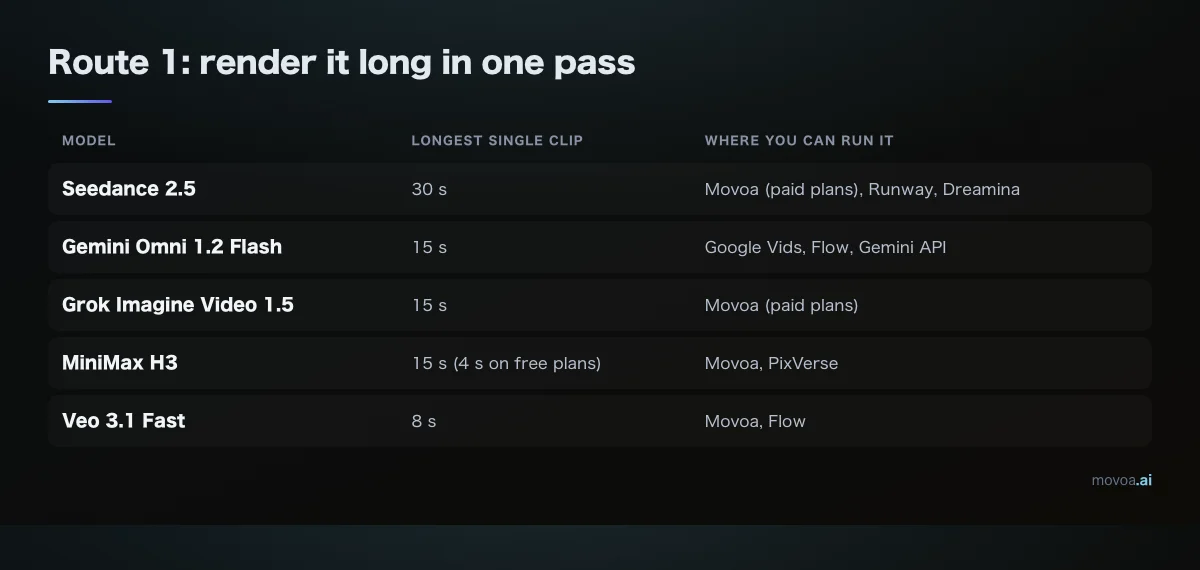
| Model | Longest single clip | Where you can run it |
|---|---|---|
| Seedance 2.5 | 30 s | Movoa (paid plans), Runway, Dreamina |
| Gemini Omni 1.2 Flash | 15 s | Google Vids, Flow, Gemini API |
| Grok Imagine Video 1.5 | 15 s | Movoa (paid plans) |
| MiniMax H3 | 15 s (4 s on free plans) | Movoa, PixVerse |
| Veo 3.1 Fast | 8 s | Movoa, Flow |
Lengths from each vendor's page and Movoa's generator, read November 8, 2026.
Route 2: use a native video extender
A native video extender reads the end of your clip and generates what happens next, so a 5-second shot becomes a 9- or 10-second one. The catch is the input: a video extender often accepts only clips its own model made.
Not every "video length" tool generates anything. extend.video, for example, loops, slows down or freezes the last frame in your browser: useful for padding a beat, but no new motion.
Route 3: continue from the last frame
The route that works on every clip: take the final frame, use it as the first frame of a new photo-to-video run, and write what happens next. Dreamina's own guide describes this as "a separate continuation shot". Each step can change the action, the camera or the line of dialogue while the scene carries on from exactly where it stopped. On Movoa, 69 of the 110 subscribers whose prompts we read on November 3, 2026 were already doing this by hand, screenshotting the final frame and asking the next clip to continue from it. That is why it is now one button.
Best free AI video extender tools compared (checked November 8, 2026)
Every cell comes from the tool's own product, pricing or help page, read on November 8, 2026. "Not stated" means the page does not say either way.
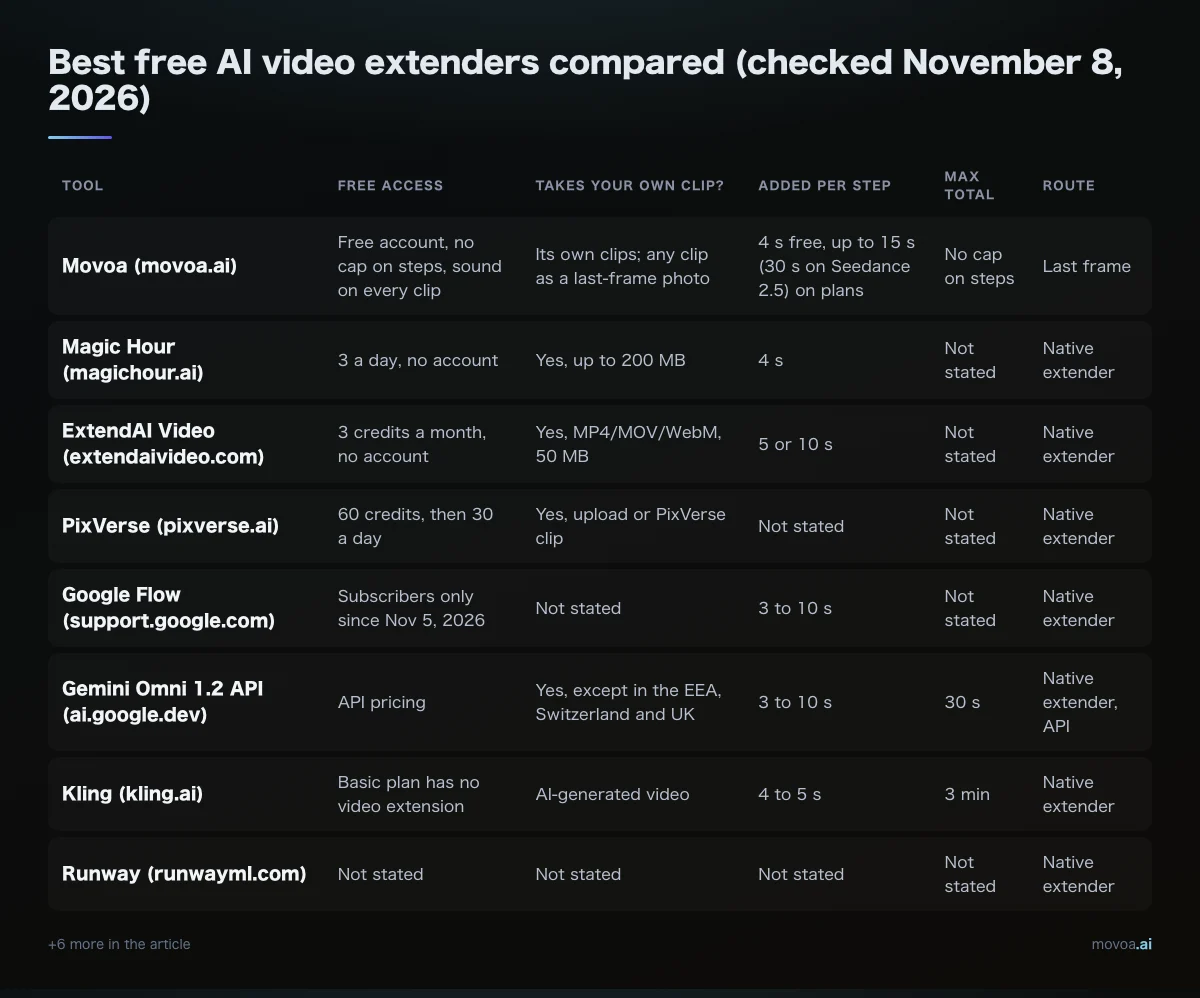
| Tool | Free access | Takes your own clip? | Added per step | Max total | Route |
|---|---|---|---|---|---|
| Movoa (movoa.ai) | Free account, no cap on steps, sound on every clip | Its own clips; any clip as a last-frame photo | 4 s free, up to 15 s (30 s on Seedance 2.5) on plans | No cap on steps | Last frame |
| Magic Hour (magichour.ai) | 3 a day, no account | Yes, up to 200 MB | 4 s | Not stated | Native extender |
| ExtendAI Video (extendaivideo.com) | 3 credits a month, no account | Yes, MP4/MOV/WebM, 50 MB | 5 or 10 s | Not stated | Native extender |
| PixVerse (pixverse.ai) | 60 credits, then 30 a day | Yes, upload or PixVerse clip | Not stated | Not stated | Native extender |
| Google Flow (support.google.com) | Subscribers only since Nov 5, 2026 | Not stated | 3 to 10 s | Not stated | Native extender |
| Gemini Omni 1.2 API (ai.google.dev) | API pricing | Yes, except in the EEA, Switzerland and UK | 3 to 10 s | 30 s | Native extender, API |
| Kling (kling.ai) | Basic plan has no video extension | AI-generated video | 4 to 5 s | 3 min | Native extender |
| Runway (runwayml.com) | Not stated | Not stated | Not stated | Not stated | Native extender |
| Pika (pika.art) | Free plan buys credit packs | Not stated | Not stated | Not stated | Native extender |
| Dreamina (dreamina.capcut.com) | 120 credits a day (US) | Eligible footage | Not stated | Not stated | Native + last frame |
| Vidu (vidu.com) | Not stated | Not stated | 1 to 7 s | Not stated | Native extender |
| Picwand (picwand.ai) | Says "free online" | Yes, upload | 4 to 15 s | Not stated | Native extender |
| ClipTrend (cliptrend.ai) | Credit packs | Yes, MP4/MOV up to 100 MB, 10 s | Follows source length | Not stated | Native extender |
| WaveSpeedAI (wavespeed.ai) | 100 trial credits | Not stated | 5 to 10 s | Not stated | Native extender, API |
The best free AI video extender for each job
Movoa: best for chaining shots into a longer story
Every finished clip on Movoa has a Continue from this clip button. It drops that clip's last frame in as the first photo of a new photo-to-video run, so step two starts on the exact pixel step one ended on. With a free account you can keep pressing it: MiniMax H3 clips run 4 seconds at 480p, every one comes with sound, and there is no cap on how many steps you chain. Save a character once under Characters (name, look, photos) and their photos ride along into each step, so the face holds across joins. Plans add 768p and longer steps.
Pick it if: you are making an AI series or a short with the same characters across many shots. Make your first clip, then press Continue from this clip.
Magic Hour: best video extender for a clip you filmed yourself
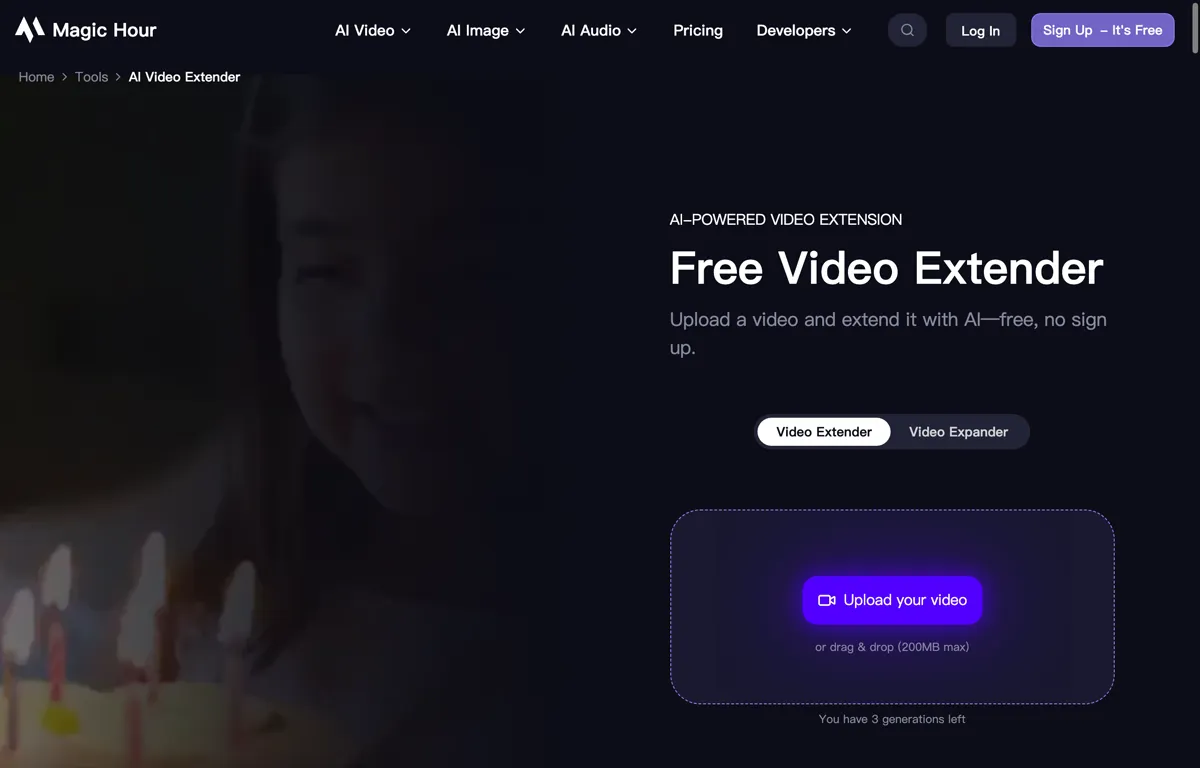
The Magic Hour video extender page says "Upload a video and extend it with AI, free, no sign up", up to 200 MB, and that "extensions use the shared allowance of 3 free video generations per day". The free tool adds 4 seconds and is fully automatic; a prompt to steer the action comes with signing in. Magic Hour's own guide says paid plans include commercial use and watermark-free exports.
Pick it if: you have a phone clip that ends a beat too early and want to see 4 more seconds today.
ExtendAI Video: no sign-up, monthly credits
ExtendAI Video gives 3 free credits a month with no account, reset on the first of each month. Each 5 seconds costs one credit, so a month covers three 5-second extensions or one 10-second plus one 5-second. This video extender takes MP4, MOV or WebM up to 50 MB, and you can continue a finished result by another 5 seconds.
PixVerse: a video extender for uploads as well as its own clips
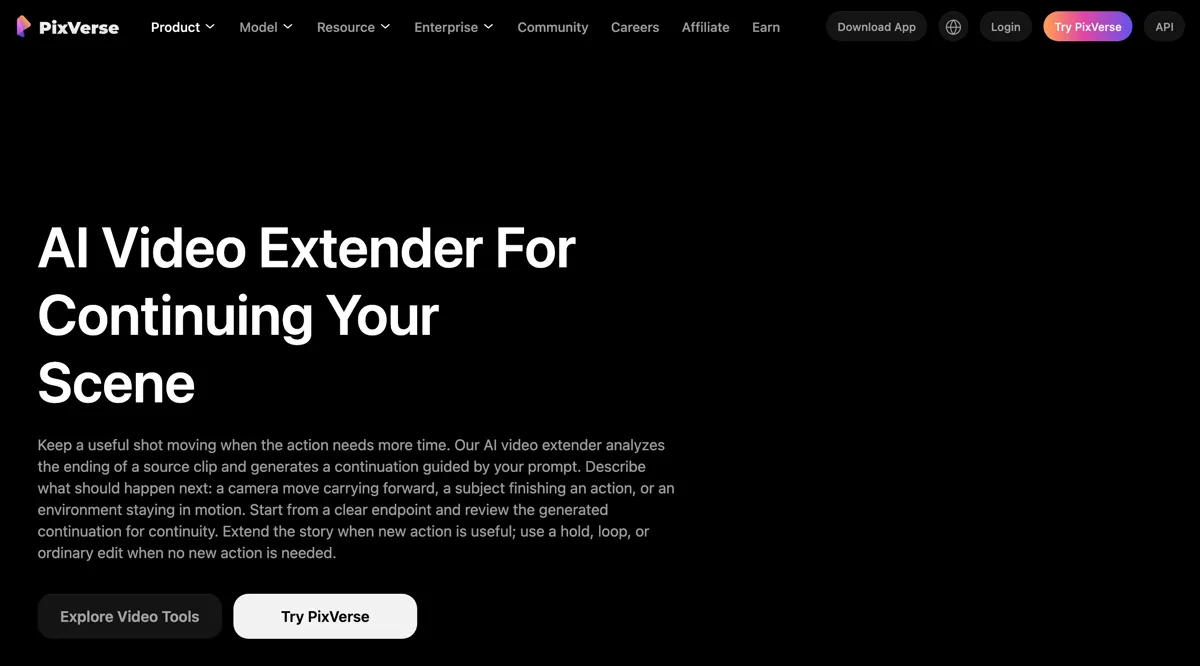
The PixVerse video extender "analyzes the ending of a source clip and generates a continuation guided by your prompt", and its documented Extend API accepts "a PixVerse-generated source video or an uploaded external video". The free web plan lists 60 initial credits and 30 a day. The PixVerse page does not say how many credits an extension costs.
Google Flow and Gemini Omni: changed on November 5
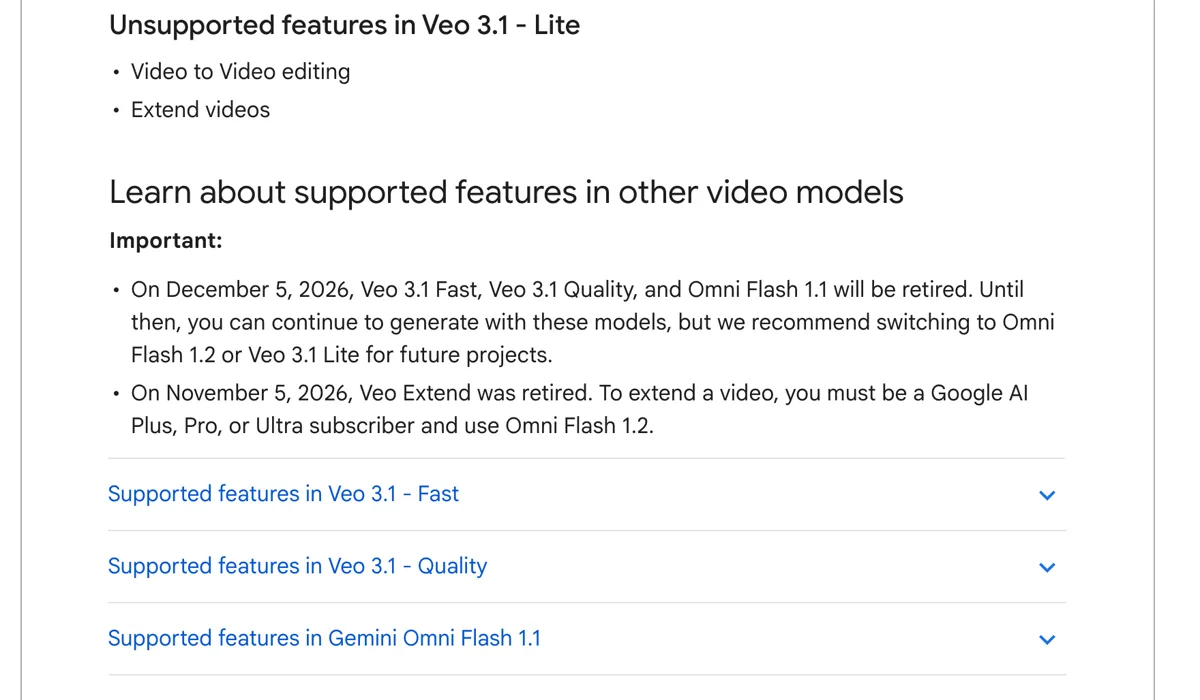
Flow's model page now reads: "On November 5, 2026, Veo Extend was retired. To extend a video, you must be a Google AI Plus, Pro, or Ultra subscriber and use Omni Flash 1.2." Omni Extend adds 3 to 10 seconds per step. Developers on the Gemini API can extend 3 to 10 seconds per turn, up to 30 seconds in total. For free users the better Google route is now Route 1: Google Vids lets "anyone with a Google account" make "up to three 15-second videos per month" on Omni 1.2 Flash at no cost.
Kling: the longest video extender chain, on a paid plan
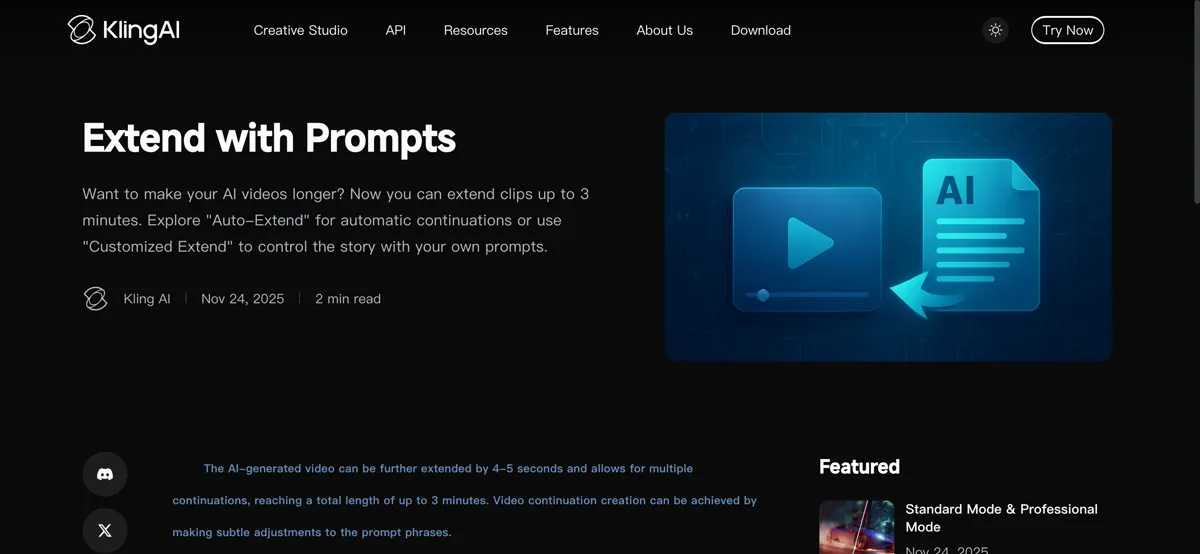
Kling's guide says an AI-generated video "can be further extended by 4-5 seconds and allows for multiple continuations, reaching a total length of up to 3 minutes". Kling's plan table lists video extension under Standard ($6.99 the first month, then $8.80) and up; the $0 Basic plan has "No monthly Credits" and its output "is not for commercial use".
Runway, Pika, Dreamina, Vidu, Picwand, ClipTrend and WaveSpeedAI
- Runway runs Seedance 2.5 with an Extend mode that continues "an existing video forwards or backwards from a prompt", per its help centre: one of the few video extender modes that works backwards.
- Pika lists Extend Video among its tools; the Pika free plan covers all models through bought credit packs, with no watermark and no commercial license.
- Dreamina gives US accounts 120 credits a day for eligible workflows and describes both a native extension mode and a last-frame continuation shot.
- Vidu lets you set 1 to 7 seconds and write how the scene continues "from the last frame", with an optional end frame to land on.
- Picwand extends 4 to 15 seconds, before or after your clip.
- ClipTrend runs Kling Extend on uploads up to 10 seconds and 100 MB, billed from credit packs.
- WaveSpeedAI is an API platform with a 100-credit trial.
Free vs paid AI video extender plans: what you actually pay for
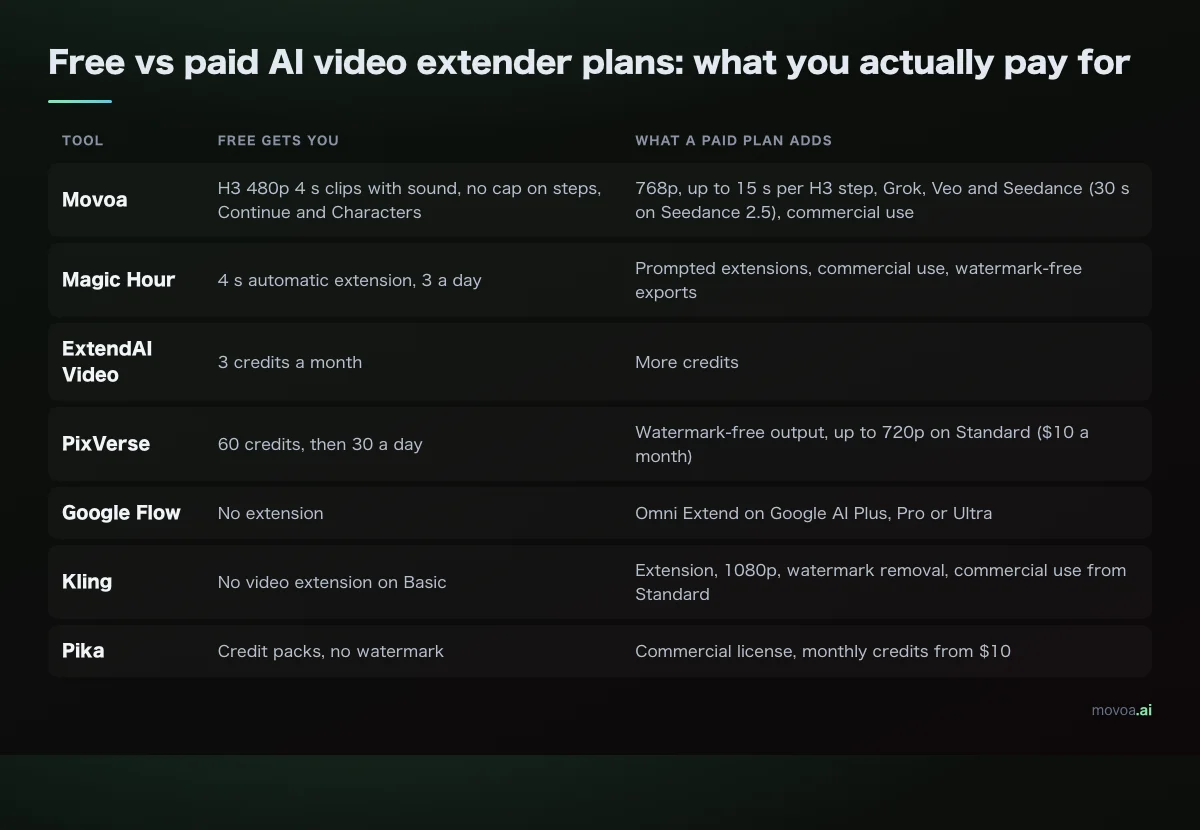
Across these seven tools, paying buys longer steps, higher resolution, watermark-free files and the right to use the result commercially.
| Tool | Free gets you | What a paid plan adds |
|---|---|---|
| Movoa | H3 480p 4 s clips with sound, no cap on steps, Continue and Characters | 768p, up to 15 s per H3 step, Grok, Veo and Seedance (30 s on Seedance 2.5), commercial use |
| Magic Hour | 4 s automatic extension, 3 a day | Prompted extensions, commercial use, watermark-free exports |
| ExtendAI Video | 3 credits a month | More credits |
| PixVerse | 60 credits, then 30 a day | Watermark-free output, up to 720p on Standard ($10 a month) |
| Google Flow | No extension | Omni Extend on Google AI Plus, Pro or Ultra |
| Kling | No video extension on Basic | Extension, 1080p, watermark removal, commercial use from Standard |
| Pika | Credit packs, no watermark | Commercial license, monthly credits from $10 |
For free tools that make the clips in the first place, see our lists of free image to video generators and free AI video generators with no daily cap.
How to prevent visual drift with an AI video extender
Drift is the face, the outfit or the light slowly turning into something else across joins. PixVerse, Kling and Google all write about it in their extension guides, and their fixes overlap.
End each step on motion that can continue
A video extender only sees the last moments of the clip. A shot that ends mid-walk or mid-pan gives it something to carry on; a hard cut, a fade or a blurred subject gives it nothing. PixVerse puts it plainly: "describe the continuation rather than summarizing the whole original clip." Our MiniMax H3 prompt guide covers how to write that next beat.
Lock the character with reference photos at every step
The last frame alone carries one angle of a face. Add the same reference photos on every step and the model has the full look to hold onto. On Movoa that is the Characters shelf: save the person once and their photos join each continued clip automatically. Google says the same of Omni 1.2: reference images keep "faces, garments, packaging typography, and brand colors" consistent. For a brand logo, upload the exact logo file as a reference; if the mark has to be pixel-perfect, lay it over the clip in your editor instead.
Pin where the shot lands
If you know how the step should end, give it an end frame. Vidu takes an optional end frame; on Movoa, MiniMax H3 takes a first and a last frame, so a step is pinned between two pictures.
Keep the model, ratio and resolution the same
Switching from one model to another between steps changes the grain, the colour and the motion style, and the join shows. Pick one, crop the source to its final ratio before the first step rather than cropping each piece afterwards, and check each join at normal speed before you add the next step.
Join the pieces in an editor
A native video extender returns one file. Last-frame chains give you one clip per step: download them in order, line them up in any editor (CapCut works on desktop and phone) and trim the repeated frame at each join. Each Movoa step comes with its own sound track, so you are not adding audio afterwards. If you want an AI extension mode rather than a timeline, that lives in Dreamina, CapCut's sister app; CapCut itself is where you join the pieces.
AI video extender FAQ
What is the best free AI video extender?
For a clip you filmed, the Magic Hour video extender: 4 seconds per extension, 3 a day, no account. For a longer story with the same characters, Movoa's Continue from this clip chains free 4-second H3 steps with sound and no cap on how many. For one long shot with no join, Google Vids gives three free 15-second Omni 1.2 videos a month.
Can I extend a video I filmed on my phone?
Yes, on Magic Hour (up to 200 MB), ExtendAI Video (50 MB), PixVerse and the Gemini API (outside the EEA, Switzerland and the UK). Kling's extension covers AI-generated video. On Movoa, upload a screenshot of your clip's last frame as the photo and write what happens next.
How do people make AI videos longer than 10 seconds?
Three ways: render longer in one pass (Seedance 2.5 goes to 30 seconds, Omni 1.2 and H3 to 15), extend with a native video extender in 4 to 10 second steps, or continue from the last frame and join the clips.
Is there a video extender with no sign-up?
Magic Hour (3 a day) and ExtendAI Video (3 credits a month) both work without an account. Movoa makes one clip without an account; chaining steps needs a free account.
Can I add footage before the start of a clip?
Some tools do. Runway's Seedance 2.5 Extend continues "forwards or backwards", and Picwand generates scenes "before or after" your clip. The Gemini API says extension "is limited to appending to the end of the video".
Does a video extender keep the audio?
It depends on the tool, and most video extender pages do not say. On Movoa every step has its own sound, so a chained story keeps speaking across joins.
Can I extend AI videos on my phone?
Yes. Movoa, Magic Hour and ExtendAI Video run in a phone browser, and PixVerse links a mobile app from its site. Use the official site or app store; skip modded APKs.
Does my computer's GPU change the result?
Not with browser tools: Movoa, Magic Hour, PixVerse and the rest generate in their own cloud, so your graphics card does not change the clip. Only local setups such as ComfyUI depend on your own GPU.
Sources
All read on November 8, 2026. Primary documents are linked; vendor pages are named with their domain so you can open them yourself:
- Google Flow help: models and supported features (Veo Extend retired November 5, 2026; Omni Extend for subscribers)
- Gemini API docs: Omni video extension
- Google: Gemini Omni 1.2 Flash, 15-second video and Omni 1.2 Flash in Google Vids
- Magic Hour AI Video Extender: magichour.ai/products/ai-video-extender
- ExtendAI Video: extendaivideo.com
- PixVerse AI Video Extender: pixverse.ai/en/product/ai-video-extender, and plan info at pixverse.ai/en/ai-info-page
- Kling AI video extension guide: kling.ai/quickstart/ai-video-extension; plan table: kling.ai/blog/kling-video-3-0-credit-cost-guide
- Runway help centre, Creating with Seedance 2.5: help.runwayml.com
- Pika pricing: pika.art/pricing
- Dreamina, free AI video extenders: dreamina.capcut.com/ai-video/free-ai-video-extenders
- Vidu AI video extender: vidu.com/tools/ai-video-extender
- Picwand AI Video Extender: picwand.ai/ai-video-extender
- ClipTrend Video Extend: cliptrend.ai/video-extend
- WaveSpeedAI, best AI video extenders: wavespeed.ai/blog
Ready to make the next shot? Make a clip on Movoa, press Continue from this clip, and write what happens next.